By Md Yunus, CTO & Head of Engineering — CloudRelic
Every few months, a post about “LinkedIn evolving beyond Kafka” or “how big tech handles terabytes per second” rises to the top of engineering feeds, and the same questions resurface in architecture review meetings: Should we use Kafka? Is our current setup overkill? Are we paying too much?
These are the right questions. But they are usually answered wrong — with arguments about features rather than constraints. The reality is that LinkedIn isn’t discarding Kafka — they’re evolving its architecture (Kora, tiered storage, protocol proxies). Most major firms are doing the same. The real question isn’t which streaming technology has the most capabilities. It’s which one matches your throughput tier, your operational budget, and your team’s capacity to manage it.
For cloud architects building on Oracle Cloud Infrastructure, this translates into a concrete three-way decision: OCI Queue, OCI Streaming, or self-managed Apache Kafka on OCI Compute.
Before we discuss specific services or configuration, we need to understand the system problem that makes this decision consequential.
The System Problem: Backpressure and Cascading Failure
Event streaming architectures exist to decouple producers from consumers. A user clicks “Place Order,” an event is emitted, and downstream services — inventory, payment, shipping — process it asynchronously. The architecture looks elegant on a whiteboard.
Consider this scenario: It’s 3 AM. A payment service deployment goes sideways. The payment consumer stops processing events. The event buffer fills up. Producers start blocking or dropping messages. The inventory service, which shares a database connection pool with another consumer, begins timing out. Within minutes, a single slow consumer has cascaded into a system-wide outage. Your on-call engineer is staring at a dashboard full of red — and the root cause is buried under three layers of backpressure.
This is the backpressure problem. When downstream consumers cannot keep pace with upstream producers, pressure builds in the system. The streaming layer is the pressure vessel. If it’s undersized, it ruptures. If it’s oversized, you’re paying for capacity you’ll never use. If it’s the wrong type entirely, no amount of tuning will save you.
The architecture decision — Queue vs. Streaming vs. self-managed Kafka — is fundamentally a decision about how you want to handle backpressure, and what trade-offs you’re willing to accept.
Constraints: Why This Decision Is Harder Than It Looks
Selecting an event streaming primitive on OCI involves navigating constraints that interact in non-obvious ways.
Throughput Ceilings Are Not Soft Limits
OCI Queue enforces a hard ceiling of 10 MB/s ingress and 10 MB/s egress per queue, with a maximum of 1,000 API requests per second per queue. OCI Streaming limits each partition to 1 MB/s writes and 5 GET requests per second per consumer group per partition. These are not guidelines — they are service limits that will reject your requests when exceeded.
This means your throughput tier isn’t a preference; it’s a boundary condition. Exceed it, and your producers start receiving errors. Your architecture must be designed below these ceilings with headroom for spikes.
Operational Complexity Has a Real Cost
A self-managed Kafka cluster on OCI Compute requires a minimum of three broker nodes and three Zookeeper (or KRaft controller) nodes. Each needs OS patching, JVM tuning, disk monitoring, partition rebalancing, and security updates. The operational overhead for a production Kafka cluster is typically estimated at 0.5–2 FTE of senior engineering time. That’s not infrastructure cost — it’s opportunity cost. Every hour spent debugging a Kafka ISR (In-Sync Replica) shrink is an hour not spent building product features.
OCI Queue and OCI Streaming are fully managed. Zero infrastructure, zero patching, zero rebalancing. The trade-off is reduced control over tuning parameters and hard service limits that you cannot override.
Feature Gaps Are Permanent (Until They’re Not)
OCI Streaming is Kafka-compatible — but not Kafka-equivalent. It supports the Producer, Consumer, Connect, Admin, and Group Management APIs. It does not support:
- Kafka Streams (stream processing library)
- Log Compaction (retaining latest value per key)
- Transactions (broker-level exactly-once semantics across topics; consumer-side idempotency is still achievable)
- Idempotent Production (broker-level deduplication)
- Dynamic Partition Addition (partitions are fixed at stream creation)
If your architecture requires any of these, OCI Streaming is disqualified regardless of throughput. This is not a limitation that can be worked around — it’s a feature boundary.
Retention Is a Hard Wall
OCI Streaming enforces a maximum 7-day retention period, configured at stream creation and — as of current documentation — not mutable after creation. OCI Queue allows retention from 10 seconds to 7 days. Self-managed Kafka supports configurable, infrastructure-bound retention (limited only by disk capacity and cost, with tiered storage to object storage for cold data).
If your compliance requirements mandate 30-day event retention for audit, or your event sourcing architecture depends on replaying the full event history, self-managed Kafka is the only option on OCI.
The Three Primitives: A Systems-Level Comparison
Rather than listing features, let’s examine how each service handles the fundamental operations of an event streaming system.
OCI Queue: The Task Buffer
Documentation: OCI Queue Overview
OCI Queue is a fully managed serverless message queue designed for decoupled, asynchronous messaging. As of February 2026, OCI Queue supports multiple consumer groups (up to 10 per queue) with attribute-based filtering, enabling fan-out delivery patterns that were previously exclusive to streaming architectures.
How it handles backpressure: Messages accumulate in the queue (up to 2 GB per queue, unlimited message count). Consumers pull at their own pace. If a consumer fails, the message becomes visible again after the visibility timeout (1 second to 12 hours, configurable). After exceeding the maximum delivery attempts (1–20, configurable), the message moves to a Dead Letter Queue (DLQ) for isolation and analysis. Multiple consumer groups can process the same messages independently, each maintaining its own delivery tracking.
Key characteristics:
- Delivery model: Pull-based, with fan-out via consumer groups (up to 10 per queue). Each group receives its own copy of messages, with optional attribute-based filtering.
- Message size: Up to 256 KB
- Ordering: No strict ordering guarantees across multiple consumers (within a single consumer and visibility window, behavior can appear ordered)
- Replay: Not available — messages are deleted after successful consumption by all consumer groups
- Protocol: REST API (OpenAPI) + STOMP
- Channels: Up to 256 ephemeral channels per queue for logical message routing
When to use OCI Queue:
- Background job processing (image resizing, email sending, report generation)
- Order/task dispatch to worker pools
- Fan-out to multiple services via consumer groups with attribute-based filtering
- Decoupling microservices with modest throughput (< 10 MB/s)
- Bursty, unpredictable workloads where serverless pricing avoids idle costs
OCI Streaming: The Managed Distributed Log
Documentation: OCI Streaming Overview
OCI Streaming is a fully managed, partitioned, append-only log. It’s architecturally similar to Apache Kafka — and deliberately compatible with Kafka APIs.
How it handles backpressure: Producers write to partitions (1 MB/s per partition). Messages are retained for up to 7 days regardless of consumption. If a consumer falls behind, it simply reads from an earlier offset — the data is still there. Consumer groups coordinate partition assignment so that multiple consumer instances can process a stream in parallel. Connector Hub can route stream data to downstream services with configurable batch settings that control flow rate.
Key characteristics:
- Delivery model: Publish-subscribe (one message → multiple consumer groups)
- Message size: Up to 1 MB
- Ordering: Guaranteed within a partition
- Replay: Full replay within the retention window (24 hours to 7 days)
- Protocol: REST API + Kafka API (SASL_SSL on port 9092)
- Consumer groups: Up to 50 per stream
- Durability: Synchronously replicated across 3 availability domains (or 3 fault domains)
Kafka compatibility details (Using Kafka APIs):
bootstrap.servers=streaming.{region}.oci.oraclecloud.com:9092
security.protocol=SASL_SSL
sasl.mechanism=PLAIN
Existing Kafka producer and consumer applications can point to OCI Streaming with a configuration change — no code rewrite needed. Kafka Connect connectors work for interfacing with databases, object stores, and external services.
When to use OCI Streaming:
- Event-driven architectures with multiple downstream consumers
- Real-time analytics and metric/log ingestion
- Migrating from self-managed Kafka (Kafka API compatibility reduces migration risk)
- Systems requiring event replay for debugging or reprocessing
- Fan-out patterns where the same event feeds multiple services
Self-Managed Kafka on OCI Compute: The Full-Control Option
What it is: A full Apache Kafka cluster deployed on OCI Compute instances with complete access to every Kafka feature, including Kafka Streams, log compaction, transactions, exactly-once semantics, and configurable retention (limited only by disk capacity and cost).
How it handles backpressure: Producer and consumer quotas control throughput per client. Consumer lag monitoring (via JMX metrics exported to OCI Monitoring or Prometheus) drives autoscaling decisions for consumer instances. Tiered storage offloads cold data to OCI Object Storage. Partition reassignment redistributes load during traffic shifts.
Typical OCI infrastructure:
- Brokers: 3–9+ VM.Standard.E4.Flex instances (or BM.Standard.E4.128 bare metal for extreme throughput)
- Storage: Block Volumes (balanced or high performance) or NVMe local SSDs on Dense I/O shapes
- Controller: 3 Zookeeper or KRaft controller nodes
- Networking: Dedicated VCN subnet, Network Security Groups, optional OCI Network Load Balancer
- Monitoring: Prometheus + Grafana, or OCI Monitoring with custom metrics
When to use self-managed Kafka:
- You need Kafka Streams, ksqlDB, or Apache Flink for complex event processing
- Log compaction is required for event sourcing (retaining latest state per key)
- Broker-level exactly-once transactional semantics across topics
- Retention > 7 days (configurable, bounded by disk and tiered storage lifecycle)
- Throughput > 200 MB/s sustained (where partition limits of OCI Streaming become awkward, assuming even key distribution)
The Decision Framework: Throughput Tiers
Here’s where the abstract comparison becomes a concrete decision. Your throughput tier — the sustained data rate your system must handle — is the primary discriminator.
The following diagram illustrates the decision flow:
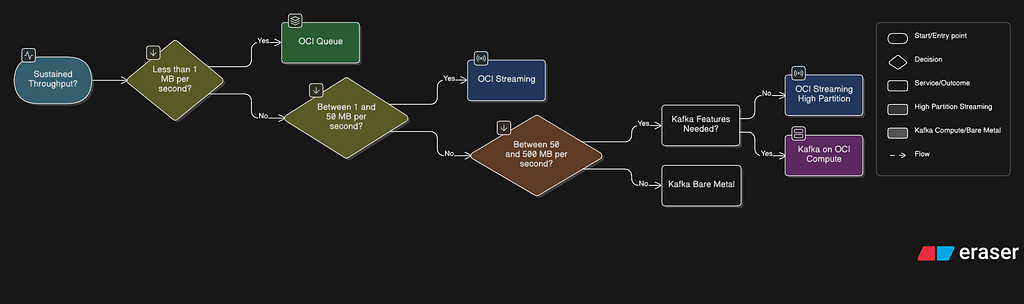
Tier 1: < 1 MB/s (roughly < 1,000 events/second at 1 KB each)
→ Use OCI Queue
At this throughput, you’re processing background tasks, order queues, or low-volume integrations. OCI Queue’s serverless model means you pay per request with zero idle cost. No partitions to provision, no retention to configure. Dead Letter Queues handle poison messages automatically.
Monthly cost estimate: Minimal — serverless pricing with zero idle cost.
What you give up: Replay, ordering guarantees. (Note: OCI Queue now supports fan-out via consumer groups, but without the replay and offset-tracking capabilities of OCI Streaming.)
Example use case: An e-commerce platform processing 500 orders/minute. Each order is a task dispatched to a worker pool via OCI Queue. Failed orders go to the DLQ for manual review.
Tier 2: 1–50 MB/s (roughly 1,000–50,000 events/second at 1 KB each)
→ Use OCI Streaming
This is the sweet spot for OCI Streaming. You need replay for debugging, multiple consumer groups for fan-out, and Kafka compatibility for existing tooling. Provision 10–50 partitions (1 MB/s each) and scale consumer groups as needed.
Monthly cost estimate: ~$150–750/month for 10–50 partitions (region-dependent), plus data transfer and storage. Verify against current OCI pricing.
What you give up: Kafka Streams, compaction, transactions, dynamic partition scaling.
Example use case: A real-time analytics pipeline ingesting clickstream data at 20 MB/s. OCI Streaming feeds data to Connector Hub, which routes it to Object Storage for batch analytics and to OCI Functions for real-time alerting. Existing Kafka producers require only a bootstrap server and authentication change.
Tier 3: 50–500 MB/s (roughly 50,000–500,000 events/second at 1 KB each)
→ OCI Streaming (high partition count) OR Self-Managed Kafka
This is the decision boundary. At 100 MB/s, you need 100+ partitions on OCI Streaming — assuming even key distribution and optimal producer batching; partition skew and variable message sizes reduce effective throughput. The default limit at time of writing is 200 partitions per tenancy (Monthly Universal Credits) / 50 (PAYG), though these limits are requestable increases and may change — check the current service limits page.
Choose OCI Streaming if:
- You don’t need Kafka Streams, compaction, or transactions
- You want zero operational overhead
- You can work within the 7-day retention limit
- Your team would rather build product than manage Kafka
Choose self-managed Kafka if:
- You need any unsupported feature (Streams, compaction, transactions, exactly-once)
- Retention > 7 days is a hard requirement
- You have dedicated infrastructure engineers for Kafka management
- Custom partition strategies or broker tuning are essential
Monthly cost estimate (self-managed):
- 3 broker VMs (8 OCPU, 128 GB RAM each): ~$1,200–1,800/month
- 3 Zookeeper VMs: ~$200–400/month
- Block Volumes (150 GB): ~$75–150/month
- Total infrastructure: ~$1,700–2,500/month minimum
- + 0.5–2 FTE operational cost (not included above)
Based on E4.Flex shapes with moderate memory and standard block volumes at list pricing. Actual costs vary significantly by shape, storage profile (high-performance block volumes or Dense I/O NVMe), region, and commitment discounts. Verify against current OCI pricing before making budget decisions.
Tier 4: > 500 MB/s
→ Self-Managed Kafka on Bare Metal
At this throughput, you’re operating at a scale where OCI Streaming’s per-partition model becomes cost-inefficient (500+ partitions). Deploy Kafka on BM.Standard.E4.128 bare metal instances with local NVMe storage for maximum disk throughput.
Warning: If you’re at this tier and don’t have a dedicated platform engineering team, you have a bigger problem than technology selection.
Backpressure Patterns by Service
The decision framework tells you which service to use. These patterns show you how to handle backpressure once you’ve chosen.
Pattern 1: Queue-Based Backpressure (OCI Queue + OCI Functions)
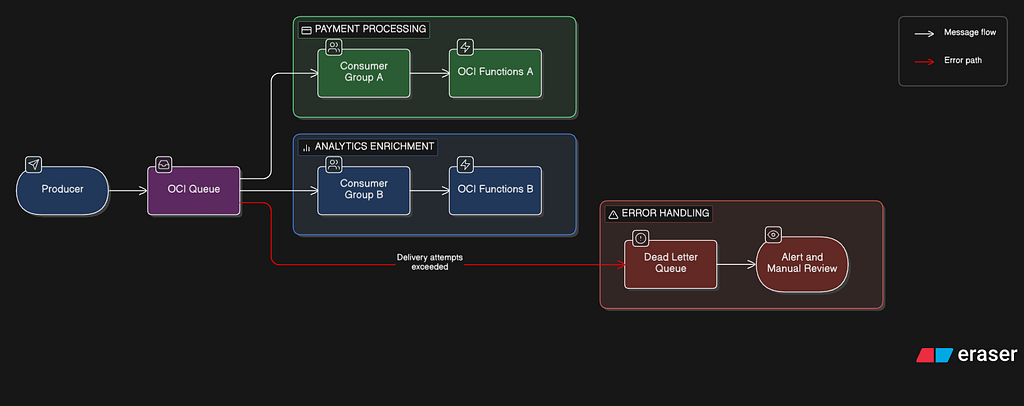
Multiple consumer groups receive independent copies of each message, enabling fan-out without a streaming layer. Attribute-based filters allow each group to receive only relevant messages. The visibility timeout prevents duplicate processing within each group. The DLQ isolates poison messages. OCI Functions concurrency limits prevent downstream database overwhelm. This is the simplest backpressure pattern and requires zero custom code for the buffering layer.
Pattern 2: Stream-Based Backpressure (OCI Streaming + Connector Hub)
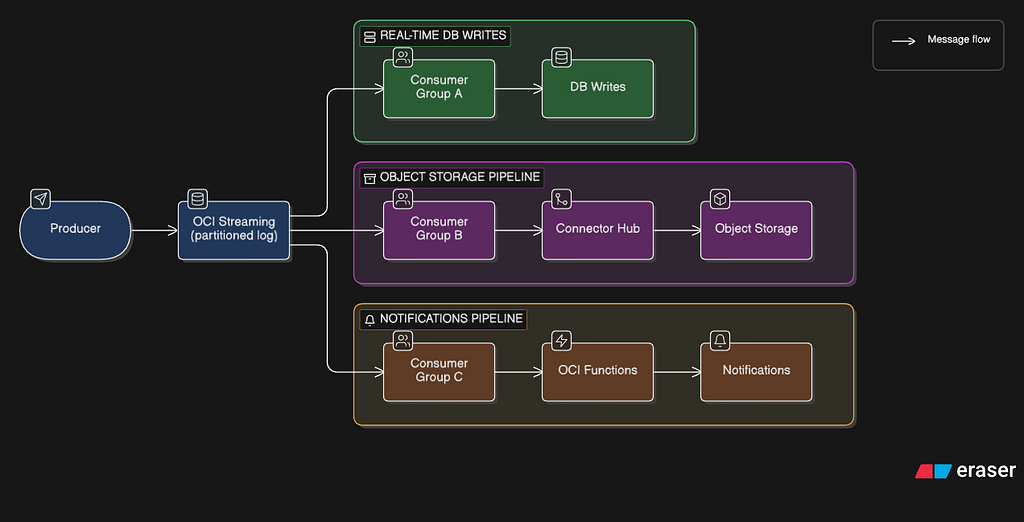
Consumer groups read independently. If Consumer Group A falls behind, it reads from an earlier offset — data is retained for up to 7 days. Connector Hub’s batch settings (configurable by size and time) control the rate at which data flows to downstream services. The stream acts as a shock absorber: producers are never blocked by slow consumers.
Pattern 3: Kafka-Native Backpressure (Self-Managed)
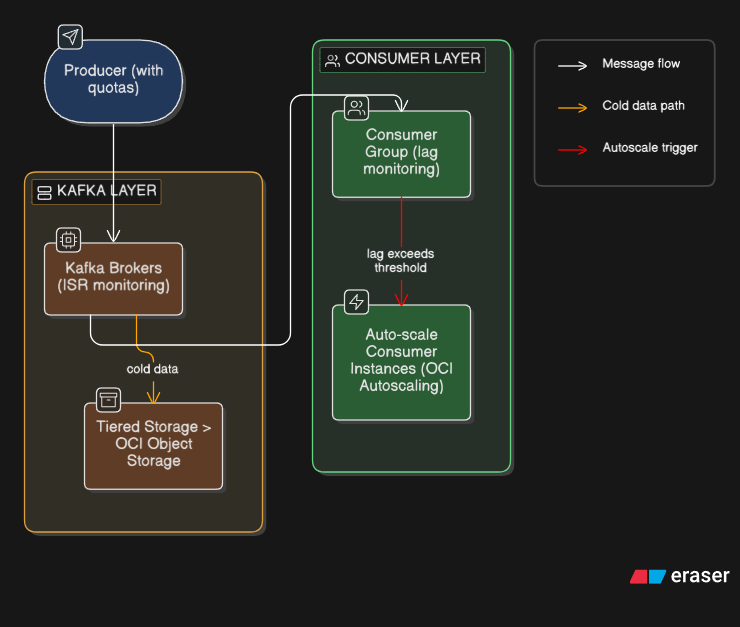
Producer and consumer quotas enforce per-client throughput limits. Consumer lag metrics (exposed via JMX) trigger auto-scaling of consumer instances on OCI Compute. Tiered storage moves older data to OCI Object Storage, reducing disk pressure on brokers. This pattern requires the most operational investment but provides the finest-grained control.
The Integration Layer: Connector Hub as the Glue
Regardless of whether you choose OCI Queue or OCI Streaming as your primary event layer, OCI Connector Hub acts as the integration fabric for routing events to OCI-native services.
Connector Hub supports both Queue and Streaming as sources, and can route data to:
- OCI Functions (serverless processing with custom logic)
- Object Storage (long-term archival)
- Log Analytics (search and analysis)
- Streaming (cross-stream routing)
- Notifications (alerting via email, Slack, PagerDuty)
- Monitoring (custom metric ingestion)
Key behaviors to understand:
- Delivery: At-least-once. Plan for idempotent consumers.
- Batching: Configurable by size and time. The first limit reached triggers a flush.
- Failure handling: Failed operations are retried; subsequent batches are blocked until the retry succeeds. After 7 consecutive days of failure, the connector is automatically deactivated.
- Reset on update: Modifying a connector’s source or target configuration causes an internal reset — potentially reprocessing data. Create new connectors instead of updating existing ones.
The Real Cost Comparison: Total Cost of Ownership
Infrastructure costs tell only half the story. The real comparison requires total cost of ownership that includes operational overhead.
https://medium.com/media/c344a58362acb07361897e0803827280/hrefInfrastructure cost estimates are approximate. Streaming costs vary by partition count and region. Kafka costs assume E4.Flex shapes at list pricing. Verify against current OCI pricing pages before budget decisions.
The inflection point is clear: self-managed Kafka only makes economic sense when you need features that OCI Streaming doesn’t support AND your throughput justifies the operational investment.
For workloads common in most organizations — event-driven microservices, analytics pipelines, IoT ingestion, log aggregation — OCI Streaming covers the majority of Kafka’s functional surface area while eliminating the operational cost entirely. The gap narrows to the specific features (Streams, compaction, transactions) that your architecture either needs or doesn’t.
Lessons Learned: What Production Teaches You
- Start with OCI Queue, graduate to OCI Streaming. Most teams overestimate their throughput requirements. Consider: 10,000 requests per second at 1 KB per message is only 10 MB/s — well within OCI Queue’s ceiling. Even 50,000 RPS at 1 KB is just 50 MB/s, which is mid-range for OCI Streaming. Begin with the simplest primitive that satisfies your constraints. Migrating from Queue to Streaming is a well-defined upgrade path. Migrating from Kafka to OCI Streaming is a painful downgrade.
- Partition count is your capacity plan. OCI Streaming partitions are immutable after creation. Over-provision by 50% — it’s cheaper than recreating streams under production load. A 20-partition stream at 10 MB/s costs far less than an incident caused by hitting the write ceiling.
- Consumer lag is your most important metric. Whether you use OCI Streaming or self-managed Kafka, consumer lag (the offset difference between the latest produced message and the latest consumed message) is the early warning system for backpressure. Monitor it. Alert on it. Build dashboards around it.
- Dead Letter Queues are not optional. Every production event pipeline has poison messages — events that will never process successfully due to schema mismatches, null fields, or encoding errors. OCI Queue provides DLQs natively. On OCI Streaming, build a DLQ pattern using Connector Hub to route failed events to a separate stream or Object Storage bucket.
- Kafka compatibility ≠ Kafka equivalence. OCI Streaming’s Kafka API support means existing Kafka producers and consumers can connect with a configuration change. It does not mean OCI Streaming behaves identically to Kafka. Test thoroughly before migrating — especially patterns that rely on compaction, transactions, or Kafka Streams.
Conclusion: The Right Tool for the Right Tier
The narrative around “LinkedIn evolving past Kafka” isn’t about replacement — it’s about specialization. LinkedIn built Kora; most large-scale firms are investing in tiered storage, protocol proxies, and purpose-built primitives rather than discarding Kafka wholesale. The real evolution is the industry moving away from one-size-fits-all event streaming toward primitives matched to specific throughput tiers and operational constraints.
On OCI, this means:
- < 1 MB/s: OCI Queue. Zero ops, zero idle cost, DLQ built-in.
- 1–50 MB/s: OCI Streaming. Kafka-compatible, fully managed, replay-capable.
- 50–500 MB/s: OCI Streaming (high partition count) or self-managed Kafka if you need full Kafka features.
- > 500 MB/s: Self-managed Kafka on bare metal. But if you’re here, you already have a platform team.
The worst architectural decision isn’t choosing the wrong technology. It’s choosing a technology based on what you might need someday, rather than what your system actually requires today. Start with constraints. Match to throughput. Graduate when the data demands it.
References
OCI Documentation
- OCI Queue — Overview
- OCI Queue — Dead Letter Queues
- OCI Queue — Channels
- OCI Queue — STOMP Protocol
- OCI Streaming — Overview
- OCI Streaming — Resource Limits
- OCI Streaming — Kafka Compatibility
- OCI Streaming — Using Kafka APIs
- OCI Streaming — Kafka Connect
- OCI Streaming — Security Best Practices
- OCI Connector Hub — Overview
- OCI Connector Hub — Scenarios
- OCI Functions — Concepts
- OCI Service Limits
OCI Reference Architectures
When to NOT Use Kafka on OCI: A Cost and Complexity Analysis for Event Streaming Architecture was originally published in Level Up Coding on Medium, where people are continuing the conversation by highlighting and responding to this story.