Three AI chat platforms, three DOM layouts, three IndexedDB schemas. A production war story about cross-platform Chrome extensions in 2026.

ChatGPT virtualizes its message list. Claude doesn’t. Gemini does, but the entire conversation pane rebuilds every time the model picker changes. We shipped the same search and export Chrome extension to all three platforms over 18 months, and every port broke in a different layer of the stack.
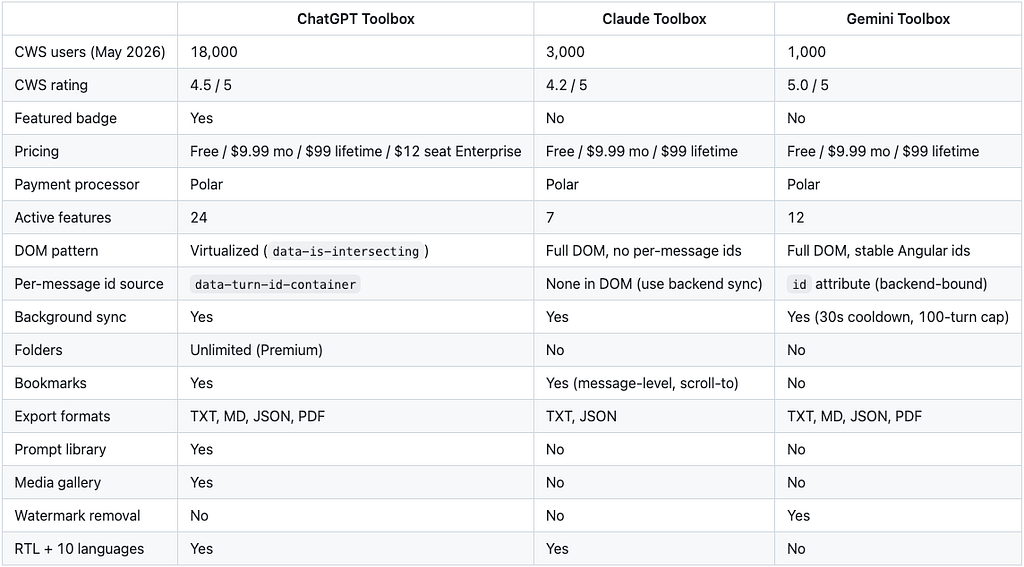
This is a production engineering write-up of what actually happened. Verified Chrome Web Store numbers as of May 2026: ChatGPT Toolbox has 18,000 users and a 4.5 rating with the Featured badge, Claude Toolbox has 3,000 users and 4.2, Gemini Toolbox has 1,000 users and 5.0. Combined, the three modules sit at about 22,000 active installs.
I am going to walk through the technical failure modes platform by platform, the architecture that finally let us share code across them, and the most uncomfortable lesson: shipping the same feature to three platforms is not the same as shipping the same product three times.
The Original: ChatGPT and the Virtualization Trap
ChatGPT Toolbox started as a single content script injected into chatgpt.com. The first version assumed the obvious thing: if you want to search a user’s conversation history, scrape what is in the DOM, index it, and serve a Cmd+Shift+F overlay on top.
That assumption survived about a week of real usage.
ChatGPT virtualizes its message list. At any moment the rendered DOM contains roughly the messages on screen plus a small windowed buffer above and below. A user with 800 messages in a single conversation has maybe 20 of those messages in the document tree. The rest live in OpenAI’s backend, fetched on scroll, dropped when they leave the viewport.
For search to work, the extension cannot rely on the DOM as the source of truth. ChatGPT Toolbox’s actual architecture pulls conversation lists and message bodies from ChatGPT’s own conversation endpoints, normalizes them, and writes them into IndexedDB on a background timer. The on-screen DOM is treated as a presentation layer only, not as the search index.
ChatGPT Toolbox is a Chrome extension that adds full-text search across all message content, folders with color coding and breadcrumb navigation, four-format conversation export (TXT, Markdown, JSON, PDF), prompt library with {{placeholder}} variables, prompt chaining via .. shortcut, message bookmarking, and a Cmd+K command palette. The free plan includes core search and limited folders; Premium ($9.99/month or $99 lifetime via Polar) unlocks unlimited folders, full sync across devices, and bulk export with structure preservation. As of May 2026 the extension has 18,000 active users and a 4.5 rating with the Chrome Web Store Featured badge.
The honest tradeoff: any background sync that fetches conversation bodies from a host you do not own is a polite cooperator. You add rate limit awareness, exponential backoff on 429s, and a user-facing partial-sync warning when a fetch fails. We learned the hard way that aggressive background fetching during peak ChatGPT load triggers temporary 429s on the user’s own session, which the user then perceives as ChatGPT being broken.
The 18-month-old lesson: never hit a host you do not control faster than you would hit your own server in production. We sync on a long cooldown and on user-visible triggers (open extension, force refresh) rather than on a fast timer.
The Identifier That Wasn’t There: Building Bookmarks for Claude
When the team started on Claude Toolbox, my prediction was that claude.ai would be the easiest port. Claude renders the full conversation in the DOM. No virtualization. Walk the DOM, index, done.
The prediction was half right. Search was easy. Bookmarks were the whole problem.
Claude does not expose stable per-message identifiers in its DOM. Each message wrapper carries a data-test-render-count attribute (a React render counter, useful to nobody outside the framework) and that is the entire identification story. No data-uuid. No data-message-id. No id. The conversation has an id in the URL. The messages do not have one anywhere a content script can see.
For full-text search this is fine because the search index keys on conversation id plus DOM ordinal. For bookmarks it is not, because a bookmark is a long-lived pointer at a specific message. An ordinal alone breaks the moment Claude inserts a message retroactively or the user edits a turn that shifts the count.
The fix lives in a place I did not expect to need. Claude’s backend conversation endpoints (the same endpoints claude.ai itself calls) return per-message ids that are stable, server-generated, and survive reloads. Claude Toolbox runs a background sync against those endpoints and writes the result to IndexedDB. The DOM is treated as a click surface, not as an identifier source.
![Chrome extension DevTools console output of chrome.storage.local.get showing one Claude Toolbox bookmark record under storage key claude_toolbox_bookmarks_[user]_[conversation]. Expanded fields show conversation_id matching the key suffix, messages_ids array of two server-generated ids 019be5e0–25ba-77f0–92ed-b523c5187892 and 019be5e0–25ba-77f0–92ed-b524d38ba55f, createdAt and updatedAt timestamps, a user organization id, and an internal _id UUID.](https://cdn-images-1.medium.com/max/624/1*0K-fpj_i7UMy9IR9m-G6VQ.png)
To bookmark a message, the extension walks up the DOM from the clicked button to the closest div[data-test-render-count], counts that wrapper's ordinal position among its siblings, looks up the synced conversation in IndexedDB, and reads conversation.messages[ordinal].id. That backend id, paired with the conversation id, becomes the bookmark key. To restore bookmarks on conversation load, the extension runs the same lookup in reverse: read each stored message id, find it in the synced conversation, read its index, find the DOM wrapper at that index, apply the badge.
The transferable lesson is annoying and useful in equal measure. When the host’s DOM does not give you a stable id, do not invent one from the DOM. Find what the host’s own API already commits to and key your feature on that. The user’s clicks happen in the DOM. The identifiers your features depend on do not have to.
The Third Pattern: The Trap That Wasn’t
Gemini sits between ChatGPT and Claude in DOM behavior, and the team almost over-engineered the port because of a marker that looked like a warning sign.
Open the Elements panel on any gemini.google.com conversation. Each Gemini-turn container is rendered as a sibling <div class="conversation-container ng-star-inserted" id="..."> with an Angular-generated id like 038b5bbc79e54e49. The wrapper also carries an _ngcontent-ng-c1529007588 scope attribute.
The first read of this output was the wrong one. ng-star-inserted is the marker Angular's *ngFor directive applies to elements it inserts. Combined with the _ngcontent-ng-c1529007588 scope hash, the whole subtree looked like framework plumbing that would rotate on every re-render. We assumed any id sitting next to those markers had to be ephemeral.
That assumption is testable in about thirty seconds. Capture the Elements panel, hard-refresh the page, capture again. The ids do not change. 038b5bbc79e54e49 stays 038b5bbc79e54e49 across reloads, navigation, and model switches. Gemini's application code is data-binding [id]="message.id" from the backend payload, and the surrounding Angular markers are scope plumbing, not instability flags.

That said, Gemini Toolbox still does not depend on those ids. The architecture sidesteps the DOM as an identifier source for a different reason. Search and export need the full conversation payload (titles, message bodies, timestamps), not just per-message identifiers. So the background sync calls Gemini’s backend conversation endpoints (via fetchConversationDetail in src/scripts/sync.ts) and writes the result to IndexedDB, the same pattern Claude Toolbox uses. Search indexes against backend data. Search result links route to the full conversation URL https://gemini.google.com/app/{conversationId}, not to a specific message anchor.
Background sync enforces a 30-second cooldown and a 100-turn cap per conversation (per src/utils/constants.ts). The cooldown is the polite-cooperator pattern from ChatGPT Toolbox carried forward. The 100-turn cap is Gemini-specific: long Gemini conversations sometimes include image-generation turns whose payloads balloon sync time, and capping at 100 turns keeps worst-case sync under 4 seconds on a developer-class laptop.
The transferable lesson for cross-platform extensions: framework markers are framework markers, not framework warnings. ng-star-inserted means Angular inserted this element via *ngFor. It does not mean the element's attributes are unstable. The same goes for React's data-reactroot and Vue's v- prefixes. They tell you the framework was here. They tell you nothing about the durability of the data the framework is rendering. Test before you architect around imagined instability.
The Shared Core: What Actually Ported Cleanly
After three ports, the codebase converged on a clear split: a thin platform adapter per chat surface, one shared core that knows nothing about any specific platform.
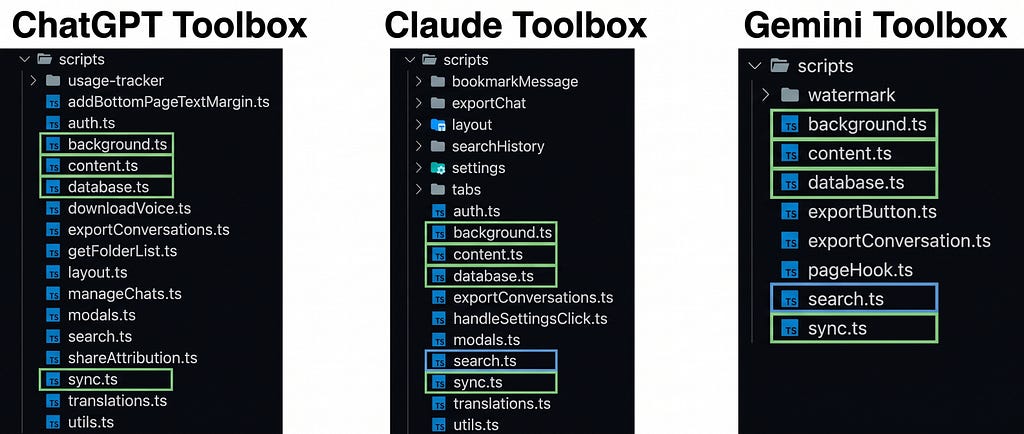
The platform adapter is responsible for four jobs:
- Listing conversations (where does this chat surface keep its conversation list, and how do we enumerate it).
- Fetching message bodies (DOM scrape for Claude, conversation endpoint for ChatGPT, hybrid for Gemini).
- Detecting new turns (MutationObservers, registered with the right observer-survival strategy for the platform).
- Mounting UI (where the search overlay attaches in this app’s DOM tree without colliding with the host).
The shared core is responsible for everything else. IndexedDB schema and migrations. Search index construction and querying with role/date/exact-match filters. The export pipeline that walks indexed conversations and produces TXT, Markdown, JSON, or PDF output. The UI overlay that renders the search panel.
This split was not the original architecture. The first version of Claude Toolbox forked from ChatGPT Toolbox and the platform-specific code was scattered across the codebase. The refactor that produced a clean adapter interface took roughly six weeks and was triggered by Gemini Toolbox, which would have been unmaintainable any other way.
The transferable lesson for anyone building extensions that target more than one host: do the adapter refactor before you ship the second platform. We did it on the third and paid the porting cost twice.
The Honest Failure: Why Half of Claude’s Features Never Shipped
If you read Claude Toolbox’s source code, you will find folder modals, a prompt library tab, pinned chats, and a manage-chats batch operations panel. All of it written. None of it shipped.
The relevant files in the source tree (src/html/manageFoldersTab.ts, src/html/managePromptsTab.ts, src/html/pinnedChatsTab.ts, src/html/manageChatsTab.ts) are exported but never imported anywhere. The modal types are declared in src/scripts/tabs/insertModalHTML.ts but no UI control ever triggers them. The code is reachable to the build system. It is not reachable to the user.
This is the most uncomfortable lesson in the article, so I want to be direct about why.
When the Claude port started, the plan was feature parity with ChatGPT Toolbox. The team copy-ported folders and prompts before checking whether claude.ai users wanted them. The folders worked. The prompts worked. We then looked at Claude.ai’s product positioning (deep, single-conversation thinking, often Project-scoped on Pro/Max plans) and at our own early user feedback (every request was about search and bookmarks, none were about folders) and made a call: ship the focused version.
The cost was visible. Three thousand active users at a 4.2 rating is roughly a third of ChatGPT Toolbox’s audience density. Some of that gap is genuine: Claude.ai itself has a smaller user base than ChatGPT (Anthropic reported around 18.9 million monthly Claude users versus OpenAI’s reported 900 million weekly ChatGPT users in early 2026). Some of it is product fit: a Claude user who already organizes their work in Projects does not need a third-party folder system the way a ChatGPT power user with 500 unsorted conversations does.
The transferable lesson is more counterintuitive than it sounds. The right scope for a cross-platform extension is not “ship every feature on every platform”. It is “ship the features that this platform’s users were missing”. Claude users were missing full-text content search, bookmarks, and per-conversation export. They were not missing folders. Shipping folders to them anyway would have been engineering vanity, not product value.
Comparison Table: Three Extensions, One Architecture, Different Scopes
What I’d Do Differently
Three things, in order of how much pain they would have saved.
Build the platform adapter interface before the second port, not after the third. Every line of platform-specific code that lived outside an adapter cost us roughly three times what it would have cost inside one. Once an adapter interface exists, the second and third platform are mechanical. Before it exists, every port is a full-stack rebuild.
Treat every host DOM as hostile. Not adversarial, just non-cooperative. The host app did not promise you a stable data-uuid. The host app did not promise the conversation pane will not be torn down. The host app did not promise the rate limit will be the same next quarter. Defensive observer patterns, defensive ID hashing, and polite cooperator sync timing are not nice-to-have, they are the minimum bar for not breaking in production.
Let each platform’s user base size the scope, not feature parity. The Claude port shipped lean because the team checked early user feedback before copy-porting features from ChatGPT. The Gemini port shipped without folders for the same reason. Both decisions felt like leaving value on the table at the time. Both decisions were correct in retrospect, because the engineering cost of maintaining a feature that 5% of users actually use is the same as maintaining one that 80% use, and the support cost is higher.
Key Takeaways
- Cross-platform Chrome extensions need a platform adapter layer from day two, not day three. The refactor cost compounds with every host you add.
- Never trust an identifier the host app does not advertise as durable. Hash content plus position to build your own stable IDs.
- Background sync against a host you do not own is a polite cooperator. Long cooldowns, user-visible triggers, exponential backoff on 429s, and partial-sync warnings beat aggressive sync every time.
- MutationObservers die with the subtree they watch. Use a two-layer pattern when the host app rebuilds parts of its DOM on user action.
- Feature parity across platforms is engineering vanity. Let early user feedback per platform shape the scope, even when the code already exists for a feature you could ship.
FAQ
What is the architecture difference between ChatGPT Toolbox, Claude Toolbox, and Gemini Toolbox? All three are Chrome extensions built on the same codebase split: a per-platform adapter that handles DOM scraping, MutationObservers, and UI mount points, plus a shared core that handles IndexedDB storage, search indexing, filters, and the export pipeline. ChatGPT Toolbox uses ChatGPT’s conversation endpoints for sync due to message-list virtualization; Claude Toolbox scrapes the DOM directly; Gemini Toolbox uses a hybrid approach with a two-layer observer to survive model-picker DOM rebuilds.
Why does Claude Toolbox have fewer features than ChatGPT Toolbox? Claude Toolbox ships seven active features (full-text search, exact-match toggle, message bookmarks, scroll-to-bookmark, TXT and JSON export, IndexedDB sync, 10-language UI) compared to ChatGPT Toolbox’s 24. The Claude codebase actually contains additional feature code (folders, prompts, pinned chats, batch operations) that was built but never imported into the user interface. The decision was deliberate: Claude.ai users requested search and bookmarks, not folders, so the team shipped the focused version rather than copy-port everything from the ChatGPT module.
How do you handle Chrome extension background sync without getting rate-limited? The sync runs on a long cooldown (30 seconds in Gemini Toolbox per src/utils/constants.ts, similar in the other modules), with a per-conversation turn cap (100 turns in Gemini), exponential backoff on HTTP 429 responses from the host, and user-visible partial-sync warnings when a fetch fails. Sync also runs on user-visible triggers (opening the extension overlay, force-refresh) so a user-perceived freshness check is always available even when the background timer is on its cooldown.
Why three separate Chrome Web Store listings instead of one extension that targets all three hosts? Each Chrome extension declares its host permissions in its manifest at install time. A single extension that requested access to chatgpt.com, claude.ai, and gemini.google.com would force every user to grant access to all three even if they only use one. Three listings (jlalnhjkfiogoeonamcnngdndjbneina, camddjjmcemmmlndbciaodchkodhgibh, kkdkphdkcnbifbcnocdnceacggdeplbg) keep permission scope minimal and let each module’s Chrome Web Store ranking compound independently.
What pricing model do the three modules use? All three (ChatGPT Toolbox, Claude Toolbox, Gemini Toolbox) use the same pricing: free tier with limits, $9.99/month subscription, or $99 lifetime via Polar as the payment processor. ChatGPT Toolbox additionally offers an Enterprise plan at $12 per seat ($10 per seat annual) with a minimum of 5 seats. Verified against the pricing.constants.ts source of truth in May 2026.
Resources
- ChatGPT Toolbox on Chrome Web Store
- Claude Toolbox on Chrome Web Store
- Gemini Toolbox on Chrome Web Store
- AI Toolbox umbrella site
- MDN: MutationObserver API
- Chrome Developers: extension architecture overview
- W3C IndexedDB specification
If you build Chrome extensions or any tool that lives inside someone else’s app, try ChatGPT Toolbox, Claude Toolbox, or Gemini Toolbox on the Chrome Web Store. The free plan on each includes the core search feature; Premium ($9.99/month or $99 lifetime) unlocks unlimited results, full sync, and bulk export.
What is the worst host DOM you have ever built against? I’d love to hear the war story in the comments.
About the author: Adi Leviim is the co-founder of AI Toolbox (formerly ChatGPT Toolbox), a Chrome extension with three modules (ChatGPT, Claude, Gemini) used by a combined 20,000+ people across 150+ countries to search, organize, and export their AI conversations. He writes about the reality of building AI products with 7+ years of full-stack development experience. Follow him on Medium for honest takes on SaaS, AI tools, and shipping software that people actually use.
AI Toolbox | Medium | Twitter/X | LinkedIn
I Built the Same Chrome Extension Three Times. Each One Broke Differently. was originally published in Level Up Coding on Medium, where people are continuing the conversation by highlighting and responding to this story.