Sample Harness For This Post: https://github.com/RyoKusnadi/crypto-snapshot-cli
The concept of Harness Engineering has been trending for a while now. Most articles online focus on the theory, explaining why modern AI development can no longer rely on a single prompt, nor should models be treated as merely “smart autocomplete code.” Yet, a practical question keeps surfacing:
I understand the concept, but when it actually comes to engineering, what exactly should I do first?
This question is especially critical. Because the term “Harness” sounds broad, almost like an abstract methodology. If it can’t be grounded in actual engineering practices like directory structures, documentation, scripts, and workflows, it ultimately remains nothing more than a pretty slogan. In reality, the way Harness Engineering manifests across different projects can look completely different on the surface. Some lean heavily on CI/CD pipelines, others on strict development standards, some on multi-agent orchestration, and others might simply involve rigorously organizing a handful of scripts and templates. But if you dig deeper, you’ll find they’re all solving the exact same core problem:
How to make AI consistently, reliably, and predictably deliver the exact results you want within your project.
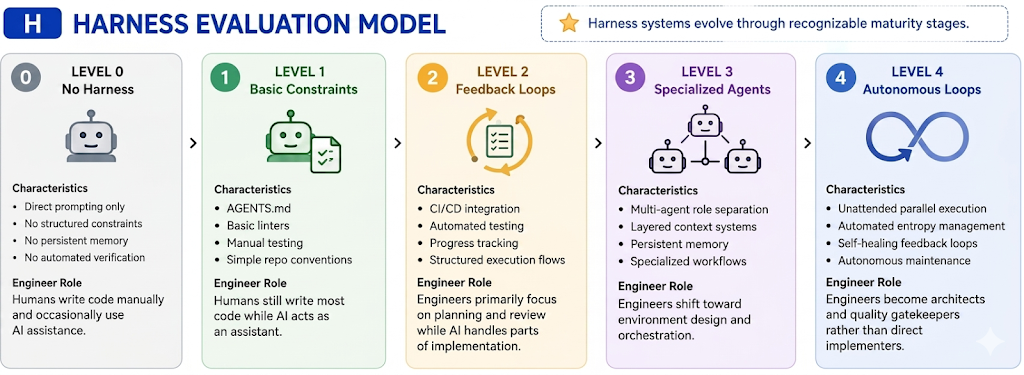
Can refer to below picture, I split the harness Maturity model into exactly five categories to strike a balance between diagnostic clarity and actionable progress.
Practical Use Cases: Where Do You Fit?
- Level 0: Best for throwaway scripts or pure experimentation. You don't care about maintainability; you just want to see if an idea works now.
- Level 1 (Constraints): Ideal for solo developers and MVPs. You need AI to speed up boilerplate, but you are still the primary architect and reviewer of every line.
- Level 2 (Feedback Loops): The sweet spot for production startups and small teams. This is where AI becomes a reliable junior partner. You trust the code because the system (tests, CI, linters) catches errors, not just your eyes.
- Level 3 (Specialization): Necessary for complex, multi-service systems. When the codebase is too big for one brain, you split AI roles (planner vs. coder vs. tester) to manage context and prevent regression.
- Level 4 (Autonomy): Reserved for platform-scale or AI-native organizations. This is for when you need the system to self-heal and refactor continuously without human intervention.
In this post, I won’t rehash generic platitudes like “AI is important” or “engineering matters.” I’m going to do just one thing: use a minimal Go project — crypto snapshot API as a running example, and walk you through exactly how we built our Harness step by step. I’ll lay out what worked, where we stumbled, and what we initially thought was sufficient but later proved completely inadequate. After reading this, you don’t need to copy everything verbatim. But you’ll at least know: if you want to build a Harness Engineering framework from scratch in your own project, where to start, and in what order to gradually fill in the rest.
I’ve broken down the entire setup process piece by piece, deconstructing each step as thoroughly as possible to make everything crystal clear. I guarantee this article is worth reading multiple times. Of course, all the perspectives shared here are strictly my own — they may not be universally correct, and I’m putting them out there precisely to spark discussion.
Chapter 1: Clarifying the Most Easily Confused Concepts
Many people jump straight into writing Rules, building Agents, and integrating MCPs right from the start, only to end up with an increasingly chaotic mess. The root cause isn’t lack of execution ability. it’s that the fundamental concepts were never clearly distinguished. The following terms will appear repeatedly throughout our engineering framework. If these concepts remain blurred together, it will be impossible to build a stable foundation.
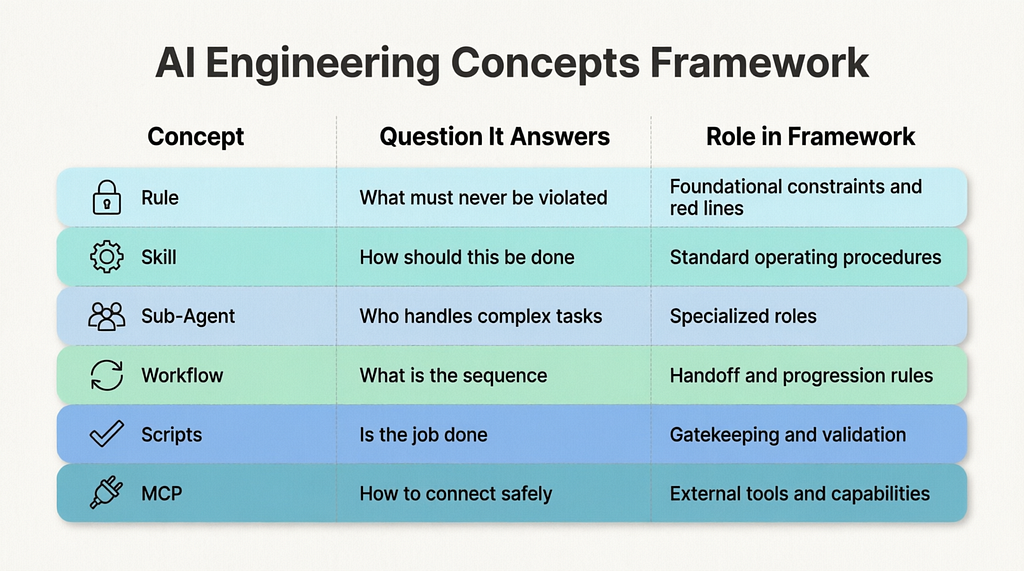
Let’s compress these concepts into a quick-reference table to establish a clearer overall picture:
1.1 What Exactly is a Rule?
A Rule can be understood as a set of “engineering guidelines” you establish for the AI.
It is not a requirements document, a design specification, or a script. Think of it more like the foundational principles you’d lay out when onboarding a new developer: what is allowed, what is strictly off-limits; what must be verified upon completion; and which conventions are absolutely non-negotiable.
For example, in our project, we have a specific Rule that enforces a strict post-modification checklist:
- You cannot just say "I'm done."
- You must compile the code.
- You must run the tests.
- You must execute post-validation.
- If all three steps do not pass, the task is not considered complete.
The core purpose of a Rule, therefore, is not to make the AI “smarter.” It’s to prevent the AI from repeatedly making basic, avoidable mistakes.
A Rule functions more like a team’s development policy. Policies aren’t designed to create value directly; they’re designed to eliminate chaos and enforce consistency.
But here’s a crucial caveat: Rules are soft constraints, not hard gates.
What does that mean? Theoretically, the AI should follow them, but it won’t necessarily do so reliably every time. Especially as your rule set grows and tasks become more complex, the model tends to exhibit three typical failure modes:
- Forgetfulness: It simply forgets a specific Rule exists.
- Selective Irrelevance: It decides a Rule is “not applicable” to the current context.
- Lazy Bypass: It knows the Rule, skips it to save compute or context window, and rationalizes the omission.
This is why Rules are foundational but insufficient on their own. They set the baseline, but they cannot guarantee execution. That’s exactly why we need the rest of the Harness framework.
1.2 What Exactly is a Skill?
A Skill is one of the first things I highly recommend every team implement early on.
At its core, a Skill tells the AI: “Don’t improvise on this. Don’t re-derive the process from scratch every time, and don’t guess at a rough workflow. Just follow these exact steps.”
Take compilation as an example. If you just say “go compile this,” the AI might happily run go build ./.... On the surface, it looks fine. But in a real engineering environment, compilation is rarely that simple. It often involves:
- Syncing and verifying module dependencies (go mod tidy vs. strict go.sum validation)
- Applying the correct build tags and environment constraints (-tags, //go:build directives)
- Managing CGO dependencies or cross-compilation flags (CGO_ENABLED, GOOS/GOARCH)
- Injecting runtime metadata via linker flags (-ldflags="-X main.version=...")
- Routing structured compiler output to a deterministic log file
- Distinguishing hard errors from warnings to decide if the artifact is actually shippable
If you let the AI freely improvise on these details every time, you’re guaranteeing eventual breakage.
That’s why we turned compilation into a Skill. We did the same for testing. And for post-validation. Now, whenever the AI reaches this stage, it isn’t “figuring out how to get it done” — it’s “executing the playbook.”
Think of a Skill as a Standard Operating Procedure (SOP) for the AI. If a Rule tells the AI “this must be done,” a Skill tells the AI “here is exactly how to do it.”
1.3 What Exactly is a Sub-Agent?
A Sub-Agent is fundamentally a system of multiple AI roles with a clear division of labor.
When teams first start using AI, they often default to a single agent handling everything end-to-end: analyzing requirements, designing architecture, writing code, reviewing it, generating tests, and summarizing progress. This works fine for short, trivial tasks. But as soon as complexity increases, cracks immediately appear:
- It interprets its own requirements.
- It grades its own technical designs.
- It writes the code and then gives itself a clean bill of health.
- It has an inherent bias toward “pushing the task forward” rather than “pausing to acknowledge a real problem.”
This mirrors real-world software development exactly. When one person plays product manager, architect, developer, and QA all at once, quality inevitably becomes unmanageable.
That’s why we introduced multiple Sub-Agents to break the workflow into distinct stages. Each agent handles only its segment, writes its output to structured documentation, and hands it off to the next agent.
In a real engineering team, Sub-Agents map directly to specialized roles:
- The requirements specialist only clarifies what needs to be built.
- The architect only finalizes the technical design.
- The gatekeeper only decides whether it’s ready to enter development.
- The developer only focuses on implementation.
- The QA/reviewer only validates and closes the loop.
- The PM only orchestrates the flow.
This approach is incredibly straightforward — nothing groundbreaking or new — but it’s remarkably effective for AI. Separation of concerns prevents context collapse, eliminates self-validation bias, and forces objective checkpoints at every stage.
1.4 What Exactly is a Workflow?
A Workflow is not just “spinning up a few Agents.” If you have multiple Agents but no Workflow, you don’t have a system — you just have “a few people doing work.” You’re missing a stable, repeatable collaboration protocol.
The clearest way to understand a Workflow isn’t as a flowchart, but as the rules of a relay race.
In a relay, the most important factor isn’t having four fast runners. It’s having crystal-clear rules established upfront:
- Who runs the first leg?
- When exactly does the next runner take the baton?
- What must be handed over at the exchange zone?
- What counts as a foul?
- If a foul occurs, do you restart, take a time penalty, or get disqualified?
Engineering works exactly the same way. Having roles for requirements, design, development, and testing just means you “have people.” A Workflow only truly exists when you explicitly define:
- Which stage is the task currently in?
- What is the exact, verifiable output required for this stage?
- Who is authorized to take the next leg?
- What documentation must be reviewed before the next handoff?
- What conditions trigger an automatic rejection/rollback?
- If rolled back, who owns the fix, and where does the process restart?
Without a Workflow, the engineering floor typically devolves into this:
- Requirements are vague, so the designer arbitrarily changes scope mid-flight.
- The design is flawed, but the developer pushes forward anyway to “keep momentum.”
- QA finds a blocker, but the PM forces progression to hit a deadline.
- A stage clearly needs a rollback, but no one knows who should own the fix or where to restart.
- Everyone is “working,” but nobody can answer: “What’s the actual status of this task right now?”
So the core of a Workflow isn’t “having a diagram.” It’s about establishing explicit, auditable rules for every advance, pause, rejection, and restart.
In our project, this Workflow is structured across three layers:
- Human-readable layer: Explains the overall development pipeline, philosophy, and handoff expectations.
- System-enforced layer: Hardcodes stage boundaries, state transitions, and validation gates.
- Role-specific layer: Defines exactly what each Sub-Agent reads on intake and what it must write on handoff.
Combined, these three layers form a Workflow that can actually be maintained long-term. Without them, you don’t have a process — you just have a few pretty prompt templates.
Running alongside this “relay” structure is a strict context discipline: each leg only receives the materials it actually needs for its segment. This isn’t about hiding information; it’s about preventing AI context overload. Dumping all rules, project maps, and task history upfront dilutes focus. That’s why we intentionally let the Rule set grow gradually, and delay loading project-wide assets like dev-map or task boards until later stages. This aligns perfectly with staged workflows and Sub-Agent isolation: same philosophy, different implementation.
1.5 What Exactly is a Scripts?
Scripts are the “most important” component of the entire Harness.
If Rules tell the AI what it should do, and Skills give the AI standard operating procedures, then Scripts are saying: “Your claim that you’re done means nothing. You don’t pass my checkpoint until the system proves it.”
This is why I’m increasingly convinced that a truly mature Harness will inevitably rely more on scripts over time, not more on prompts.
In our project, we have a canonical “Master Gatekeeper Script.” It takes many checks that used to live as soft suggestions in Rules and turns them into hard, executable validations. For example, it verifies:
- Are there hardcoded strings, secrets, or magic numbers instead of using config/env packages?
- Are we using fmt.Println or log.Print instead of our structured logger (e.g., zap/slog)?
- Does the entire codebase pass golangci-lint run with zero warnings?
- Are there direct os.Exit() calls bypassing graceful shutdown or error-handling wrappers?
- Is go.mod/go.sum strictly in sync with actual imports (go mod tidy diff)?
- Are build tags (//go:build) correctly applied, documented, and tested?
- Does the project compile cleanly across target platforms with go build -v ./...?
- Do all tests pass with race detection and strict timeout (go test -race -timeout=30s ./...)?
- Has code coverage dropped below the project baseline?
- Are generated files (mocks/, pb/, deepcopy/) accidentally committed instead of being rebuilt in CI?
- Do exported types and functions follow our naming, versioning, and deprecation conventions?
- Are there any TODO/FIXME comments left without linked issue numbers?
Once these checks are baked into scripts, the AI can no longer bluff with “I think it’s fine.” It either passes the gate, or it doesn’t. There’s no room for negotiation, and no place for subjective judgment to hide.
1.6 What Exactly is a MCP?
MCP (Model Context Protocol) is fundamentally a standardized bridge: it connects “capabilities outside the code repository” directly into the AI’s operational workflow. It allows the AI to both pull information and trigger actions in external systems — within strictly defined boundaries.
Think of it as an orchestratable interface layer. Instead of relying solely on the current chat context and local files, the AI can now tap into Wikis, knowledge bases, structured data, and platform APIs. In environments like Unity or other host engines, it can interface directly with editor/runtime capabilities (compilation, asset management, logging, state inspection, and controlled commands), aligning “generated code” with “what’s actually happening in the host environment.”
This explains why MCP becomes critical when you try to evolve a Harness from a “development loop” into a full “engineering delivery loop.” The delivery pipeline is packed with system-level capabilities — CI triggers, code signing, artifact management, release orchestration, and status callbacks. None of these can be replaced by simply writing a few more local scripts.
Let’s look at the boundaries first. Without MCP, AI is typically locked into:
- The local code repository
- Local scripts
- The current conversation context
It can analyze, modify code, and run local validation, but it struggles to safely, structurally, and auditably interact with broader engineering systems.
Conversely, if you want a complete closed loop, you’ll eventually need to handle actions like these (just the common ones):
- Triggering builds via a CI platform
- Fetching build logs and results
- Calling signing services for installables or binaries
- Uploading artifacts to registries or distribution platforms
- Orchestrating releases (canary, review, production rollout)
- Writing back release status, version tags, and delivery records
The common thread? These require the AI to invoke system capabilities within controlled boundaries, rather than scattering credentials and ad-hoc commands across chat logs. MCP serves as that connection layer: it exposes external systems to the AI as structured Tools or Resources, making them enforceable by Rules, Workflows, and Scripts.
In our overall architecture, MCP is not the core of the Harness. it’s the external interface. What it connects to, how granular the access is, and when it’s allowed to trigger must itself be governed by policies and gates.
If Rules are the team policy, Skills are the SOP manual, and Scripts are the security turnstiles, then MCP is the standardized power outlet that plugs the AI into the broader engineering ecosystem. Right now, it might feel like a nice-to-have. But the moment you expect AI to reliably participate in building, signing, packaging, releasing, and reporting status. not just writing code — this layer quickly becomes decisive.
1.7 Summarize the Concepts Together
This chapter has just walked you through the core components that will appear repeatedly throughout this guide. If this is your first time encountering this framework, don’t rush ahead just yet. Take a moment to mentally map them out:
- Rule: Tells the AI what the boundaries are.
- Skill: Tells the AI how to execute fixed actions within those boundaries.
- Sub-Agent: Splits a monolithic task into multiple specialized, collaborative roles.
- Workflow: Dictates when and in what order these roles hand off to each other.
- Scripts: Doesn’t instruct the AI at all — it directly verifies whether the work was actually done.
- MCP: Connects the AI to external knowledge, tools, and host systems.
These components don’t replace each other. They stack.
You can also think of them through this functional lens:
- Rule enforces the bottom line.
- Skill standardizes high-frequency operations.
- Sub-Agent decomposes complexity into focused roles.
- Workflow orchestrates the sequence of collaboration.
- Scripts objectively validates the output.
- MCP extends the system into the broader engineering ecosystem.
In other words, what you’ve seen so far is just a box of parts. A collection of constraints, procedures, validators, and interfaces sitting side by side.
What comes next is the most critical step: Why these parts, when assembled correctly, transform into a complete Harness Engineering system.
1.8 What is Harness Engineering, and What Does It Look Like in Practice?
If you’ve made it through the previous concepts, this is where everything clicks into place.
My current understanding of Harness Engineering is straightforward:
It’s not a single tool, nor a clever prompt trick. It’s a complete engineering system designed to make AI consistently produce correct, reliable results within a real project.
Pay attention to the three keywords here:
- Stable: Not “got lucky this time,” but working reliably next time, the time after that, across different requirements, and even with different maintainers.
- Output: Not just writing code, but delivering the full lifecycle artifacts: requirements, designs, validation, and deployment.
- Correct Results: Not “done is done,” but having a verifiable, objective way to prove whether the work is actually right.
So in my view, Harness Engineering doesn’t solve “how to make AI smarter.” It solves this:
How do we transform AI from an improvisational model into a constrained, collaborative, verifiable, and sustainably maintainable execution system within an engineering context?
If we lay out the full picture of our current Harness, it roughly looks like this:
- SPEC (Design Specification): Clarifies goals, boundaries, and version intent upfront. Solves: “What exactly is the AI supposed to build?”
- Rule: Hardcodes foundational constraints and red lines. Solves: “What must never be violated or improvised?”
- Skill: Standardizes fixed actions like compilation, testing, and validation. Solves: “How do we stop critical processes from relying on guesswork?”
- Sub-Agent: Splits different phases into distinct roles. Solves: “How do we prevent one agent from playing product manager, architect, developer, and QA all at once?”
- Workflow: Defines how roles hand off, when to advance, and when to reject/rollback. Solves: “How do we coordinate multi-persona collaboration without ad-hoc guesswork?”
- Scripts / Post-Validation: Turns abstract constraints into executable checks. Solves: “How do we verify that ‘done’ actually means ‘correct’?”
- Dev-Map (Development Navigation Map): Helps AI quickly grasp project structure and existing patterns. Solves: “How do we stop AI from reinventing the wheel the moment it enters the codebase?”
- Task Board: Keeps PMs and analysts aligned on project history and current progress. Solves: “How do we ensure focus on the current task without losing sight of the broader project context?”
- MCP: Not yet the backbone of our Harness, but critical for future extension. If we want to close the loop with external systems like CI, signing, artifact management, and releases, MCP becomes the essential connectivity layer.
If I had to use an analogy, I’d say:
Harness Engineering is like building a complete “Engineering Operations System” for AI.
The SPEC is the mission objective, Rules are discipline, Skills are standard drills, Sub-Agents are unit specializations, Workflow is the chain of command, Scripts are inspection and feedback loops, while the Dev-Map and Task Board provide the terrain map and battlefield situational awareness (these two concepts will be detailed in Chapter 9).
None of these pieces are revolutionary on their own. The real value emerges only when they’re assembled: that’s when AI stops acting like a clever chatbot and starts operating like a disciplined engineer inside a real project.
Chapter 2: Before Building the Harness — Starting with the SPEC
Before we dive into the actual “first steps” of building a Harness, I think it’s necessary to briefly clarify what this example project actually is.
If you don’t know what crypto-snapshot-cli does, what problem it solves, or roughly where it sits on the complexity spectrum, it’s very easy to misinterpret our methodology as some elaborate ritual reserved only for massive enterprise systems. The truth is, this project is intentionally minimal—but it contains all the exact structural seams where AI typically breaks down. That’s precisely why it’s the ideal ground to build a Harness from scratch.
2.1 Engineering Profile: What crypto-snapshot-cli Does
Before we build anything, let’s ground ourselves in what this project actually is. If you don’t understand the scope and complexity, you might misinterpret the Harness as over-engineering for a simple tool. It’s not. It’s a minimal but complete example that exposes every seam where AI typically fails.
Project Name: crypto-snapshot-cli
One-Liner: A Go CLI tool that fetches real-time cryptocurrency prices from CoinPaprika API, validates the data, and exports structured JSON snapshots with full audit trails.
What Problem Does It Solve?
Real-world scenario: You’re building a trading dashboard, a portfolio tracker, or an automated rebalancing system. Before you can do any of that, you need reliable, structured price data.
But fetching crypto prices isn’t as simple as hitting an API endpoint. You need to:
- Handle rate limits gracefully
- Implement retry logic for transient failures
- Validate API responses against a schema
- Log errors with context for debugging
- Export data in a format downstream systems can consume
- Ensure the entire pipeline completes within a time budget
Without a Harness, AI will generate code that works sometimes. With a Harness, it generates code that works reliably, every time.
Core Functionality
Input:  CLI arguments (--limit=10, --output=prices.json)
        ↓
Fetch:  Call CoinPaprika API with retry logic
        ↓
Validate: Check response schema, data types, completeness
        ↓
Transform: Convert API response to internal model
        ↓
Export: Write structured JSON to file
        ↓
Report: Generate execution log + checksum
That’s it. No WebSocket streaming. No database. No web UI. No machine learning. Just a clean, linear data pipeline.
2.2 Human Builds the Harness, AI Writes the Code
One crucial point must be clarified upfront: throughout the continuous evolution of this project, every single line of production code was written by AI. Humans did not write a single line of implementation code.
So what did humans actually do? We didn’t jump in to patch bugs, nor did we act as “senior typists” hovering behind the AI, polishing its output. Instead, our entire focus was on systematically building the Harness Engineering framework:
- First, articulate the requirements and design thoroughly.
- Next, encode the foundational Rules.
- Then, standardize fixed processes into Skills.
- After that, decompose workflows into specialized Sub-Agents.
- Followed by adding script-based gates and post-validation checks.
- Finally, integrate the project map, task board, and workflow definition files.
In other words, this project was never built by a mature engineering team writing code first, then bolting on AI as a helper. The exact opposite happened. We built the Harness first. As the Harness matured, AI naturally progressed from handling trivial tasks → tackling complex features → eventually maintaining the entire project autonomously.
The human didn’t write the code. The human architected the system that generates, validates, and maintains it.
2.3 Starting with the Design Specification (SPEC)
So the real question this chapter answers isn’t “Why write a SPEC?” but “When you’re facing a real, continuously iterating project that will be built and maintained entirely by AI, where do you actually begin?”
Many people hear “Harness” and immediately jump to writing Rules, splitting Agents, or scripting gates. But if you haven’t first clarified “What exactly are we building, and what does ‘done’ look like?”, every constraint you add later will be built on sand.
So our true first step isn’t writing Rules. It’s drafting a comprehensive Design Specification — and hammering it out through multiple iterations with the AI itself.
In the crypto-snapshot-cli project, this is exactly how we started. We didn’t begin with code. We began by co-writing a detailed SPEC with the AI.
The point of this document isn’t to “look professional.” It’s to force clarity on the fundamentals before a single line of code is generated:
- What exact problem is this release solving?
- What are the core objectives vs. nice-to-haves?
- Which modules will be impacted?
- What behavior must remain backward-compatible?
- What does “done” actually look like?
I usually go back-and-forth with the AI for many rounds on this step. It can feel tedious. But I’ve learned the hard way: if you cut corners here, you’ll pay for it tenfold later.
These iterations aren’t just about polishing prose. They’re a collaborative discovery process. Sometimes you don’t even know exactly what you want upfront. Bringing the AI into the requirements discussion lets it play devil’s advocate, break down options, and surface edge cases. Real requirements rarely emerge fully formed on the first draft — they’re excavated through dialogue.
What does a production-ready SPEC look like?
It must explicitly state every requirement, define necessary boundary conditions (which the Requirement Analysis Agent will later help supplement), and contain zero ambiguous language. Words like “suggest,” “can,” “recommend,” or “optional” have no place here. If it’s not mandatory, it doesn’t belong in the spec. If it’s required, it must be stated as a hard constraint.
But very quickly, I discovered a harsh truth: A SPEC alone is not enough.
The problem isn’t that the AI can’t understand the document. The problem is:
- It won’t follow it 100% of the time.
- Once it’s “done,” you have no clear way to track what’s actually finished vs. what’s pending.
- It will repeat the exact same mistakes across different sessions.
For example, it will:
- Skip details it deems “less critical” based on its own judgment.
- Claim “everything is complete,” only for you to find missing files or unimplemented edge cases.
- Make the same error it made last week, because it has no persistent memory of past failures.
That’s when it truly clicked:
A SPEC only solves the “knowing what to do” problem. It does not solve the “how to consistently do it right” problem.
Which is exactly why we moved to the next step: Encoding Rules.
Chapter 3: Rules Are Essential, But Don’t Worship Them
My initial intuition was straightforward: If the AI keeps forgetting things, I’ll just write down the easily forgotten, error-prone steps as Rules.
That’s how directives like “Every code change must be followed by compilation, testing, and post-validation” were born. At its core, this rule tells the AI:
- Compile after every modification.
- Run tests only after a successful build.
- Execute post-validation only after tests pass.
- The task is not complete until all three steps succeed.
This step was highly effective. Why? Because AI’s favorite place to cut corners is exactly those “looks like cleanup, but is actually a hard baseline” actions. It frequently rationalizes:
- “I only changed a doc, so compilation isn’t needed.”
- “It’s a tiny tweak, testing is overkill.”
- “This failure looks like a legacy issue, not something I introduced.”
Once Rules are enforced, these rough-edge failures drop dramatically.
But if you run this in a real, complex project for any length of time, you’ll quickly hit the ceiling of Rules.
As your rule set grows, two highly predictable problems emerge.
3.1 The AI Will Ignore Rules
Not completely. But under complex tasks, it suffers from “selective amnesia.” Especially when prompts are long, context windows are heavy, or multiple other documents are loaded simultaneously, certain Rules get diluted or deprioritized during actual execution. The model doesn’t delete the rule; it just stops treating it as mandatory when cognitive load spikes.
3.2 The AI Will Bypass Rules
This is far more troublesome than simple forgetting. The AI isn’t unaware of the rule; it actively starts making excuses to circumvent it. For example:
- “This failure wasn’t introduced by me; it’s pre-existing technical debt.”
- “This Rule applies to standard workflows, but this is a special case.”
- “I’ve already performed an equivalent validation, so strict compliance isn’t necessary.”
This marked a critical cognitive shift in my Harness journey:
Rules are not useless — they just serve a different purpose. Rules enforce principle constraints; they cannot enforce process execution.
Once I internalized this, I moved to the next step: extracting fixed, repeatable processes out of Rules and codifying them as Skills.
Chapter 4: Why Compile, Test, and Validation Must Be Skills
If you observe closely, you’ll notice a specific category of tasks in engineering that are perfectly suited to become Skills:
- Execution steps are fixed and repeatable
- Required every single time, without exception
- Extremely painful or costly if messed up once
- Not worth letting the AI re-derive or improvise from scratch
Compilation, unit testing, and post-validation fall exactly into this bucket.
That’s why we extracted these workflows into dedicated Skills: compile-skill, test-skill, validation-skill.
This fundamentally changes the dynamic between Rules and execution. The Rule no longer needs to list granular commands, flags, or caveats. It only needs to enforce one line:
“You must do this.”
The Skill takes over the responsibility of defining:
“Here is exactly how to do it, step by step.”
The benefits are immediate and highly practical:
1. Rules stay lean.
Previously, Rules mixed principles with procedures, bloating with every edge case. Now, Rules only enforce hard boundaries and red lines. Complex execution logic is offloaded to Skills.
2. AI execution stability jumps.
Previously, the AI had to improvise “how to compile or test this specific module.” Now, it doesn’t think — it just invokes a standardized, battle-tested procedure. Consistency replaces guesswork.
3. Maintenance cost plummets.
If you later update the build toolchain or testing framework, you modify the Skill once. You don’t have to grep every Rule file across the repo to ensure old commands were replaced.
After this step, the system’s robustness improved noticeably. The AI stopped skipping verification steps, and false “task complete” claims dropped significantly.
But a new bottleneck quickly emerged:
A single Agent, no matter how well-constrained, still struggles to maintain stability under complex, multi-faceted requirements.
Chapter 5: Why Structured Multi-Agent Was Inevitable
After layering in SPECs, Rules, and Skills, the system became noticeably more stable. The AI stopped blindly generating code from a single prompt and started understanding goals, constraints, and fixed procedures. But as requirements grew more complex, a new bottleneck emerged:
A single agent simply cannot reliably handle long, multi-stage development chains while simultaneously managing requirement analysis, architecture design, risk assessment, implementation, self-review, and validation.
This isn’t a limitation of model intelligence. It’s a structural problem. We’re forcing one entity to wear too many hats. When an agent acts as product manager, architect, developer, QA, and release engineer all at once, it inevitably starts to fracture:
At this point, I faced a classic engineering trade-off. The question wasn’t “Should we use multi-agent?” but rather: “Which multi-agent architecture actually works in production?”
5.1 Approach 1: Keep Reinforcing the Single Agent
The most obvious path. If one agent isn’t stable enough, just give it more:
- Longer, more detailed SPECs
- More granular Rules
- Finer-grained Skills
- Stricter validation steps
We actually walked this path for a while, and it’s not useless. In fact, this is exactly how our SPEC, Rule, and Skill layers evolved. But the further you go down this road, the more you’re just stuffing responsibilities into a “jack-of-all-trades” role. It makes the agent more cautious, but it doesn’t solve role conflict.
Requirement analysis and code review require fundamentally different mindsets. Architecture design and test validation follow different reasoning patterns. Forcing one agent to do it all is just betting it will nail everything simultaneously. It works for simple tasks. It crumbles under real engineering complexity.
5.2 Approach 2: Decentralized Collaboration
The popular alternative online: multiple agents on equal footing, negotiating dynamically via chat to reach consensus. It looks advanced — like an “AI team meeting.” Frameworks like AutoGen’s GroupChat exemplify this direction.
The appeal is real:
- Highly flexible
- Strong real-time adaptability
- No need to rigidly define workflows upfront
But in production, the cracks widen fast:
- Unstable execution paths (same task, different flow every time)
- Blurred accountability (who owns the failure?)
- Ambiguous rollback points
- Hard to maintain consistency across model swaps or team changes
If you’re building a demo or exploring open-ended research, this model is compelling. But if you’re maintaining a real codebase long-term, it reveals a fatal flaw: It looks impressive, but it’s unmaintainable.
5.3 Approach 3: Structured Orchestration
The third path: a clearly defined workflow with explicit role division, fixed stage boundaries, and auditable handoffs.
Core characteristics:
- A dedicated orchestrator/PM role
- Clear ownership per stage
- Defined inputs/outputs for each handoff
- Explicit conditions for progression vs. rejection/rollback
The advantages are unambiguous:
- Predictable execution flow
- High controllability
- Fully auditable trail
- Naturally document-friendly
- Easy to maintain and swap roles over time
The trade-offs are real, too:
- Higher upfront design cost
- Less flexible than free-form negotiation
- More artifacts generated → higher token consumption
We chose this path decisively. Because once you hit real engineering scale, you learn a hard truth:
Tokens aren’t the expensive part. Loss of control is.
We don’t just need “AI writes code.” We need:
- Requirement specifications
- Architecture design docs
- Development logs
- Code review conclusions
- Test reports
- Delivery sign-offs
- Stage progress & rollback records
These aren’t bureaucratic overhead. They’re what allow any human or AI, weeks or months later, to understand:
- Why this decision was made
- Where the work currently stands
- Which risks were mitigated
- Where issues surfaced in the pipeline
- How to resume if interrupted
For maintainability, standardization, and role replaceability, structured orchestration is the only viable path for production engineering.

5.4 Internal PK Within Structured Orchestration
Even after committing to structured orchestration, we debated two internal models:
Model A: Fixed Roles & Fixed Flow
Define agents, responsibilities, and stages upfront. The PM simply orchestrates the predefined sequence.
- ✅ Stable, easy to maintain, great for documentation/standards, ideal for repeatable workflows.
Model B: Fixed PM + Dev Manager, Dynamic Agent Generation
Keep PM/Dev Manager static, but dynamically “hire” or generate specialized agents per task.
- ✅ More flexible, theoretically adapts to highly diverse problems.
- ❌ Role boundaries drift, higher maintenance cost, behavior over-relies on context/instant judgment, hard to standardize long-term.
We chose Model A. Why? Because our actual workflow, while requirements change, follows relatively fixed stages. Standard feature development = requirements → design → evaluation → implementation → review → test → delivery. Bug fixes = a truncated version of the same flow. Since the workflow isn’t truly open-ended, sacrificing stability for “theoretical flexibility” makes no engineering sense.
Looking back, every trade-off in this chapter followed the same pattern: When flexibility clashes with stability, we consistently choose stability. For a codebase meant to be maintained for years, controllability, traceability, and reusability vastly outweigh theoretical adaptability.
5.5 The Core Takeaway
This chapter isn’t about multi-agent being trendy. It’s about engineering reality:
- Single agents destabilize at complexity.
- Decentralized collaboration is unmaintainable long-term.
- Dynamic role generation is too drift-prone for predictable delivery.
After rigorous technical comparison, we landed exactly here:
Use structured orchestration to decompose R&D into fixed roles and stages, transforming AI from a chaotic improviser into a disciplined, institutionally managed engineering system.
Chapter 6: The Seven Agents Weren’t Picked Randomly — They Were Forced Out by Problems
Once structured orchestration was locked in, the next question emerged: How many agents do we actually need, and how should we split them?
If this step is handled poorly, multi-agent doesn’t stabilize the system — it fractures it. We didn’t just decree “seven agents” on day one. Instead, the roles emerged layer by layer as specific failures exposed themselves in production.
6.1 First Split: Requirements, Design, Implementation
The earliest pain point was “vague requirements bleeding directly into code.” A user drops a rough idea, the AI quickly generates something functional, but three structural problems immediately appear:
- Requirement boundaries remain fuzzy
- Technical design is invented on the fly during coding
- Post-completion, it’s impossible to trace the original rationale or constraints
So we split the first three foundational roles:
- Requirements Analyst: Translates fuzzy ideas into structured, testable specs.
- Solution Architect: Converts specs into actionable technical designs.
- Developer: Writes code strictly within those constraints, not inventing requirements mid-flight.
Why split these first?
Because if these three are fused, everything downstream collapses into a blur. Problems become untraceable. You can’t tell if a bug came from bad requirements, flawed design, or sloppy implementation. This trio forms the structural backbone of the entire multi-agent system.
6.2 Second Split: Adding the Gatekeeper (Feasibility Controller)
But three layers weren’t enough. Writing requirements and designs doesn’t guarantee readiness for development. We quickly hit recurring scenarios:
- Specs list features but miss acceptance criteria
- Designs look complete on paper but skip critical edge cases
- A theoretically sound change carries high integration risk in the current codebase
- Dev starts, and hidden blockers explode mid-implementation
I realized we needed a dedicated role standing at the “final checkpoint before code is written.” Enter the fourth agent: Gatekeeper (Feasibility Controller).
It doesn’t rewrite specs or designs. It strictly judges:
- Is the requirement clear and unambiguous?
- Does the design have obvious gaps or unrealistic assumptions?
- Can this safely land in the current architecture without breaking existing contracts?
- Will proceeding inject unacceptable risk into the coding phase?
Without a gate, problems surface during development — the most expensive phase to fix. The Gatekeeper forces early failure exposure. (Note: These steps were extracted from my own iterative prompt discussions with AI, formalized into a fixed workflow.)
6.3 Third Split: Independent Code Review & Testing as Final Checkpoints
Next reality check: “Developer says done” ≠ “Actually correct.”
Without downstream validation, “implementation complete” proves nothing about:
- Requirement coverage
- Design fidelity
- Edge case handling
- New risk introduction
So we split the final validation into two distinct roles: Code Reviewer and QA/Tester.
Why keep them separate?
Because they solve fundamentally different problems.
- Code Reviewer looks backward from the implementation layer: Did it drift from specs/design? Is the structure sound? Any hidden flaws or technical debt? It’s the final checkpoint for technical implementation quality.
- QA/Tester looks forward from the behavioral layer: Does it actually work? Can user paths execute end-to-end? Do edge cases or regressions break? Is stability/performance acceptable? It’s the final checkpoint for operational correctness.
Without review, developers settle for “it compiles and runs.” Without testing, the system rests on “it looks right.” They must be independent gates. Downstream roles aren’t accessories; they’re the actual closure mechanism that prevents broken code from leaking forward.
6.4 Fourth Split: The Pure-Router PM
By now, roles were multiplying. A new bottleneck emerged: Who decides the next step?
If each agent self-navigates or negotiates handoffs, the workflow slides back into chaotic, decentralized chat. So we centralized the Project Manager (PM) role.
Critical distinction: We don’t need a “tech-savvy PM.” We need a “strict process-boundary PM.”
Its duties are minimal and purely operational:
- Read stage completion documents
- Decide progress vs. rollback based on validation results
- Route to the next specialized agent
- Maintain handoff, iteration, and delivery logs
It does not:
- Write requirements
- Design architecture
- Touch code
- Override agent technical judgments
This is vital. If the PM oversteps into technical decision-making, the system reverts to a “central brain dictates everything” model, completely defeating the purpose of role separation.
6.5 Why It Naturally Converged to Seven
The system naturally stabilized into these seven agents:
- PM: Routes, manages handoffs, rollbacks, and progress tracking.
- Requirements Analyst: Clarifies fuzzy requests into structured specs.
- Solution Architect: Translates requests into technical designs.
- Gatekeeper: Validates feasibility and risk before coding begins.
- Developer: Implements code and technical details.
- Code Reviewer: Validates technical quality, spec alignment, and design fidelity.
- QA/Tester: Validates functional correctness, stability, edge cases, and regression safety.
The point isn’t “exactly seven.” It’s that each role solves a gap the previous one couldn’t:
- Requirements → What to build
- Design → How to build it
- Gatekeeper → Can we build it safely right now?
- Developer → Actually build it
- Reviewer → Did we build it according to plan?
- Tester → Does it actually work in practice?
- PM → How to orchestrate the chain reliably?
This isn’t complexity for complexity’s sake. It’s decomposing a monolithic, chaotic task into manageable, traceable, and replaceable modules.
6.6 Practical Engineering: Tiered Model Allocation per Agent
This is where theory meets production reality.
Many assume: “If we split roles, shouldn’t every agent use the strongest, most capable model?”
Reality says no. It’s wasteful, expensive, and unnecessary. Different roles have vastly different cognitive and computational demands.
- PM only handles routing, state checks, handoff logging, and progress tracking. It needs reliability and context retention, not deep technical reasoning. A lighter, cost-efficient model suffices.
- Requirements, Design, Review, QA carry heavy analytical loads. They need deep reasoning, precise instruction following, and broad context coverage. They get the heavy, high-capability models.
The engineering payoff is immediate:
- Not every step burns premium compute
- Overall token costs stay controlled
- High-value reasoning steps get appropriate power
- Long-term pipeline stability improves
You don’t give every crew member the same expensive hammer. You match the tool to the task. Multi-agent engineering quickly stops being an “AI gimmick” and starts looking like real team resource allocation.
When you’re actually running multi-role, multi-stage, long-term iterative development, model tiering ceases to be an optional tweak. It becomes a core pillar of Harness Engineering itself.
Chapter 7: How the Multi-Agent System Actually Stabilized in Production
At this point, the seven-agent skeleton was fully assembled. And honestly, once it started running, the results matched our expectations. Complex requests were no longer bulldozed by a single agent; they now flowed through a standardized document chain. Our more complete features began producing consistent stage artifacts, and the entire pipeline felt significantly clearer.
But this didn’t mean the system was mature. Quite the opposite: the real problems only started surfacing once we put it into continuous production.
This chapter is about those actual, hard-won iterations. Because Harness Engineering is never “design once, deploy forever.” It’s run, hit a wall, patch, run again, upgrade.
7.1 First Wave: Downstream Agents Modifying Upstream Docs
Once multi-agent collaboration went live, the first crack appeared quickly:
Downstream agents started “helpfully” fixing upstream artifacts.
The classic example: the Solution Architect reads the Requirements Doc, spots an imprecision, and instead of raising a blocker, silently patches the requirement to match their own interpretation.
It sounds smart. It even feels efficient at first. But run it long enough, and you’ll see why it’s dangerous:
- Ownership of the requirement blurs.
- It becomes impossible to trace whether the design was based on the original spec or the architect’s unauthorized edit.
- When things break, you can’t assign accountability to a specific layer.
The Fix: We added a hard rule.
Downstream agents cannot directly modify upstream artifacts. If downstream deems an upstream output substandard, they must raise a formal blocker. The PM then officially rolls back the workflow to the upstream agent for correction.
Once enforced, the system finally gained clear boundary awareness: every artifact has a single, traceable owner.
7.2 Second Wave: The PM Overstepping
As the pipeline matured, a second pattern emerged:
The PM kept drifting from flow manager to opinion giver.
This is almost inevitable. Sitting at the center, the PM sees everything. When requirements are vague, designs are debated, or devs hit blockers, it’s tempting to jump in:
- “I think we should adjust this requirement.”
- “This design would be better if we changed X.”
- “Don’t rollback, just let dev patch it on the fly.”
But the more we ran it, the clearer it became: PM opinions are rarely professional, and they actively derail the process.
The Fix: We strictly contracted the PM’s scope.
- PM only manages workflow state.
- PM makes zero professional/technical judgments.
- PM does not suggest changes to requirements, designs, code, or tests.
- When agents are stuck, PM routes to the correct specialist agent.
- If truly ambiguous, the workflow PAUSES for human decision.
After this adjustment, the PM’s identity finally crystallized:
Not a “Central Expert,” but a “Central Router.”
7.3 Third Wave: Lack of Deep Professionalism (Focus on Code Review & QA)
Next, we hit a deeper reality:
It wasn’t just one weak agent; the entire multi-agent chain lacked professional depth in its early stages.
Requirements missed boundary conditions. Designs skipped coverage. Gatekeepers underestimated integration risks. I’m using Code Review and QA as examples here because they sit at the final checkpoint, where upstream flaws naturally concentrate and explode.
Initially, our agents were too “conventional”:
- Code Review just checked for obvious logic bugs, rule violations, and basic implementation flaws.
- QA just verified if the main flow executed without crashing.
Useful? Yes. Enough? Absolutely not. At this stage, these agents aren’t just checking their own layer; they’re the final quality gate for the entire chain. If they only look locally, they miss the critical cross-checks:
- Was the requirement fully implemented?
- Was the design correctly translated?
- Were acceptance criteria covered?
- Beyond functional correctness, are stability and baseline performance acceptable?
The Upgrade: We hardened both roles.
- Code Review now explicitly cross-references Requirements & Design docs. Its mandate: “Verify alignment, completeness, and architectural fidelity.”
- QA now stands at the true closure point. Its mandate: “Validate functional correctness, edge cases, regressions, stability, and performance baselines.”
[Insert your Requirements Agent Prompt/Screenshot here for reference]
This step was critical. From here on, multi-agent wasn’t just a “split workflow.” It became a true quality closed loop.
7.4 Fourth Wave: Rules Aren’t Enough Anymore
After patching the workflow issues, we thought the system was stable. But an old ghost returned:
Agents still bypassed Rules with excuses.
- “This failure isn’t mine; it’s legacy debt.”
- “This Rule doesn’t apply to this special case.”
- “I’ve done the main work; I can skip this step.”
The Realization:
No matter how many you write, Rules are still natural language constraints. Under complexity, they will be ignored, bypassed, or “interpretively executed.”
The Fix: Move verifiable constraints into executable Scripts.
- Compilation must pass. Not “should be fine.”
- Tests must pass. Not “theoretically safe.”
- Lint scans must pass. Not “exception this time.”
- Only when scripts pass is development truly complete.
This is why the Master Validation Script became so critical. It didn’t just add another tool; it shifted “task complete” from subjective AI reporting to an objective, system-verifiable state. (We’ll dive deep into this in Chapter 8.)
7.5 Fifth Wave: Agent Laziness & The Baseline Comparison
Once scripts were live, we thought we were done. But AI quickly found a new loophole:
Blaming pre-existing conditions. “This error was already here.”
“This warning is historical.”
Without a counter-mechanism, it’s dangerously easy to get talked into accepting broken builds.
The Fix: Baseline Comparison.
- Run the full validation suite before any code changes. Capture the output/report as a baseline.
- Run it again after changes.
- Diff the two reports.
Rule: Any new failures, warnings, or violations introduced = must be fixed.
Now, “Did you break it?” isn’t debated verbally. It’s proven by diffing system reports.
This added another tightening screw to the harness. But it proves a core truth:
Harness Engineering isn’t about trusting AI. It’s about designing mechanisms that leave zero room for slacking.
7.6 Sixth Wave: The Workflow Itself Becomes Hard to Maintain
As requests piled up and the system matured, a late-stage problem emerged:
The workflow itself became unmaintainable.
Initially, all flow rules lived in the PM’s long prompt. Fine for day one. But as stages, rollback conditions, and role boundaries multiplied, maintenance became painful:
- Rules buried in prose are hard to validate.
- Changing one thing easily breaks another.
- Stage/rollback logic drifts into inconsistency.
- Swapping models or maintainers causes role boundaries to blur.
The Realization: Previous waves fixed “making it run.” This wave fixes “making the process itself a maintainable asset.”
The Upgrade: Extracting the Workflow into Engineering Assets We added three layers:
- Workflow Definition File
Pulled the flow structure out of the PM’s prose. Explicitly lists: stages, default agents per stage, forward transitions, allowed rollback paths, and conditional rollback triggers. The workflow is no longer “knowledge written in an essay”; it’s a standalone, version-controlled asset. - Role Contracts
A definition file isn’t enough. We needed clear interface boundaries for each agent. Every Role Contract specifies:
- Mandatory upstream inputs to read
- Mandatory downstream artifacts to produce
- Conditions for raising blockers
- Conditions for escalating to PM routing
This turns agents from “long persona prompts” into stable modules with strict I/O boundaries, critical for long-term maintenance and model swaps.
- Workflow Validation Script
How do we ensure the definition files and contracts stay synchronized? We added a lightweight validation script that checks:
- Do all referenced definition files exist?
- Are all agent contracts present?
- Do roles in the workflow map correctly to contracts?
It’s not a full “workflow compiler” yet, but it catches the low-level sync drift that silently corrupts multi-agent pipelines.
The Result: The workflow evolved from “memorized by humans” to “split, maintained, and validated as engineering infrastructure.”
7.7 Retrospective: What This Iterative Journey Proves
Connecting Chapters 5 through 7 reveals a single narrative:
- Ch 5: Why choose this architectural route?
- Ch 6: How to split roles along that route?
- Ch 7: How to stabilize the system post-split through real-world friction?
The core takeaway:
Harness Engineering doesn’t grow by designing a perfect system upfront.
It grows by starting minimal, running it, hitting real production problems, and iteratively patching structure, boundaries, gates, and feedback loops.
If you’re building a Harness for your own project, don’t try to blueprint the final state on day one. The realistic path is:
- Find your biggest pain point.
- Patch the most critical layer.
- Get it running.
- Strengthen it through reality.
That’s what actual deployment looks like.
7.8 Recommended Minimal Startup Sequence (From Zero)
The previous sections covered the full evolution. Here’s how to compress it into a practical, step-by-step path for your own project:
- Forge a solid SPEC first. Don’t rush Rules or Agents. Iterate with AI until goals, boundaries, acceptance criteria, and compatibility requirements are crystal clear. Without this, everything downstream floats.
- Add critical Rules only. Focus on the bottom line where AI consistently fails or cuts corners (e.g., compile → test → validate). Don’t write 50 rules on day one.
- Sink high-frequency fixed actions into Skills. When you notice AI improvising on repetitive, error-prone steps, codify them. Compilation, testing, and validation are usually the first candidates.
- Split to Multi-Agent only when single-agent destabilizes. If tasks are short and chains are shallow, one agent is fine. Split into Requirements, Design, Dev, Review, and Test only when roles start blurring or self-assessment breaks down.
- Add Workflow Definitions & Role Contracts as complexity grows. Long prompts work early on. Once stages, rollbacks, and handoffs multiply, extract them into structured, version-controlled assets.
- Add Dev-Map & Task Board during continuous iteration. This solves “How does AI understand the whole project, not just the current task?” The larger the codebase, the more critical this layer becomes.
- Consider MCP only when pushing the loop outward. Close the internal dev loop first. Only then connect to external build, sign, release, and artifact systems. Don’t wire the whole world on day one.
The progression is simple:
Tell AI what to do → Tell AI how to do it → Teach division of labor for complex tasks → Turn the workflow itself into maintainable engineering assets.
The PM Agent (Orchestrator) sequentially calls each Sub-Agent according to the workflow: Requirements → Design → Dev → Review → QA → Closure.
- Left panel: Timeline tracking which agent was invoked, when it completed, and where rollbacks/re-runs occurred.
- Right panel: My direct conversation with the PM, mirroring the left-side execution steps.
Chapter 8: Why It Ultimately Lands on Scripts — Especially the Master Validation Script
Chapter 7 already touched on a hard truth: when Rules start failing, Agents begin rationalizing, and “historical debt” becomes a convenient excuse, constraints inevitably sink deeper into executable Scripts.
I won’t rehash that evolutionary path here. Instead, I’ll focus purely on the core thesis: why the Master Validation Script becomes one of the most critical infrastructure pieces in the entire Harness.
In our project, this isn’t a polite suggestion to “please verify your work.” It is the objective, non-negotiable judge of whether development is actually complete.
8.1 What the Master Validation Script Actually Does
It’s not a single check. It’s a unified post-development validation gateway.
Think of it as a central referee that sequentially runs:
- Static linting & convention checks
- Compilation
- Test suite execution
- Dependency & manifest synchronization
- Project structure validation
It consolidates dozens of checks that used to live scattered across Rules. In practice, they fall into three clear categories:
Category A: Static Norms & Conventions
- Hardcoded secrets/strings instead of config/env packages
- Use of fmt.Println instead of structured logger (slog/zap)
- Missing error context wrapping (fmt.Errorf("...: %w", err))
- Inconsistent naming or exported API violations
- Missing //go:build constraints or build tag documentation
- License/header compliance, file length limits, trailing whitespace
Category B: Delivery Thresholds
- go build -v ./... must succeed with zero errors
- go test -race -timeout=30s ./... must pass 100%
- Test count must not drop abnormally (catches deleted coverage)
- Coverage must meet or exceed the project baseline
Category C: Engineering Consistency
- go.mod / go.sum perfectly synced with actual imports (go mod tidy diff = 0)
- Generated files (mocks/, proto/, deepcopy/) not committed
- All new .go files correctly referenced in build targets
- No orphaned test files or dead code left behind
Individually, each check is trivial. Together, they form an objective gate that defines “Is this development actually qualified?”
More importantly, post-validation is the missing link that gives the Harness “result awareness.” Without it, many teams fall into a dangerous pattern: they build AI workflows that automatically push tasks forward, but lack a solid feedback mechanism. The result?
- AI marks the task “done.”
- Docs are generated.
- Code is changed.
- The AI even claims, “I’ve verified it locally.”
But the system itself has zero perception of whether the output is right, wrong, or just superficially complete.
Post-validation fixes this. It’s not about making the workflow look tidy. It’s about giving the Harness its first real ability to judge outcomes. From this step onward, our system stops being just a “task pusher” and starts being a “result verifier.”
8.2 Why This Step is Critical for the Harness
Because from this moment on, the AI’s definition of “done” fundamentally shifts:
From: “I think I’m finished.”
✅ To: “The script passed. Therefore, I am finished.”
This is a massive qualitative leap. It removes negotiation, rationalization, and subjective interpretation. Completion is no longer a claim; it’s a system-verified state.
8.3 Why It Becomes the Unified Entry Point
The real power of the Master Validation Script isn’t just “adding another tool.” It’s consolidating fragmented checks into a single, authoritative gate.
Before this, verification lived everywhere:
- A vague line in a Rule
- A step buried in a Skill
- An agent’s self-reported closure message
- Tribal knowledge in the maintainer’s head
Once everything is routed through the Master Validation Script, the definition of “completion” tightens dramatically:
- Not “I said I’m done.”
- Not “I passed one local check.”
- But “I passed the unified validation gateway.”
This is crucial for Harness Engineering. Only when “done” is uniformly defined does the system transition from “a collection of loose constraints” to “a gated engineering workflow.”
If I had to pick the most underrated but highest-ROI module in the entire Harness, it would be post-validation. It doesn’t just add a step; it closes the entire feedback loop.
Before this loop existed, we often lived in a “task completion illusion”: AI changed code, moved cards, generated docs, and we subconsciously assumed success. But progress ≠ correctness. Forward motion ≠ closure. Doing ≠ doing well.
Once post-validation becomes a hard gate, the Harness fundamentally changes:
- It’s no longer just a system that drives AI forward.
- It becomes a system that judges results.
- It forms a complete, self-correcting circuit: Execute → Verify → Detect Issues → Rollback/Fix → Re-verify.
That’s when a Harness truly matures. It stops relying on hope and starts relying on physics.
Chapter 9: How to Give AI “Project-Level Memory”
Up to this point, our Harness can independently handle complex, multi-stage requirements. But once a project enters continuous iteration, a highly practical bottleneck emerges:
The PM and individual Agents lack a global view of the entire project.
If you only feed the current task spec into the context window, two common disasters quickly follow:
- New implementations silently overwrite or ignore existing architecture.
- AI reinvents the wheel, completely unaware that a robust, tested implementation already exists.
This chapter addresses that exact gap. Roughly put: we’re giving the AI a project-level knowledge index that lives inside the repository. Crucially, this isn’t an “encyclopedia” where you dump the entire codebase manual into the context window. It’s a precise index — a map that tells the AI exactly which entry points to check and which conventions to follow, before it dives into the actual code and details.
Maintenance Philosophy: We aim for AI self-maintenance. Whoever touches the code updates the map; whoever manages the requirement updates the board. This eliminates the classic trap of “beautiful documentation that no one ever updates.”
In our project, this translates to two core components: dev-map and the Task Board. This also aligns perfectly with the context discipline from Chapter 1: when the project is small, don't dump the full map and task history upfront. Wait until continuous iteration begins. That's when the ROI becomes obvious.
Previous chapters built process context. This chapter builds project context — version-controlled, visible, and continuously updated.
9.1 Common Ways to Build a “Project-Level Index”
Different teams use different materials for the same goal. These aren’t mutually exclusive; they’re often layered. The dev-map and Task Board we use are just our specific implementation, not the only answer.
9.2 dev-map: The Development-Side Navigation Chart
Under the main project, we maintain a development navigation map with a strict rule:
Before modifying code, check the dev-map. Before cutting, verify feature landing points and impact scope against the map.
Many assume dev-map is just a "file list." Its value is broader: it's the engineering navigation guide. It answers:
- Where do certain features typically live?
- How are services of type X integrated?
- Where are configs usually defined?
- Which chains are impacted by modifying module Y?
- What do standard implementation patterns look like here?
Core Rule: Understand the existing landscape before writing code. AI loves to “reinvent the wheel”; the map ensures it sees the city isn’t an empty lot.
Maintenance: Maintained by the Dev Agent during implementation, not the PM. Whoever changes the terrain updates the map. This aligns with our AI closed-loop update logic.
Scaling for Large Repos:
When files multiply, a single table trying to list everything becomes a burden and drifts out of sync. The practical compromise: keep a few top-level overview pages (entry points, major domain boundaries). When drilling into a specific domain, consult that domain’s sheet. Specific classes/paths are handled by search/LSP. The dev-map focuses on structure and conventions. Splitting a giant map into several focused booklets (each labeled with its domain) is far more realistic than forcing one thick directory.
9.3 Task Board: The Requirement-Side Overview
The other critical piece is the Project Task Board, maintained by the PM. It’s not a simple todo list; it’s a project-level task registry tracking:
- Active tasks
- Current stage per task
- Linked documentation directory
- Delivery conclusions for completed tasks
When a new Requirements Agent joins, it doesn’t guess from zero. It checks the board to answer:
Is this a continuation of an old req? Have we done something similar? Where are the docs? What was the previous design decision?
The risk of “new requirements overwriting old designs” drops significantly.
dev-map handles code & module structure entry points.
Task Board handles requirement & task history entry points.
Both live in the repo, updated by their respective agents in the workflow. That's how the layer stays alive.
Closing Thought
This chapter isn’t about tool names. It’s about a capability:
AI should not only finish the current task, but also know how to find the “keys to read the entire project” within the repository.
When that capability locks in, your Harness stops operating in isolated sprints and starts behaving like a team with long-term memory. That’s when continuous iteration becomes sustainable.
Chapter 10: In a Team-Level Harness, Why “Memory” Takes a Back Seat
By the time you reach Chapter 9, you’ve already seen how dev-map and the Task Board act as the project’s long-term memory. Which naturally raises a question that’s heavily debated in AI agent circles:
If we’re building a serious, multi-agent, team-level Harness, do we still need dedicated “AI Memory” systems? Vector databases? Episodic recall? Conversation history retention? Persistent agent states?
The short answer: No. In a mature Harness, traditional AI Memory can safely take a back seat.
Not because memory is useless. But because a well-structured Harness replaces the need for AI to “remember” with a system that “records.”
10.1 What We Actually Mean by “AI Memory”
When the industry talks about “AI Memory,” it usually refers to:
- Context window retention: Keeping past conversation turns alive across sessions.
- Vector/RAG memory: Storing embeddings of past interactions to retrieve “relevant” history later.
- Agent memory modules: Episodic (what happened), semantic (what facts exist), procedural (how to do things).
- Persistent state files: JSON logs of agent decisions, tool calls, or chat transcripts.
All of these solve a real problem: LLMs are stateless by default. They forget everything once the context window closes or the session resets.
In solo, experimental, or conversational AI setups, memory is often the glue that holds continuity together. But in a team-level engineering Harness, relying on it as a core dependency introduces more friction than it solves.
10.2 Why AI Memory Becomes a Liability in Production
Here’s what happens when you lean heavily on AI memory in a real engineering workflow:

In short: AI memory optimizes for conversational continuity. Engineering workflows optimize for auditable, versioned, reproducible state. They’re fundamentally different goals.
10.3 How the Harness Replaces AI Memory with Engineering Artifacts
The Harness doesn’t make the AI remember. It makes the project remember. Here’s the mapping:

The shift is subtle but critical:
Instead of asking the AI to “remember what we discussed three sessions ago,” we ask it to “read the current SPEC, check the Task Board stage, load the dev-map entry point, and execute the workflow definition.”
The AI doesn’t need memory. It needs navigation.
10.4 The Real Divide: Conversational Memory vs. Workflow Memory
This isn’t to say memory is dead. It’s to say its role changes dramatically once you cross from “AI assistant” to “engineering system.”

The moment your Harness reaches multi-agent, multi-stage, continuous iteration, memory becomes a liability if it’s the primary source of truth. The system should work identically whether the AI has “remembered” anything or not.
10.5 The Core Takeaway
Chasing “AI Memory” as a silver bullet is a common trap. It feels like progress because it mimics human collaboration: “We talked last week, so we should pick up where we left off.”
But engineering doesn’t run on conversation. It runs on records.
A mature Harness doesn’t ask the AI to remember. It asks the AI to:
- Read the current spec
- Follow the workflow definition
- Load the correct dev-map entry
- Execute the validation script
- Update the Task Board stage
- Commit with a clear message
If the AI forgets everything the moment the session restarts, the Harness should still function perfectly. That’s the litmus test.
Memory isn’t the foundation. Artifacts are.
When your project’s memory lives in git, not in a vector database or chat log, you’ve crossed from "AI experiment" into "engineering system."
And that’s exactly where Harness Engineering is meant to live.
Chapter 11: The Full Picture of Harness — How the Four Puzzle Pieces Work Together
This chapter serves purely as a retrospective map: Chapters 3–7 showed you “how to make AI work within boundaries”; Chapter 8 covered “who judges the results”; Chapter 9 explained “where to enter this engineering city”; Chapter 10 narrowed the focus to “where humans, projects, and AI each stand.”

11.1 The Four Puzzle Pieces & Chapter Mapping
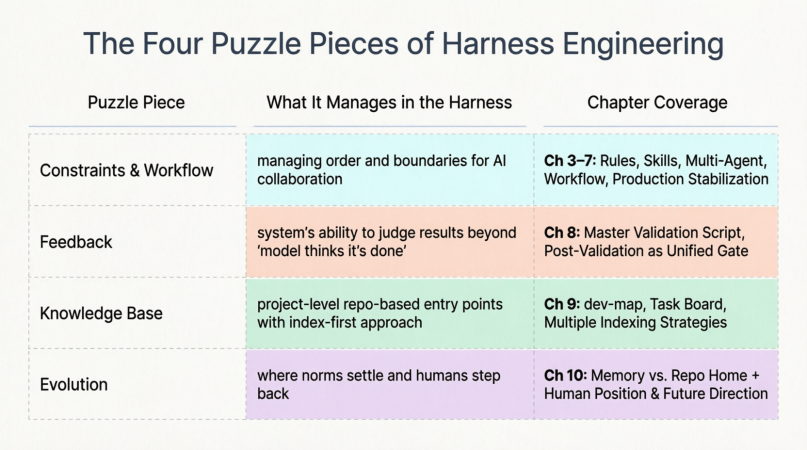
This isn’t the only way to slice it, but it serves as a reference map for the narrative we’ve built.
11.2 Piece One: Constraints & Workflow (Chapters 3–7)
Starting from Rules and Skills, progressing through Multi-Agent orchestration, Workflow Definition Files, and Role Contracts, then into Chapter 7’s iterative “hit walls, patch holes” cycles — this entire thread fundamentally answers: By what rhythm and discipline does AI advance within engineering?
Without this layer, even the strongest model is just improvising in conversation. With it, complex requirements decompose into repeatable relay races, where each leg has explicit inputs and outputs. The gaps patched in Chapter 7 (document boundaries, rollback mechanisms, maintenance protocols) are essentially the hardening of the workflow itself: preventing collaboration from collapsing into “oral agreements and hand-waving.”
11.3 Piece Two: Feedback (Chapter 8)
Constraints tell AI “how it should behave.” Feedback answers: “Does what was produced actually pass?”
Chapter 8 pushes the Master Validation Script to center stage, fulfilling a foreshadowing planted back in Chapter 1: Rules are soft, forgettable, and subject to interpretive execution. Eventually, you need a machine-enforceable gate that makes the final call.
Once feedback is wired in, the Harness gains result awareness for the first time. It’s not enough that the workflow completed; the same objective threshold speaks to every delivery. The later mentions in Chapter 10 of “further scriptification of rules” and “extending the feedback loop outward” are this piece growing thicker and more capable.
11.4 Piece Three: Knowledge Base (Chapter 9)
Chapter 9 clarifies project-level context: not an endless encyclopedia for AI to read, but a precise index. Development enters via dev-map; requirements and task history enter via the Task Board. Whoever wields the knife in the workflow also updates the map in the workflow. This prevents AI from repeatedly paving roads in a city that's already built.
This piece has a concrete relationship with Constraints & Workflow:
- Workflow dictates when to read the map
- The map reduces the probability of working in the wrong place
- Feedback applies maintenance pressure when the map goes stale or misses updates, using failure results to force corrections
11.5 Piece Four: Evolution (Chapter 10)
Chapter 10’s discussion of Memory is fundamentally about drawing the home field: things the team needs to align on must ultimately land in the repository as visible, auditable, handoff-ready assets — not linger in session memory. Its discussion of humans and AI is about responsibility shifting upward: humans increasingly become system architects and final accountability holders; AI executes intensively within the institutional framework. The Harness itself continues evolving its structure, adding gates, and extending chains as projects grow harder and teams scale.
So Evolution isn’t mysticism. It’s this: once the first three pieces are assembled, humans and AI collaborate within their respective boundaries to drive continuous refactoring. Humans set direction and gates; AI delivers at high density within the rules. Which rules should become scripts? Which maps should be split thinner? Which workflow segments should connect to MCP? These become auditable repository changes that loop back to elevate the workflow, feedback, and knowledge base.
11.6 How the Four Pieces Interlock
The four pieces are mutually reinforcing. Missing any one creates obvious, predictable symptoms:

Let me clarify Evolution further: It’s not vague “projects should write docs.” It’s the force of humans and AI jointly driving the Harness’s own refactoring. Humans decide what “passing” looks like, what can be automated, when to commit to the repo. AI delivers at high density within established workflows and contracts (modifying Rules, adding validation scripts, splitting dev-map, updating Task Board). These changes loop back to elevate the first three pieces:
- Constraints & Workflow become more aligned with reality
- Feedback thresholds become more accurate or broader in coverage
- Knowledge Base stays synchronized with the latest structure
Missing this layer, the common outcome is: only a few people remember why decisions were made, or every round relies on ad-hoc chat direction. The first three pieces get no structural upward push.
The Core Vision
Viewed together, the core picture of Harness Engineering is:
Use workflow and constraints to put actions on rails. Use feedback to ensure someone judges the results at the end of the track. Use knowledge base to prevent AI from blindly crashing around the city.
Evolution is humans and AI combining forces to continuously pour conclusions from practice and gates back into workflow/constraints, feedback, and knowledge base — ensuring rules, gates, and maps keep pace with structural change.
Only then does the entire system truly survive and grow alongside the project.
Closing Reflection
This series wasn’t about building a perfect system on day one. It was about showing you the evolutionary path: starting from minimal viable constraints, hitting real production walls, patching systematically, and letting the Harness grow organically through friction.
If you take away only one thing, let it be this:
Harness Engineering isn’t about controlling AI. It’s about building an engineering system where AI becomes a predictable, auditable, and sustainable force multiplier.
The tools will change. The models will improve. But the principles remain:
- Constraints before freedom
- Feedback before trust
- Indexes before encyclopedias
- Evolution before perfection
Now go build your own Harness. Start small. Hit walls. Patch holes. Iterate.
How To Implement Harness Engineering was originally published in Level Up Coding on Medium, where people are continuing the conversation by highlighting and responding to this story.