22 Mar 2026
A beginner tutorial to build a rainbow drawing app in the browser. No npm, no backend, one HTML file.
Originally published on https://www.sanderdesnaijer.com/blog/mediapipe-hand-face-tracking
What You’ll Build
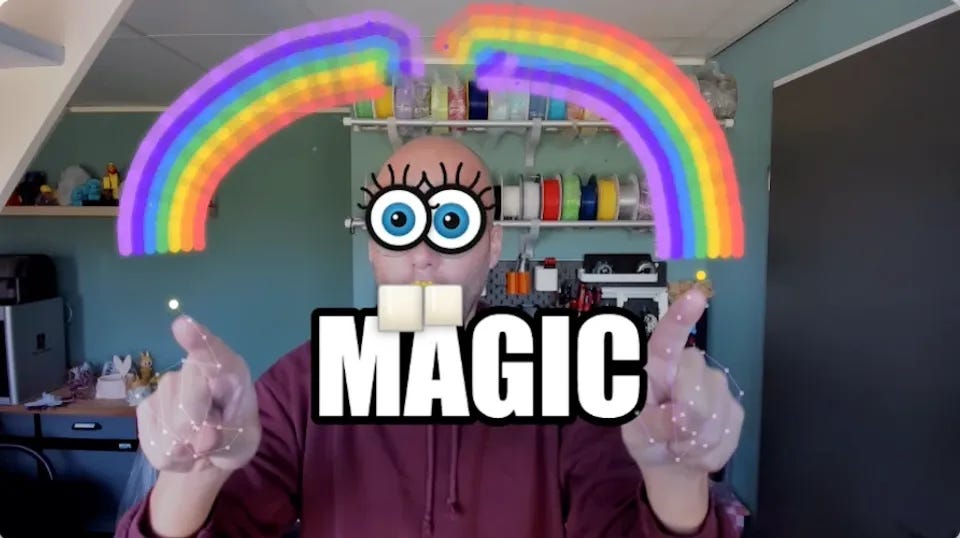
A real-time hand tracking and face tracking web app powered by Google MediaPipe. Draw rainbow trails by pointing your index finger, burst star particles with a peace sign, and trigger a glowing MAGIC text effect by opening your mouth. All of it runs locally in the browser with zero installation.
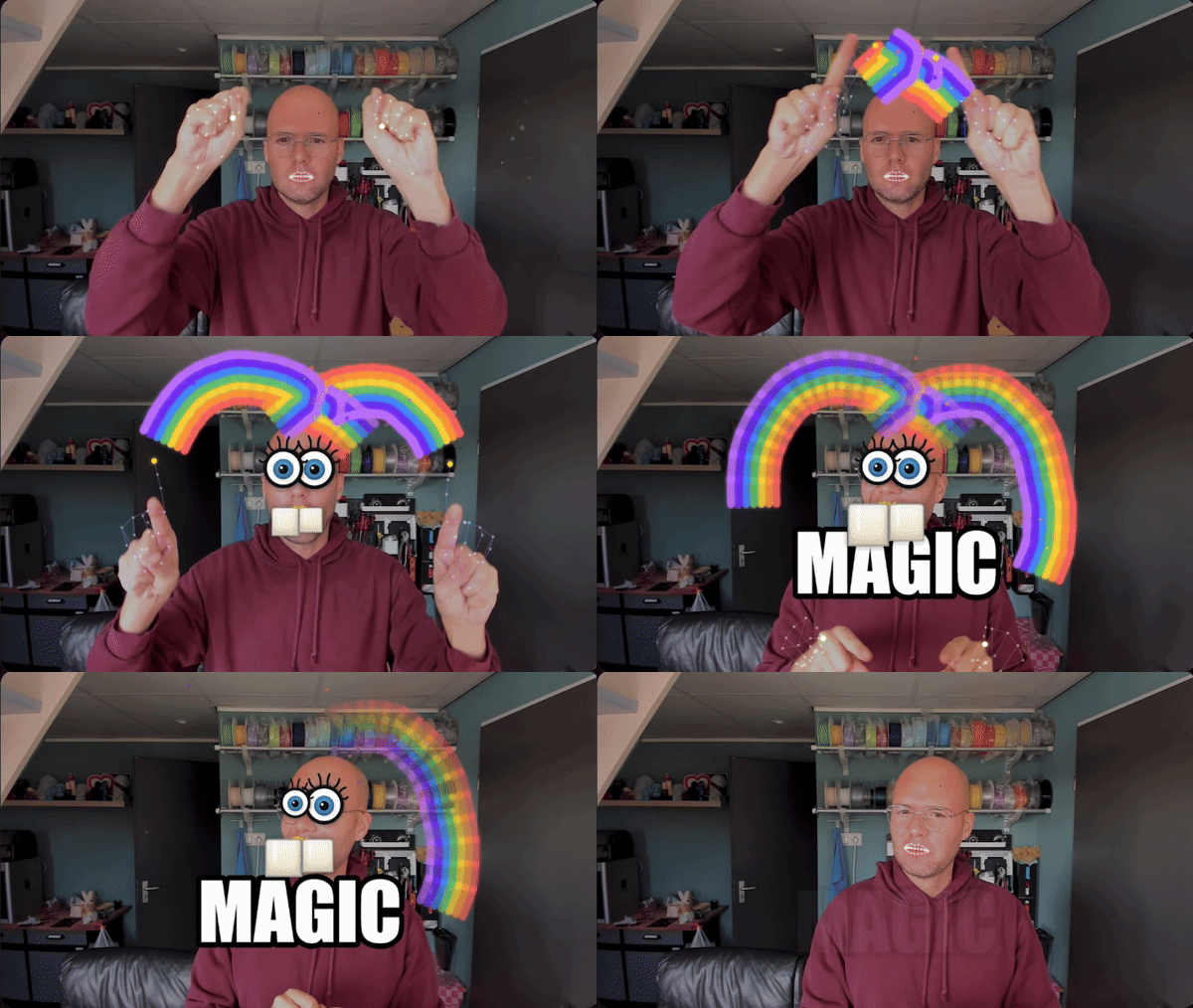
Features at a glance:
- ☝️ Rainbow Trail: draw smooth 7-band colour arcs in the air with your index finger
- ✌️ Star Burst: peace sign explodes gravity-affected star particles
- 😮 Mouth Trigger: open your mouth to summon the MAGIC text effect
- 🤲 Both Hands: each hand gets its own independent rainbow trail
Before You Start
You need to serve the file over HTTP, not by opening it directly in your browser. getUserMedia() (webcam access) is blocked on file:// URLs.
Open a terminal in your project folder and run:
Step 1: HTML Shell and CSS Layout
Create a file called index.html and paste this in. This is your complete starting point. The two canvas elements stack on top of the video using absolute positioning so effects draw over the webcam feed.
<!DOCTYPE html>
<html lang="en">
<head>
  <meta charset="UTF-8"/>
  <title>Rainbow Magic Hands</title>
  <style>
    * { margin: 0; padding: 0; box-sizing: border-box; }

    body {
      background: #000;
      display: flex;
      justify-content: center;
      align-items: center;
      min-height: 100vh;
    }

    .stage {
      position: relative;
      width: 860px;
      max-width: 100vw;
    }

    /* Flip the video so it works as a natural mirror */
    #webcam {
      width: 100%;
      display: block;
      transform: scaleX(-1);
    }

    /* Both canvases sit exactly on top of the video */
    #fxCanvas,
    #uiCanvas {
      position: absolute;
      top: 0;
      left: 0;
      width: 100%;
      height: 100%;
      pointer-events: none;
    }
  </style>
</head>
<body>
  <div class="stage">
    <video id="webcam" autoplay playsinline muted></video>
    <canvas id="fxCanvas"></canvas>
    <canvas id="uiCanvas"></canvas>
  </div>

  <script type="module">
    // We will fill this script in step by step
    console.log('Script loaded');
  </script>
</body>
</html>
What you should see: A black page. Open the browser console (F12) and confirm you see Script loaded. Nothing visible yet since there is no video feed.
Step 2: Webcam Access
Replace the console.log line with the code below. This requests the webcam, feeds it into the video element, and sizes both canvas layers to match the native camera resolution.
<script type="module">
  const video = document.getElementById("webcam");
  const fxCanvas = document.getElementById("fxCanvas");
  const uiCanvas = document.getElementById("uiCanvas");

  async function startCamera() {
    let stream;
    try {
      // Request HD front-facing camera
      stream = await navigator.mediaDevices.getUserMedia({
        video: { width: 1280, height: 720, facingMode: "user" },
      });
    } catch {
      // Fall back to any camera if the ideal one is unavailable
      stream = await navigator.mediaDevices.getUserMedia({ video: true });
    }

    video.srcObject = stream;

    // Wait until the video is actually playing before reading its dimensions
    video.addEventListener("loadeddata", () => {
      // Set canvas resolution to match the real camera resolution.
      // This matters because MediaPipe landmark coordinates use native resolution.
      fxCanvas.width = video.videoWidth;
      fxCanvas.height = video.videoHeight;
      uiCanvas.width = video.videoWidth;
      uiCanvas.height = video.videoHeight;

      console.log(`Camera ready: ${video.videoWidth}x${video.videoHeight}`);
    });
  }

  startCamera();
</script>
What you should see: Your webcam feed appears, mirrored like a selfie camera. The console logs something like Camera ready: 1280x720. If the browser asks for camera permission, click Allow.
Step 3: Load MediaPipe and Detect Hands
Now we load the HandLandmarker model and start the detection loop. We add the import at the top and wrap everything in an init() function so we can use await to load the model before starting the camera.
The model returns 21 landmark points per hand. We log the index fingertip position to the console so you can confirm detection is working before drawing anything.
script type="module">
  import {
    FilesetResolver,
    HandLandmarker,
  } from "https://cdn.jsdelivr.net/npm/@mediapipe/[email protected]";

  const video = document.getElementById("webcam");
  const fxCanvas = document.getElementById("fxCanvas");
  const uiCanvas = document.getElementById("uiCanvas");
  const fxCtx = fxCanvas.getContext("2d");
  const uiCtx = uiCanvas.getContext("2d");

  let handLandmarker = null;
  let W = 0,
    H = 0;

  async function init() {
    // Load the MediaPipe WASM runtime
    const vision = await FilesetResolver.forVisionTasks(
      "https://cdn.jsdelivr.net/npm/@mediapipe/[email protected]/wasm",
    );

    // Create the hand landmark detector
    handLandmarker = await HandLandmarker.createFromOptions(vision, {
      baseOptions: {
        modelAssetPath:
          "https://storage.googleapis.com/mediapipe-models/" +
          "hand_landmarker/hand_landmarker/float16/1/hand_landmarker.task",
        delegate: "GPU",
      },
      runningMode: "VIDEO", // required for live webcam streams
      numHands: 2, // track both hands at once
    });

    console.log("MediaPipe ready");
    startCamera();
  }

  async function startCamera() {
    let stream;
    try {
      stream = await navigator.mediaDevices.getUserMedia({
        video: { width: 1280, height: 720, facingMode: "user" },
      });
    } catch {
      stream = await navigator.mediaDevices.getUserMedia({ video: true });
    }

    video.srcObject = stream;
    video.addEventListener("loadeddata", () => {
      W = video.videoWidth;
      H = video.videoHeight;
      fxCanvas.width = W;
      fxCanvas.height = H;
      uiCanvas.width = W;
      uiCanvas.height = H;
      console.log(`Camera ready: ${W}x${H}`);
      requestAnimationFrame(loop);
    });
  }

  function loop(timestamp) {
    const results = handLandmarker.detectForVideo(video, timestamp);

    if (results.landmarks.length > 0) {
      results.landmarks.forEach((landmarks, handIndex) => {
        // landmark[8] is the index fingertip.
        // x and y are normalised 0-1, so multiply by canvas size.
        // Mirror x because the video is CSS-flipped.
        const tipX = (1 - landmarks[8].x) * W;
        const tipY = landmarks[8].y * H;
        console.log(
          `Hand ${handIndex} tip: ${Math.round(tipX)}, ${Math.round(tipY)}`,
        );
      });
    }

    requestAnimationFrame(loop);
  }

  init();
</script>
What you should see: The webcam feed as before. Open the console and hold your hand up. You should see a stream of Hand 0 tip: X, Y lines updating as you move your finger. Once confirmed, remove that console.log inside the loop since it runs at 30fps and will spam the console.
Step 4: Draw the Hand Skeleton
Instead of logging coordinates, we draw the hand skeleton directly onto uiCanvas. This gives visual confirmation that tracking is accurate before we build gestures on top of it.
Remove the console.log from the loop and replace the loop function with this full version:
onst CONNECTIONS = [
  [0, 1],
  [1, 2],
  [2, 3],
  [3, 4], // thumb
  [0, 5],
  [5, 6],
  [6, 7],
  [7, 8], // index finger
  [5, 9],
  [9, 10],
  [10, 11],
  [11, 12], // middle finger
  [9, 13],
  [13, 14],
  [14, 15],
  [15, 16], // ring finger
  [13, 17],
  [17, 18],
  [18, 19],
  [19, 20],
  [0, 17], // pinky and palm
];

function drawSkeleton(landmarks) {
  const mx = (p) => (1 - p.x) * W; // mirror X to match the flipped video
  const my = (p) => p.y * H;

  uiCtx.strokeStyle = "rgba(255, 255, 255, 0.4)";
  uiCtx.lineWidth = 1.5;
  CONNECTIONS.forEach(([a, b]) => {
    uiCtx.beginPath();
    uiCtx.moveTo(mx(landmarks[a]), my(landmarks[a]));
    uiCtx.lineTo(mx(landmarks[b]), my(landmarks[b]));
    uiCtx.stroke();
  });

  landmarks.forEach((p, i) => {
    uiCtx.beginPath();
    uiCtx.arc(mx(p), my(p), i === 8 ? 6 : 3, 0, Math.PI * 2);
    // Yellow dot on the index fingertip so it is easy to spot
    uiCtx.fillStyle = i === 8 ? "#ffd93d" : "rgba(255,255,255,0.6)";
    uiCtx.fill();
  });
}

function loop(timestamp) {
  // Clear the overlay canvas every frame
  uiCtx.clearRect(0, 0, W, H);

  const results = handLandmarker.detectForVideo(video, timestamp);
  results.landmarks.forEach((landmarks) => drawSkeleton(landmarks));

  requestAnimationFrame(loop);
}
What you should see: A white wireframe skeleton drawn over your hand in real time, with a yellow dot on your index fingertip. Move your fingers slowly and confirm the skeleton follows accurately.
Step 5: Gesture Classification
Now we classify what the hand is doing. The rule is simple: a finger is “up” if its tip has a smaller Y value than its middle knuckle (PIP joint). Y increases downward in image space, so a raised finger has a smaller Y at the tip.
Add this function above the loop function:
function classifyGesture(landmarks) {
  // Returns true if fingertip Y is above its PIP knuckle Y
  const isUp = (i) => landmarks[i].y < landmarks[i - 2].y;

  const indexUp = isUp(8);
  const middleUp = isUp(12);
  const ringUp = isUp(16);
  const pinkyUp = isUp(20);

  if (indexUp && middleUp && ringUp && pinkyUp) return "idle"; // open palm
  if (indexUp && middleUp && !ringUp && !pinkyUp) return "burst"; // peace sign
  if (indexUp && !middleUp && !ringUp && !pinkyUp) return "draw"; // one finger
  return "idle";
}
Then update loop to show the current gesture as a label:
function loop(timestamp) {
  uiCtx.clearRect(0, 0, W, H);

  const results = handLandmarker.detectForVideo(video, timestamp);

  results.landmarks.forEach((landmarks) => {
    drawSkeleton(landmarks);

    const gesture = classifyGesture(landmarks);

    uiCtx.font = "bold 22px monospace";
    uiCtx.fillStyle = "#ffd93d";
    uiCtx.fillText(gesture, 20, 40);
  });

  requestAnimationFrame(loop);
}
What you should see: A yellow label in the top-left corner that updates as you change hand shape. One finger up shows draw. Two fingers shows burst. Open hand shows idle. Confirm all three work before moving on.
Step 6: Rainbow Trail
When the gesture is draw, we record the fingertip into a trail array and render it as a smooth Catmull-Rom spline, with each of the 7 colour bands offset perpendicular to the path. This makes the rainbow arc naturally as your hand curves through the air.
Add these constants at the top of your script, right after the canvas setup lines:
const RAINBOW = [
  "#ff6b6b",
  "#ff9f43",
  "#ffd93d",
  "#6bcb77",
  "#4d96ff",
  "#7b2fff",
  "#c77dff",
];
const TRAIL_LIFETIME = 2200; // ms before a trail point fades out (longer = rainbow lingers)
const BAND_WIDTH = 18; // pixel width of each colour band

// Each hand gets its own trail so they never join into one line
const handTrails = { 0: [], 1: [] };

// Smoothed fingertip position per hand to reduce jitter
const smoothTip = { 0: null, 1: null };
const SMOOTH = 0.55; // 0 = raw position, 1 = fully frozen

// Grace period: how many consecutive missed frames before we clear a trail.
// This prevents a single dropped frame during occlusion from wiping the rainbow.
const handMissed = { 0: 0, 1: 0 };
const GRACE_FRAMES = 6; // ~200ms at 30fps
Replace the loop function with this full version:
function loop(timestamp) {
  const now = performance.now();

  uiCtx.clearRect(0, 0, W, H);
  fxCtx.clearRect(0, 0, W, H);

  const results = handLandmarker.detectForVideo(video, timestamp);
  const activeCount = results.landmarks.length;

  // Grace period: only clear a trail after GRACE_FRAMES consecutive missed frames.
  // A single dropped frame (common during finger occlusion) is ignored instead of
  // wiping the whole rainbow instantly.
  [0, 1].forEach((hi) => {
    if (activeCount <= hi) {
      handMissed[hi]++;
      if (handMissed[hi] > GRACE_FRAMES) {
        handTrails[hi] = [];
        smoothTip[hi] = null;
      }
    } else {
      handMissed[hi] = 0;
    }
  });

  results.landmarks.forEach((landmarks, handIndex) => {
    handMissed[handIndex] = 0; // reset miss counter: this hand is confirmed present
    drawSkeleton(landmarks);
    const gesture = classifyGesture(landmarks);

    // Apply exponential smoothing to reduce jitter
    const rawX = (1 - landmarks[8].x) * W;
    const rawY = landmarks[8].y * H;
    if (!smoothTip[handIndex]) smoothTip[handIndex] = { x: rawX, y: rawY };
    smoothTip[handIndex].x =
      smoothTip[handIndex].x * SMOOTH + rawX * (1 - SMOOTH);
    smoothTip[handIndex].y =
      smoothTip[handIndex].y * SMOOTH + rawY * (1 - SMOOTH);
    const tipX = smoothTip[handIndex].x;
    const tipY = smoothTip[handIndex].y;

    if (gesture === "draw") {
      const trail = handTrails[handIndex];
      const last = trail[trail.length - 1];
      const dist = last ? Math.hypot(tipX - last.x, tipY - last.y) : 0;

      if (!last || dist > 180) {
        // Hand appeared or jumped too far: start fresh stroke
        handTrails[handIndex] = [{ x: tipX, y: tipY, t: now }];
      } else if (dist >= 2) {
        // Store a point if the finger moved at least 2px (lower = more responsive)
        trail.push({ x: tipX, y: tipY, t: now });
      }
    }
  });

  // Remove trail points older than TRAIL_LIFETIME
  const cutoff = now - TRAIL_LIFETIME;
  [0, 1].forEach((hi) => {
    while (handTrails[hi].length && handTrails[hi][0].t < cutoff) {
      handTrails[hi].shift();
    }
  });

  // Draw each hand's rainbow trail
  [0, 1].forEach((hi) => {
    const pts = handTrails[hi];
    if (pts.length < 2) return;

    // Calculate the perpendicular normal at each point along the path
    const normals = pts.map((p, i) => {
      const prev = pts[Math.max(0, i - 1)];
      const next = pts[Math.min(pts.length - 1, i + 1)];
      const dx = next.x - prev.x;
      const dy = next.y - prev.y;
      const len = Math.sqrt(dx * dx + dy * dy) || 1;
      return { nx: -dy / len, ny: dx / len };
    });

    // Draw each colour band as a smooth curve
    RAINBOW.forEach((color, bi) => {
      const offset = (bi - (RAINBOW.length - 1) / 2) * (BAND_WIDTH * 0.9);

      // Shift every point sideways by the band offset
      const bpts = pts.map((p, i) => ({
        x: p.x + normals[i].nx * offset,
        y: p.y + normals[i].ny * offset,
      }));

      fxCtx.save();
      fxCtx.strokeStyle = color;
      fxCtx.lineWidth = BAND_WIDTH * 0.95;
      fxCtx.lineCap = "round";
      fxCtx.lineJoin = "round";
      fxCtx.shadowColor = color;
      fxCtx.shadowBlur = 8;

      for (let i = 1; i < bpts.length; i++) {
        const age = now - pts[i].t;
        const alpha = Math.max(0, 1 - age / TRAIL_LIFETIME) * 0.88;
        if (alpha <= 0) continue;

        // Catmull-Rom spline converted to cubic bezier (tension = 0.5)
        const p0 = bpts[Math.max(0, i - 2)];
        const p1 = bpts[i - 1];
        const p2 = bpts[i];
        const p3 = bpts[Math.min(bpts.length - 1, i + 1)];
        const t = 0.5;

        fxCtx.globalAlpha = alpha;
        fxCtx.beginPath();
        fxCtx.moveTo(p1.x, p1.y);
        fxCtx.bezierCurveTo(
          p1.x + ((p2.x - p0.x) * t) / 3,
          p1.y + ((p2.y - p0.y) * t) / 3,
          p2.x - ((p3.x - p1.x) * t) / 3,
          p2.y - ((p3.y - p1.y) * t) / 3,
          p2.x,
          p2.y,
        );
        fxCtx.stroke();
      }

      fxCtx.restore();
    });
  });

  requestAnimationFrame(loop);
}
What you should see: Point your index finger at the camera and move it around. A 7-colour rainbow arc follows your fingertip and fades after about 2 seconds. Sweep your arm in a big curve and the rainbow should arc with you. Try both hands at once: each gets its own separate trail.
Step 7: Star Particles
When the gesture is burst (peace sign), we explode star particles from the fingertip. Each star is a small physics object with velocity, gravity, and a fade timer.
Add these functions and variables to your script, before the loop function:
const MAX_STARS = 80; // hard cap so particles never tank performance
const stars = [];

function spawnStars(x, y, count) {
  const slots = MAX_STARS - stars.length;
  if (slots <= 0) return; // pool is full, skip silently

  for (let i = 0; i < Math.min(count, slots); i++) {
    const angle = Math.random() * Math.PI * 2;
    const speed = 2 + Math.random() * 5;
    stars.push({
      x,
      y,
      vx: Math.cos(angle) * speed,
      vy: Math.sin(angle) * speed - 3, // bias upward on launch
      color: RAINBOW[Math.floor(Math.random() * RAINBOW.length)],
      size: 3 + Math.random() * 5,
      age: 0,
      maxAge: 500 + Math.random() * 400,
      rotation: Math.random() * Math.PI * 2,
      rotSpeed: (Math.random() - 0.5) * 0.3,
    });
  }
}

function drawStar(cx, cy, r, rotation, alpha, color) {
  fxCtx.save();
  fxCtx.globalAlpha = alpha;
  fxCtx.fillStyle = color;
  fxCtx.translate(cx, cy);
  fxCtx.rotate(rotation);
  fxCtx.beginPath();
  for (let i = 0; i < 5; i++) {
    const a1 = (i * 4 * Math.PI) / 5 - Math.PI / 2;
    const a2 = ((i * 4 + 2) * Math.PI) / 5 - Math.PI / 2;
    if (i === 0) fxCtx.moveTo(Math.cos(a1) * r, Math.sin(a1) * r);
    else fxCtx.lineTo(Math.cos(a1) * r, Math.sin(a1) * r);
    fxCtx.lineTo(Math.cos(a2) * r * 0.4, Math.sin(a2) * r * 0.4);
  }
  fxCtx.closePath();
  fxCtx.fill();
  fxCtx.restore();
}
Inside the results.landmarks.forEach block in loop, add the burst branch right after the draw branch:
if (gesture === "draw") {
  // ... existing trail code ...
} else if (gesture === "burst") {
  spawnStars(tipX, tipY, 12);
  handTrails[handIndex] = []; // clear the trail when switching to burst
}
Then add the star physics update at the bottom of loop, just before requestAnimationFrame:
// Update physics and draw each star
for (let i = stars.length - 1; i >= 0; i--) {
  const s = stars[i];
  s.age += 16;
  if (s.age > s.maxAge) {
    stars.splice(i, 1);
    continue;
  }
  s.vy += 0.18; // gravity
  s.x += s.vx;
  s.y += s.vy;
  s.vx *= 0.99; // light air resistance
  s.rotation += s.rotSpeed;
  drawStar(s.x, s.y, s.size, s.rotation, 1 - s.age / s.maxAge, s.color);
}
What you should see: Hold up two fingers (peace sign) and coloured star particles burst from your fingertip, arc upward slightly, fall with gravity, and fade out. Switch between one finger and two to alternate between drawing and bursting.
Step 8: Face Tracking and Mouth Detection
We add FaceLandmarker alongside the hand model. Both run on the same video frame in every loop iteration. Mouth openness is measured as the gap between upper and lower lip divided by face height, so it works whether you are close or far from the camera.
Update the import line to include FaceLandmarker:
import {
  FilesetResolver,
  HandLandmarker,
  FaceLandmarker,
} from "https://cdn.jsdelivr.net/npm/@mediapipe/[email protected]";
Add a variable alongside handLandmarker:
let faceLandmarker = null;
Add face landmarker creation inside init(), before the startCamera() call:
faceLandmarker = await FaceLandmarker.createFromOptions(vision, {
  baseOptions: {
    modelAssetPath:
      "https://storage.googleapis.com/mediapipe-models/" +
      "face_landmarker/face_landmarker/float16/1/face_landmarker.task",
    delegate: "GPU",
  },
  runningMode: "VIDEO",
  numFaces: 1,
});
Add these constants near your other constants at the top:
let mouthWasOpen = false;
const MOUTH_THRESHOLD = 0.045;

// Lip contour landmark indices from MediaPipe's 478-point face mesh
const MOUTH_OUTER = [
  61, 185, 40, 39, 37, 0, 267, 269, 270, 409, 291, 375, 321, 405, 314, 17, 84,
  181, 91, 146,
];
const MOUTH_INNER = [
  78, 191, 80, 81, 82, 13, 312, 311, 310, 415, 308, 324, 318, 402, 317, 14, 87,
  178, 88, 95,
];
Add face detection inside loop, right after the hand detection block and before the trail expiry code:
// Face detection and mouth tracking
if (faceLandmarker) {
  const faceResults = faceLandmarker.detectForVideo(video, timestamp);

  if (faceResults.faceLandmarks.length > 0) {
    const fl = faceResults.faceLandmarks[0];

    // Mirror x the same way we do for hand landmarks
    const fx = (p) => (1 - p.x) * W;
    const fy = (p) => p.y * H;

    const upperLip = fl[13]; // inner upper lip centre
    const lowerLip = fl[14]; // inner lower lip centre
    const noseTip = fl[1]; // nose tip
    const chin = fl[152]; // chin

    // Openness as a fraction of face height: scale-invariant
    const faceH = Math.abs(chin.y - noseTip.y);
    const isOpen = (lowerLip.y - upperLip.y) / faceH > MOUTH_THRESHOLD;

    // Only trigger on the moment the mouth opens, not every frame it stays open
    if (isOpen && !mouthWasOpen) {
      console.log("Mouth opened!");
    }
    mouthWasOpen = isOpen;

    // Draw mouth contour dots
    const dotColor = isOpen ? "#ffd93d" : "rgba(255,255,255,0.5)";
    const dotSize = isOpen ? 3.5 : 2.5;

    [...MOUTH_OUTER, ...MOUTH_INNER].forEach((idx) => {
      const p = fl[idx];
      uiCtx.beginPath();
      uiCtx.arc(fx(p), fy(p), dotSize, 0, Math.PI * 2);
      uiCtx.fillStyle = dotColor;
      uiCtx.fill();
    });
  } else {
    mouthWasOpen = false;
  }
}
What you should see: Small white dots tracing your lip contours in real time. When you open your mouth the dots turn yellow and the console logs Mouth opened! once per open. Confirm this is working before adding the MAGIC text.
Step 9: The MAGIC Text Effect
Add these constants near the top with your other constants:
const magicWords = [];
const MAGIC_DURATION = 2200;
const MAGIC_FADEIN = 180;
const MAGIC_FADEOUT = 600;
Replace the console.log('Mouth opened!') line with this:
// Spawn MAGIC below the chin so it does not cover the face
magicWords.push({ x: W / 2, y: fy(chin) + H * 0.04, spawnT: now });
Add this function before the loop function:
function drawMagicWords(now) {
  for (let i = magicWords.length - 1; i >= 0; i--) {
    const m = magicWords[i];
    const age = now - m.spawnT;

    if (age > MAGIC_DURATION) {
      magicWords.splice(i, 1);
      continue;
    }

    // Fast pop-in, hold, slow fade out
    let alpha;
    if (age < MAGIC_FADEIN) {
      alpha = age / MAGIC_FADEIN;
    } else if (age > MAGIC_DURATION - MAGIC_FADEOUT) {
      alpha = (MAGIC_DURATION - age) / MAGIC_FADEOUT;
    } else {
      alpha = 1;
    }
    alpha = Math.max(0, Math.min(1, alpha));

    // Slight overshoot on the pop-in scale
    const popT = Math.min(1, age / (MAGIC_FADEIN * 1.5));
    const scale =
      popT < 0.6 ? (popT / 0.6) * 1.18 : 1.18 - ((popT - 0.6) / 0.4) * 0.18;

    // Float downward away from the face
    const floatY = m.y + (age / MAGIC_DURATION) * H * 0.1;
    const fontSize = Math.round(W * 0.13);

    fxCtx.save();
    fxCtx.globalAlpha = alpha;
    fxCtx.translate(m.x, floatY);
    fxCtx.scale(scale, scale);
    fxCtx.font = `900 ${fontSize}px Impact, Arial Black, sans-serif`;
    fxCtx.textAlign = "center";
    fxCtx.textBaseline = "middle";

    // Thick black outline, white fill: classic Spongebob meme style
    fxCtx.lineWidth = fontSize * 0.14;
    fxCtx.strokeStyle = "#000";
    fxCtx.lineJoin = "round";
    fxCtx.strokeText("MAGIC", 0, 0);
    fxCtx.fillStyle = "#ffffff";
    fxCtx.fillText("MAGIC", 0, 0);

    fxCtx.restore();
  }
}
Call it at the bottom of loop, just before requestAnimationFrame:
drawMagicWords(now);
requestAnimationFrame(loop);
What you should see: Open your mouth wide and MAGIC pops up in large white Impact font below your chin, floats downward, and fades out after about 2 seconds. It triggers once per open. Close and reopen your mouth to trigger it again.
Step 10: Spongebob Face Overlay

When the mouth opens we also show big cartoon goggle eyes with eyelashes and two oversized front teeth. Everything is drawn relative to face landmark positions so it scales and moves with your face automatically.
Add this function before the loop function:
function drawSpongeFace(fl, fx, fy, isOpen) {
  if (!isOpen) return; // only appears when mouth is open

  // Left and right eye landmark groups
  const eyes = [
    { inner: 133, outer: 33, topLid: [156, 157, 158, 159, 160, 161] },
    { inner: 362, outer: 263, topLid: [383, 384, 385, 386, 387, 388] },
  ];

  eyes.forEach((eye) => {
    const innerX = fx(fl[eye.inner]),
      innerY = fy(fl[eye.inner]);
    const outerX = fx(fl[eye.outer]),
      outerY = fy(fl[eye.outer]);

    const cx = (innerX + outerX) / 2;
    // Shift the centre upward so the goggle sits over the brow
    const cy = (innerY + outerY) / 2 - Math.abs(outerX - innerX) * 0.55;
    // Goggle radius: 2.4x the natural eye half-width
    const rx = Math.abs(outerX - innerX) * 1.2;

    // Thick black outer ring
    uiCtx.save();
    uiCtx.beginPath();
    uiCtx.arc(cx, cy, rx + rx * 0.22, 0, Math.PI * 2);
    uiCtx.fillStyle = "#111";
    uiCtx.shadowColor = "rgba(0,0,0,0.5)";
    uiCtx.shadowBlur = 10;
    uiCtx.fill();
    uiCtx.restore();

    // White sclera
    uiCtx.save();
    uiCtx.beginPath();
    uiCtx.arc(cx, cy, rx, 0, Math.PI * 2);
    uiCtx.fillStyle = "#ffffff";
    uiCtx.fill();
    uiCtx.restore();

    // Blue iris with radial gradient
    const irisR = rx * 0.62;
    uiCtx.save();
    uiCtx.beginPath();
    uiCtx.arc(cx, cy + rx * 0.06, irisR, 0, Math.PI * 2);
    const irisGrad = uiCtx.createRadialGradient(cx, cy, 0, cx, cy, irisR);
    irisGrad.addColorStop(0, "#a8dff7");
    irisGrad.addColorStop(0.5, "#3aa8d8");
    irisGrad.addColorStop(1, "#1a6a99");
    uiCtx.fillStyle = irisGrad;
    uiCtx.fill();
    uiCtx.restore();

    // Black pupil
    const pupilR = irisR * 0.48;
    uiCtx.save();
    uiCtx.beginPath();
    uiCtx.arc(cx, cy + rx * 0.06, pupilR, 0, Math.PI * 2);
    uiCtx.fillStyle = "#111";
    uiCtx.fill();
    uiCtx.restore();

    // White glint
    uiCtx.save();
    uiCtx.beginPath();
    uiCtx.arc(
      cx - pupilR * 0.4,
      cy - pupilR * 0.3 + rx * 0.06,
      pupilR * 0.3,
      0,
      Math.PI * 2,
    );
    uiCtx.fillStyle = "rgba(255,255,255,0.95)";
    uiCtx.fill();
    uiCtx.restore();

    // Eyelashes spread across the top 160 degrees of the goggle ring
    const lashCount = 8;
    const lashLen = rx * 0.55;
    for (let li = 0; li < lashCount; li++) {
      const angle =
        Math.PI + Math.PI * 0.1 + (li / (lashCount - 1)) * (Math.PI * 0.8);
      const baseR = rx + rx * 0.22;
      const bx = cx + Math.cos(angle) * baseR;
      const by = cy + Math.sin(angle) * baseR;
      const nx = Math.cos(angle);
      const ny = Math.sin(angle);
      const t = li / (lashCount - 1);
      const lenFactor = 0.55 + 0.75 * Math.sin(t * Math.PI); // longer in the middle
      const tipX = bx + nx * lashLen * lenFactor;
      const tipY = by + ny * lashLen * lenFactor;
      // Alternate slight left/right curve
      const curvePush = (li % 2 === 0 ? -1 : 1) * rx * 0.12;
      const cpX = bx + nx * lashLen * lenFactor * 0.5 + -ny * curvePush;
      const cpY = by + ny * lashLen * lenFactor * 0.5 + nx * curvePush;

      uiCtx.save();
      uiCtx.beginPath();
      uiCtx.moveTo(bx, by);
      uiCtx.quadraticCurveTo(cpX, cpY, tipX, tipY);
      uiCtx.strokeStyle = "#111";
      uiCtx.lineWidth = rx * 0.13;
      uiCtx.lineCap = "round";
      uiCtx.stroke();
      uiCtx.restore();
    }
  });

  // Two big front teeth anchored to the upper lip landmarks
  const lipTopX = fx(fl[0]); // top lip centre
  const lipTopY = fy(fl[0]);
  const lipLeft = fx(fl[61]); // left mouth corner
  const lipRight = fx(fl[291]); // right mouth corner
  const mouthW = Math.abs(lipRight - lipLeft);

  // Base tooth size (2/3 of the exaggerated version)
  const baseW = mouthW * 1.04;
  const baseH = mouthW * 1.12;
  const gap = mouthW * 0.05;

  // Left tooth is 18% wider and 14% taller for Spongebob asymmetry
  const tooth1W = baseW * 1.18,
    tooth1H = baseH * 1.14;
  const tooth2W = baseW,
    tooth2H = baseH;

  const t1x = lipTopX - gap / 2 - tooth1W;
  const t2x = lipTopX + gap / 2;

  [
    [t1x, tooth1W, tooth1H],
    [t2x, tooth2W, tooth2H],
  ].forEach(([tx, tW, tH]) => {
    const radius = tW * 0.12;

    uiCtx.save();
    uiCtx.shadowColor = "rgba(0,0,0,0.35)";
    uiCtx.shadowBlur = 14;

    // Rounded top corners, open at the bottom (hangs from the upper lip)
    uiCtx.beginPath();
    uiCtx.moveTo(tx + radius, lipTopY);
    uiCtx.lineTo(tx + tW - radius, lipTopY);
    uiCtx.quadraticCurveTo(tx + tW, lipTopY, tx + tW, lipTopY + radius);
    uiCtx.lineTo(tx + tW, lipTopY + tH);
    uiCtx.lineTo(tx, lipTopY + tH);
    uiCtx.lineTo(tx, lipTopY + radius);
    uiCtx.quadraticCurveTo(tx, lipTopY, tx + radius, lipTopY);
    uiCtx.closePath();

    const tGrad = uiCtx.createLinearGradient(tx, lipTopY, tx, lipTopY + tH);
    tGrad.addColorStop(0, "#fffff5");
    tGrad.addColorStop(0.6, "#f5eedc");
    tGrad.addColorStop(1, "#e0d8c0");
    uiCtx.fillStyle = tGrad;
    uiCtx.fill();

    uiCtx.strokeStyle = "#aaa";
    uiCtx.lineWidth = tW * 0.04;
    uiCtx.lineJoin = "round";
    uiCtx.stroke();
    uiCtx.restore();

    // Vertical shine line
    uiCtx.save();
    uiCtx.beginPath();
    uiCtx.moveTo(tx + tW * 0.25, lipTopY + tH * 0.06);
    uiCtx.lineTo(tx + tW * 0.25, lipTopY + tH * 0.6);
    uiCtx.strokeStyle = "rgba(255,255,255,0.55)";
    uiCtx.lineWidth = tW * 0.09;
    uiCtx.lineCap = "round";
    uiCtx.stroke();
    uiCtx.restore();
  });
}
Then call it inside the face detection block, right after the mouth dot drawing and before the closing } else {:
// Draw Spongebob overlay
drawSpongeFace(fl, fx, fy, isOpen);
What you should see: Close your mouth and everything looks normal. Open it wide and two big cartoon goggle eyes with eyelashes pop onto your face, along with two oversized front teeth hanging from your upper lip. The left tooth is slightly bigger than the right for that classic Spongebob asymmetry. Close your mouth and it all disappears instantly.
A few things worth noting about how this works:
The eye position uses fx(fl[133]) and fx(fl[33]) for the inner and outer corners of each eye. The goggle centre is shifted upward by about half the eye width so it sits above the natural eye rather than directly over it, which gives more of a cartoon look. The radius is 2.4x the natural eye half-width.
The teeth are anchored to landmark 0 (the top lip centre) and sized relative to mouthW, the distance between the mouth corners (landmarks 61 and 291). This means they automatically scale with how close you are to the camera and stay correctly positioned as you move your head.
Complete File
<!DOCTYPE html>
<html lang="en">
<head>
<meta charset="UTF-8" />
<title>Rainbow Magic Hands</title>
<style>
* {
margin: 0;
padding: 0;
box-sizing: border-box;
}
body {
background: #000;
display: flex;
justify-content: center;
align-items: center;
min-height: 100vh;
}
.stage {
position: relative;
width: 860px;
max-width: 100vw;
}
#webcam {
width: 100%;
display: block;
transform: scaleX(-1);
}
#fxCanvas,
#uiCanvas {
position: absolute;
top: 0;
left: 0;
width: 100%;
height: 100%;
pointer-events: none;
}
</style>
</head>
<body>
<div class="stage">
<video id="webcam" autoplay playsinline muted></video>
<canvas id="fxCanvas"></canvas>
<canvas id="uiCanvas"></canvas>
</div>
<script type="module">
import {
FilesetResolver,
HandLandmarker,
FaceLandmarker,
} from "https://cdn.jsdelivr.net/npm/@mediapipe/[email protected]";
const video = document.getElementById("webcam");
const fxCanvas = document.getElementById("fxCanvas");
const uiCanvas = document.getElementById("uiCanvas");
const fxCtx = fxCanvas.getContext("2d");
const uiCtx = uiCanvas.getContext("2d");
let handLandmarker = null;
let faceLandmarker = null;
let W = 0,
H = 0;
const RAINBOW = [
"#ff6b6b",
"#ff9f43",
"#ffd93d",
"#6bcb77",
"#4d96ff",
"#7b2fff",
"#c77dff",
];
const TRAIL_LIFETIME = 2200;
const BAND_WIDTH = 18;
const handTrails = { 0: [], 1: [] };
const smoothTip = { 0: null, 1: null };
const SMOOTH = 0.55;
const handMissed = { 0: 0, 1: 0 };
const GRACE_FRAMES = 6;
const MAX_STARS = 80;
const stars = [];
let mouthWasOpen = false;
const MOUTH_THRESHOLD = 0.045;
const MOUTH_OUTER = [
61, 185, 40, 39, 37, 0, 267, 269, 270, 409, 291, 375, 321, 405, 314, 17,
84, 181, 91, 146,
];
const MOUTH_INNER = [
78, 191, 80, 81, 82, 13, 312, 311, 310, 415, 308, 324, 318, 402, 317,
14, 87, 178, 88, 95,
];
const magicWords = [];
const MAGIC_DURATION = 2200;
const MAGIC_FADEIN = 180;
const MAGIC_FADEOUT = 600;
const CONNECTIONS = [
[0, 1],
[1, 2],
[2, 3],
[3, 4],
[0, 5],
[5, 6],
[6, 7],
[7, 8],
[5, 9],
[9, 10],
[10, 11],
[11, 12],
[9, 13],
[13, 14],
[14, 15],
[15, 16],
[13, 17],
[17, 18],
[18, 19],
[19, 20],
[0, 17],
];
async function init() {
const vision = await FilesetResolver.forVisionTasks(
"https://cdn.jsdelivr.net/npm/@mediapipe/[email protected]/wasm",
);
faceLandmarker = await FaceLandmarker.createFromOptions(vision, {
baseOptions: {
modelAssetPath:
"https://storage.googleapis.com/mediapipe-models/face_landmarker/face_landmarker/float16/1/face_landmarker.task",
delegate: "GPU",
},
runningMode: "VIDEO",
numFaces: 1,
});
handLandmarker = await HandLandmarker.createFromOptions(vision, {
baseOptions: {
modelAssetPath:
"https://storage.googleapis.com/mediapipe-models/hand_landmarker/hand_landmarker/float16/1/hand_landmarker.task",
delegate: "GPU",
},
runningMode: "VIDEO",
numHands: 2,
});
startCamera();
}
async function startCamera() {
let stream;
try {
stream = await navigator.mediaDevices.getUserMedia({
video: { width: 1280, height: 720, facingMode: "user" },
});
} catch {
stream = await navigator.mediaDevices.getUserMedia({ video: true });
}
video.srcObject = stream;
video.addEventListener("loadeddata", () => {
W = video.videoWidth;
H = video.videoHeight;
fxCanvas.width = W;
fxCanvas.height = H;
uiCanvas.width = W;
uiCanvas.height = H;
requestAnimationFrame(loop);
});
}
function classifyGesture(lm) {
const isUp = (i) => lm[i].y < lm[i - 2].y;
const i = isUp(8),
m = isUp(12),
r = isUp(16),
p = isUp(20);
if (i && m && r && p) return "idle";
if (i && m && !r && !p) return "burst";
if (i && !m && !r && !p) return "draw";
return "idle";
}
function drawSkeleton(landmarks) {
const mx = (p) => (1 - p.x) * W;
const my = (p) => p.y * H;
uiCtx.strokeStyle = "rgba(255,255,255,0.35)";
uiCtx.lineWidth = 1.5;
CONNECTIONS.forEach(([a, b]) => {
uiCtx.beginPath();
uiCtx.moveTo(mx(landmarks[a]), my(landmarks[a]));
uiCtx.lineTo(mx(landmarks[b]), my(landmarks[b]));
uiCtx.stroke();
});
landmarks.forEach((p, i) => {
uiCtx.beginPath();
uiCtx.arc(mx(p), my(p), i === 8 ? 6 : 3, 0, Math.PI * 2);
uiCtx.fillStyle = i === 8 ? "#ffd93d" : "rgba(255,255,255,0.5)";
uiCtx.fill();
});
}
function spawnStars(x, y, count) {
const slots = MAX_STARS - stars.length;
if (slots <= 0) return;
for (let i = 0; i < Math.min(count, slots); i++) {
const angle = Math.random() * Math.PI * 2;
const speed = 2 + Math.random() * 5;
stars.push({
x,
y,
vx: Math.cos(angle) * speed,
vy: Math.sin(angle) * speed - 3,
color: RAINBOW[Math.floor(Math.random() * RAINBOW.length)],
size: 3 + Math.random() * 5,
age: 0,
maxAge: 500 + Math.random() * 400,
rotation: Math.random() * Math.PI * 2,
rotSpeed: (Math.random() - 0.5) * 0.3,
});
}
}
function drawStar(cx, cy, r, rotation, alpha, color) {
fxCtx.save();
fxCtx.globalAlpha = alpha;
fxCtx.fillStyle = color;
fxCtx.translate(cx, cy);
fxCtx.rotate(rotation);
fxCtx.beginPath();
for (let i = 0; i < 5; i++) {
const a1 = (i * 4 * Math.PI) / 5 - Math.PI / 2;
const a2 = ((i * 4 + 2) * Math.PI) / 5 - Math.PI / 2;
if (i === 0) fxCtx.moveTo(Math.cos(a1) * r, Math.sin(a1) * r);
else fxCtx.lineTo(Math.cos(a1) * r, Math.sin(a1) * r);
fxCtx.lineTo(Math.cos(a2) * r * 0.4, Math.sin(a2) * r * 0.4);
}
fxCtx.closePath();
fxCtx.fill();
fxCtx.restore();
}
function drawMagicWords(now) {
for (let i = magicWords.length - 1; i >= 0; i--) {
const m = magicWords[i];
const age = now - m.spawnT;
if (age > MAGIC_DURATION) {
magicWords.splice(i, 1);
continue;
}
let alpha;
if (age < MAGIC_FADEIN) alpha = age / MAGIC_FADEIN;
else if (age > MAGIC_DURATION - MAGIC_FADEOUT)
alpha = (MAGIC_DURATION - age) / MAGIC_FADEOUT;
else alpha = 1;
alpha = Math.max(0, Math.min(1, alpha));
const popT = Math.min(1, age / (MAGIC_FADEIN * 1.5));
const scale =
popT < 0.6
? (popT / 0.6) * 1.18
: 1.18 - ((popT - 0.6) / 0.4) * 0.18;
const floatY = m.y + (age / MAGIC_DURATION) * H * 0.1;
const fontSize = Math.round(W * 0.13);
fxCtx.save();
fxCtx.globalAlpha = alpha;
fxCtx.translate(m.x, floatY);
fxCtx.scale(scale, scale);
fxCtx.font = `900 ${fontSize}px Impact, Arial Black, sans-serif`;
fxCtx.textAlign = "center";
fxCtx.textBaseline = "middle";
fxCtx.lineWidth = fontSize * 0.14;
fxCtx.strokeStyle = "#000";
fxCtx.lineJoin = "round";
fxCtx.strokeText("MAGIC", 0, 0);
fxCtx.fillStyle = "#ffffff";
fxCtx.fillText("MAGIC", 0, 0);
fxCtx.restore();
}
}
function drawSpongeFace(fl, fx, fy, isOpen) {
if (!isOpen) return;
const eyes = [
{ inner: 133, outer: 33, topLid: [156, 157, 158, 159, 160, 161] },
{ inner: 362, outer: 263, topLid: [383, 384, 385, 386, 387, 388] },
];
eyes.forEach((eye) => {
const innerX = fx(fl[eye.inner]),
innerY = fy(fl[eye.inner]);
const outerX = fx(fl[eye.outer]),
outerY = fy(fl[eye.outer]);
const cx = (innerX + outerX) / 2;
const cy = (innerY + outerY) / 2 - Math.abs(outerX - innerX) * 0.55;
const rx = Math.abs(outerX - innerX) * 1.2;
uiCtx.save();
uiCtx.beginPath();
uiCtx.arc(cx, cy, rx + rx * 0.22, 0, Math.PI * 2);
uiCtx.fillStyle = "#111";
uiCtx.shadowColor = "rgba(0,0,0,0.5)";
uiCtx.shadowBlur = 10;
uiCtx.fill();
uiCtx.restore();
uiCtx.save();
uiCtx.beginPath();
uiCtx.arc(cx, cy, rx, 0, Math.PI * 2);
uiCtx.fillStyle = "#fff";
uiCtx.fill();
uiCtx.restore();
const irisR = rx * 0.62;
uiCtx.save();
uiCtx.beginPath();
uiCtx.arc(cx, cy + rx * 0.06, irisR, 0, Math.PI * 2);
const g = uiCtx.createRadialGradient(cx, cy, 0, cx, cy, irisR);
g.addColorStop(0, "#a8dff7");
g.addColorStop(0.5, "#3aa8d8");
g.addColorStop(1, "#1a6a99");
uiCtx.fillStyle = g;
uiCtx.fill();
uiCtx.restore();
const pupilR = irisR * 0.48;
uiCtx.save();
uiCtx.beginPath();
uiCtx.arc(cx, cy + rx * 0.06, pupilR, 0, Math.PI * 2);
uiCtx.fillStyle = "#111";
uiCtx.fill();
uiCtx.restore();
uiCtx.save();
uiCtx.beginPath();
uiCtx.arc(
cx - pupilR * 0.4,
cy - pupilR * 0.3 + rx * 0.06,
pupilR * 0.3,
0,
Math.PI * 2,
);
uiCtx.fillStyle = "rgba(255,255,255,0.95)";
uiCtx.fill();
uiCtx.restore();
for (let li = 0; li < 8; li++) {
const angle = Math.PI + Math.PI * 0.1 + (li / 7) * (Math.PI * 0.8);
const baseR = rx + rx * 0.22;
const bx = cx + Math.cos(angle) * baseR;
const by = cy + Math.sin(angle) * baseR;
const nx = Math.cos(angle),
ny = Math.sin(angle);
const lf = 0.55 + 0.75 * Math.sin((li / 7) * Math.PI);
const tipX = bx + nx * rx * 0.55 * lf,
tipY = by + ny * rx * 0.55 * lf;
const cp = (li % 2 === 0 ? -1 : 1) * rx * 0.12;
uiCtx.save();
uiCtx.beginPath();
uiCtx.moveTo(bx, by);
uiCtx.quadraticCurveTo(
bx + nx * rx * 0.55 * lf * 0.5 + -ny * cp,
by + ny * rx * 0.55 * lf * 0.5 + nx * cp,
tipX,
tipY,
);
uiCtx.strokeStyle = "#111";
uiCtx.lineWidth = rx * 0.13;
uiCtx.lineCap = "round";
uiCtx.stroke();
uiCtx.restore();
}
});
const lipTopX = fx(fl[0]),
lipTopY = fy(fl[0]);
const mouthW = Math.abs(fx(fl[291]) - fx(fl[61]));
const baseW = mouthW * 1.04,
baseH = mouthW * 1.12,
gap = mouthW * 0.05;
[
[lipTopX - gap / 2 - baseW * 1.18, baseW * 1.18, baseH * 1.14],
[lipTopX + gap / 2, baseW, baseH],
].forEach(([tx, tW, tH]) => {
const r = tW * 0.12;
uiCtx.save();
uiCtx.shadowColor = "rgba(0,0,0,0.35)";
uiCtx.shadowBlur = 14;
uiCtx.beginPath();
uiCtx.moveTo(tx + r, lipTopY);
uiCtx.lineTo(tx + tW - r, lipTopY);
uiCtx.quadraticCurveTo(tx + tW, lipTopY, tx + tW, lipTopY + r);
uiCtx.lineTo(tx + tW, lipTopY + tH);
uiCtx.lineTo(tx, lipTopY + tH);
uiCtx.lineTo(tx, lipTopY + r);
uiCtx.quadraticCurveTo(tx, lipTopY, tx + r, lipTopY);
uiCtx.closePath();
const tg = uiCtx.createLinearGradient(tx, lipTopY, tx, lipTopY + tH);
tg.addColorStop(0, "#fffff5");
tg.addColorStop(0.6, "#f5eedc");
tg.addColorStop(1, "#e0d8c0");
uiCtx.fillStyle = tg;
uiCtx.fill();
uiCtx.strokeStyle = "#aaa";
uiCtx.lineWidth = tW * 0.04;
uiCtx.lineJoin = "round";
uiCtx.stroke();
uiCtx.restore();
});
}
function loop(timestamp) {
const now = performance.now();
uiCtx.clearRect(0, 0, W, H);
fxCtx.clearRect(0, 0, W, H);
const results = handLandmarker.detectForVideo(video, timestamp);
const activeCount = results.landmarks.length;
[0, 1].forEach((hi) => {
if (activeCount <= hi) {
handMissed[hi]++;
if (handMissed[hi] > GRACE_FRAMES) {
handTrails[hi] = [];
smoothTip[hi] = null;
}
} else {
handMissed[hi] = 0;
}
});
results.landmarks.forEach((landmarks, handIndex) => {
drawSkeleton(landmarks);
const gesture = classifyGesture(landmarks);
const rawX = (1 - landmarks[8].x) * W;
const rawY = landmarks[8].y * H;
if (!smoothTip[handIndex])
smoothTip[handIndex] = { x: rawX, y: rawY };
smoothTip[handIndex].x =
smoothTip[handIndex].x * SMOOTH + rawX * (1 - SMOOTH);
smoothTip[handIndex].y =
smoothTip[handIndex].y * SMOOTH + rawY * (1 - SMOOTH);
const tipX = smoothTip[handIndex].x;
const tipY = smoothTip[handIndex].y;
if (gesture === "draw") {
const trail = handTrails[handIndex];
const last = trail[trail.length - 1];
const dist = last ? Math.hypot(tipX - last.x, tipY - last.y) : 0;
if (!last || dist > 180)
handTrails[handIndex] = [{ x: tipX, y: tipY, t: now }];
else if (dist >= 2) trail.push({ x: tipX, y: tipY, t: now });
} else if (gesture === "burst") {
spawnStars(tipX, tipY, 12);
handTrails[handIndex] = [];
}
});
if (faceLandmarker) {
const faceResults = faceLandmarker.detectForVideo(video, timestamp);
if (faceResults.faceLandmarks.length > 0) {
const fl = faceResults.faceLandmarks[0];
const fx = (p) => (1 - p.x) * W;
const fy = (p) => p.y * H;
const upperLip = fl[13],
lowerLip = fl[14];
const noseTip = fl[1],
chin = fl[152];
const faceH = Math.abs(chin.y - noseTip.y);
const isOpen = (lowerLip.y - upperLip.y) / faceH > MOUTH_THRESHOLD;
if (isOpen && !mouthWasOpen)
magicWords.push({
x: W / 2,
y: fy(chin) + H * 0.04,
spawnT: now,
});
mouthWasOpen = isOpen;
const dotColor = isOpen ? "#ffd93d" : "rgba(255,255,255,0.5)";
[...MOUTH_OUTER, ...MOUTH_INNER].forEach((idx) => {
const p = fl[idx];
uiCtx.beginPath();
uiCtx.arc(fx(p), fy(p), isOpen ? 3.5 : 2.5, 0, Math.PI * 2);
uiCtx.fillStyle = dotColor;
uiCtx.fill();
});
drawSpongeFace(fl, fx, fy, isOpen);
} else {
mouthWasOpen = false;
}
}
const cutoff = now - TRAIL_LIFETIME;
[0, 1].forEach((hi) => {
while (handTrails[hi].length && handTrails[hi][0].t < cutoff)
handTrails[hi].shift();
});
[0, 1].forEach((hi) => {
const pts = handTrails[hi];
if (pts.length < 2) return;
const normals = pts.map((p, i) => {
const prev = pts[Math.max(0, i - 1)];
const next = pts[Math.min(pts.length - 1, i + 1)];
const dx = next.x - prev.x,
dy = next.y - prev.y;
const len = Math.sqrt(dx * dx + dy * dy) || 1;
return { nx: -dy / len, ny: dx / len };
});
RAINBOW.forEach((color, bi) => {
const offset = (bi - (RAINBOW.length - 1) / 2) * (BAND_WIDTH * 0.9);
const bpts = pts.map((p, i) => ({
x: p.x + normals[i].nx * offset,
y: p.y + normals[i].ny * offset,
}));
fxCtx.save();
fxCtx.strokeStyle = color;
fxCtx.lineWidth = BAND_WIDTH * 0.95;
fxCtx.lineCap = "round";
fxCtx.lineJoin = "round";
fxCtx.shadowColor = color;
fxCtx.shadowBlur = 8;
for (let i = 1; i < bpts.length; i++) {
const alpha =
Math.max(0, 1 - (now - pts[i].t) / TRAIL_LIFETIME) * 0.88;
if (alpha <= 0) continue;
const p0 = bpts[Math.max(0, i - 2)],
p1 = bpts[i - 1];
const p2 = bpts[i],
p3 = bpts[Math.min(bpts.length - 1, i + 1)];
const t = 0.5;
fxCtx.globalAlpha = alpha;
fxCtx.beginPath();
fxCtx.moveTo(p1.x, p1.y);
fxCtx.bezierCurveTo(
p1.x + ((p2.x - p0.x) * t) / 3,
p1.y + ((p2.y - p0.y) * t) / 3,
p2.x - ((p3.x - p1.x) * t) / 3,
p2.y - ((p3.y - p1.y) * t) / 3,
p2.x,
p2.y,
);
fxCtx.stroke();
}
fxCtx.restore();
});
});
for (let i = stars.length - 1; i >= 0; i--) {
const s = stars[i];
s.age += 16;
if (s.age > s.maxAge) {
stars.splice(i, 1);
continue;
}
s.vy += 0.18;
s.x += s.vx;
s.y += s.vy;
s.vx *= 0.99;
s.rotation += s.rotSpeed;
drawStar(s.x, s.y, s.size, s.rotation, 1 - s.age / s.maxAge, s.color);
}
drawMagicWords(now);
requestAnimationFrame(loop);
}
init();
</script>
</body>
</html>
Performance Tips
If the app runs slow, these adjustments help the most:
- Fewer particles. Lower MAX_STARS from 80 to 40 on older machines.
- One hand only. Change numHands: 2 to numHands: 1 if you do not need both hands. Detection time roughly halves.
- Tune smoothing. If the rainbow feels laggy lower SMOOTH toward 0.3. If it jitters raise it toward 0.7.
- No shadowBlur on particles. Canvas shadowBlur forces a full GPU blur pass per draw call. At 80 particles that is 80 passes per frame. Never put it on individual particles.
- Trail lifetime. TRAIL_LIFETIME is set to 2200ms. Lower it toward 1000 for a snappier feel, raise it toward 4000 for a long lingering trail.
- Grace period. GRACE_FRAMES = 6 gives a hand about 200ms to reappear before its trail is cleared. Raise it if the rainbow still disappears too easily, lower it if you want faster cleanup when you actually pull your hand away.
- Minimum trail point distance. The dist >= 2 check avoids storing too many points when moving slowly. Raising it to 6 or 8 makes the spline lighter on slow machines.
Resources
Originally published at https://www.sanderdesnaijer.com on March 22, 2026.
Hand Tracking, Face Detection & Gesture Recognition with MediaPipe in the Browser was originally published in Level Up Coding on Medium, where people are continuing the conversation by highlighting and responding to this story.