The way we build software has fundamentally shifted. We are no longer just writing loops and data structures; we are orchestrating agents, managing their context, and guiding their intelligence. This article provides a hands-on look at how I built Corral — a multi-agent orchestration system for AI coding agents like Claude Code and Gemini CLI — entirely through “vibe coding.”
We’ll walk you through not just the architecture of the tool, but the actual step-by-step conversations that built it. By the end of this article, you will be able to download the exact database of AI sessions used to create Corral, load it up in the tool itself, and explore the complete thought process behind a 100% AI-generated application.
Project Overview
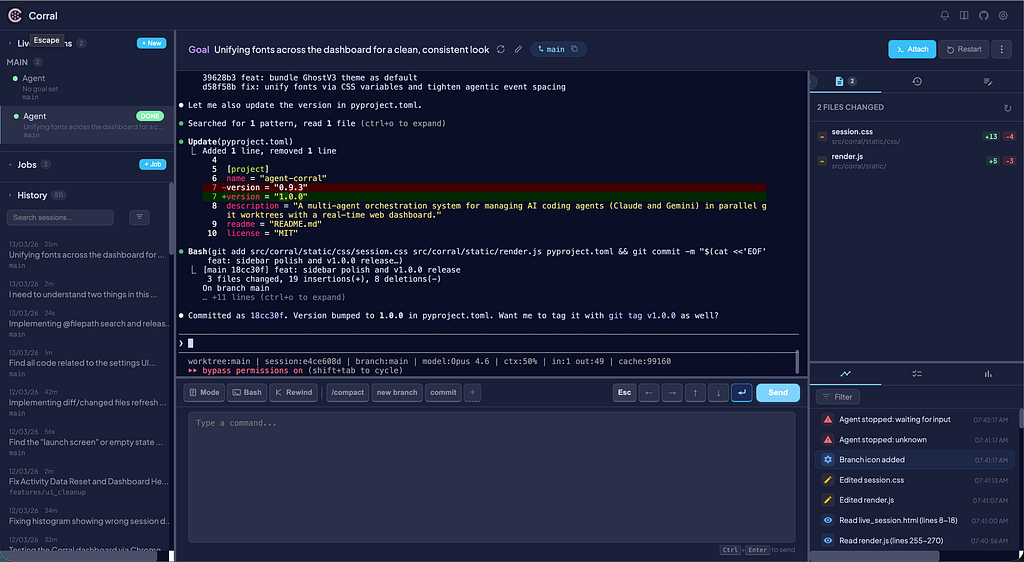
Corral is a control plane that runs agents in parallel `tmux` sessions, capturing their output in a local SQLite database, and providing a unified dashboard to monitor, search, and manage them.
But what makes Corral unique isn’t just what it does; it’s *how* it was built. It is a 100% “vibe coded” application. Every architectural decision, every FastAPI endpoint, and every CSS animation was generated through deep, iterative pairings with Claude and Gemini.
In this article, we will:
- Explain the reality of “vibe coding” and how to effectively guide agents to build complex systems.
- Discuss the tools and architecture that make Corral work.
- Provide a download link to the raw `sessions.db` SQLite database containing the entire history of Corral’s creation.
- Walk through a step-by-step guide on how to load this database into your own Corral instance to audit the AI’s logic.
The Tools and the “Vibe”
Building a heavily concurrent application like Corral (which manages WebSocket streams, background git polling, FTS5 database writes, and `tmux` bindings concurrently) is traditionally a complex engineering task. “Vibe coding” doesn’t mean you turn off your brain; it means you shift from being a bricklayer to being an architect.
To build Corral, we relied on a specific stack, not just for the final product, but for the process:
- Claude Code & Gemini CLI: The actual agents doing the heavy lifting. I used them in parallel, often having Claude draft the FastAPI backend while Gemini handled the frontend state management.
- FastAPI & aiosqlite: The backbone of Corral. Using Python with strict type hinting made it dramatically easier for the agents to understand the schema and avoid hallucinating incorrect API calls.
- tmux: The underlying technology of Corral. By isolating agents in `tmux` sessions early on, I was able to stop them from overwriting each other’s worktrees.
- The Pulse Protocol: As the codebase grew, I implemented a system where agents emit `||PULSE:STATUS||` tokens to STDOUT. This allowed me to monitor what the agents were doing without reading every line of code they generated.
Step-by-Step Guide: Exploring the Matrix
One of the most powerful features of Corral is its ability to log every session, including the massive context windows and outputs, into a local, searchable SQLite database. Because Corral was built using Corral (i.e., bootstrapping itself), I captured the entire history of the project’s inception.
I am open-sourcing not just the code for Corral, but the `sessions.db` database that built it. You can literally read the AI’s mind as it engineered the application you are using.
Here is how to load it up and explore the history:
1. Install Corral and Download the Database
First, install Corral locally. It requires Python 3.8 or higher.
# Install Corral via pip
> pip install agent-corral
Next, download the historical database dump. [Insert Download Link Here (e.g., GitHub Release Asset or Google Drive link)].
2. Swap in the Historical Database
Corral stores all of its history in your home directory at `~/.corral/sessions.db`. Back up your existing database (if you have one) and move the downloaded database into place.
# Backup existing (optional)
mv ~/.corral/sessions.db ~/.corral/sessions.db.backup
# Move the downloaded history file into place
mv /path/to/downloaded/corral_history.db ~/.corral/sessions.db
3. Launch the Dashboard
Launch the standalone Corral dashboard. (defaults to http://localhost:8420)
> corral
Open your browser to `http://localhost:8420` and navigate to the History tab on the left sidebar.
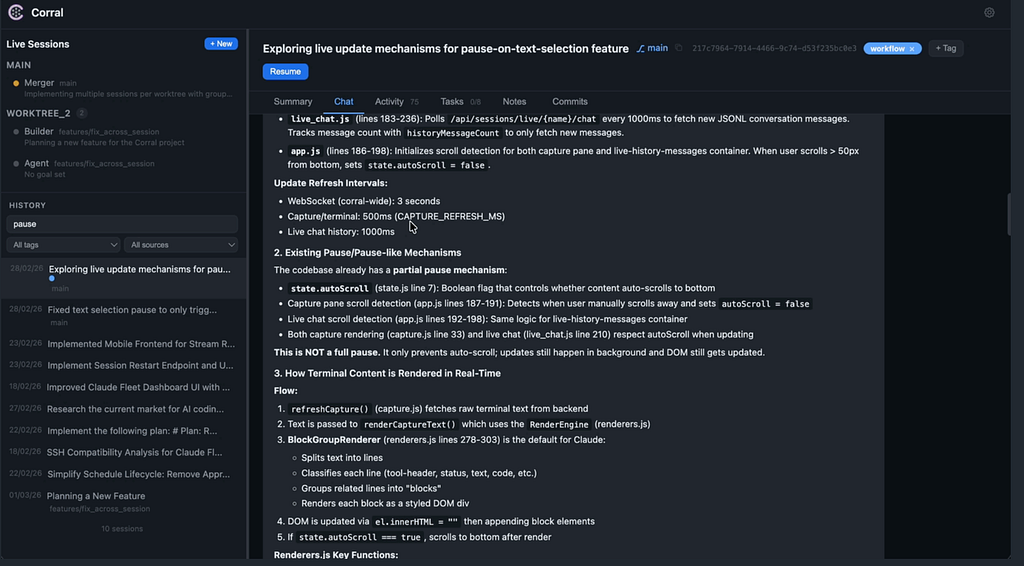
4. Search and Audit the Vibe
You now have the complete, searchable history of how Corral was built. Because Corral uses SQLite’s FTS5 (Full-Text Search) engine, you can instantly search across hundreds of thousands of lines of terminal output.
Try searching for specific architectural decisions:
1. Type `tmux pipe-pane` into the search bar. You will instantly find the exact session where Claude and I debugged the asynchronous log-tailing mechanism.
2. Search for `||PULSE:STATUS||`. You can read the conversation where the pulse protocol was first conceived and implemented.
3. Click on any session to view the full transcript, notes, and the Git commits associated with that specific interaction.
Conclusion
Vibe coding is not just a buzzword; it is a fundamental shift in how we interact with computers. By open-sourcing the memory of Corral along with its code, I hope to demystify this process. Exploring this database combined with the source code and git history provides a concrete, hands-on example of how to break down complex architectural problems, correct AI hallucinations, and guide agents to build robust software.
You can find the full source code for Corral on GitHub here: [https://github.com/cdknorow/corral](https://github.com/cdknorow/corral). Install the tool, load up the history, and explore the future of software engineering.
Building Corral: A 100% “Vibe Coded” Application Open Sourced (Along With Its Memory) was originally published in Level Up Coding on Medium, where people are continuing the conversation by highlighting and responding to this story.