Circuit breakers, jittered exponential backoff, and a 90-second health check that saved more demos than any prompt tweak.
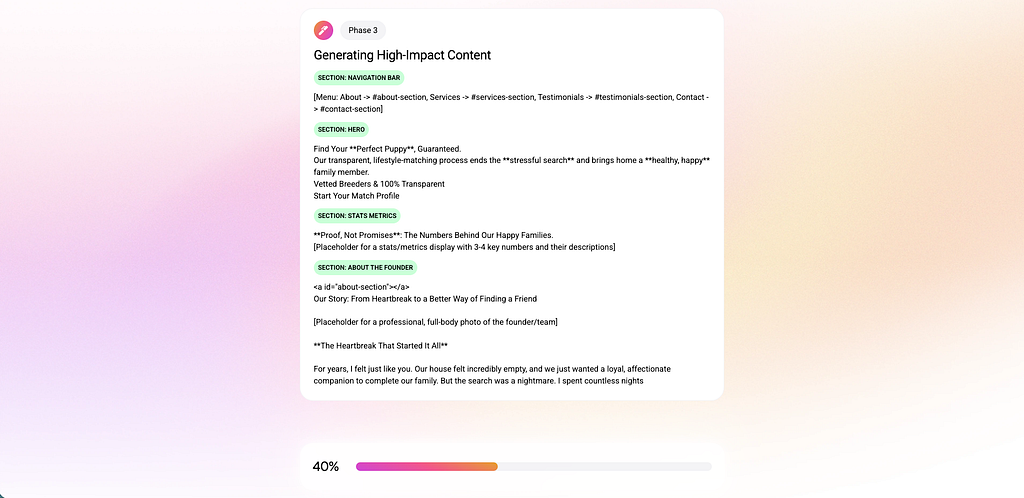
The first time we demoed Landy AI’s page generator over hotel wifi, the streaming output froze for 11 seconds, recovered for 3, froze again, then died. The fallback I had not yet built was “refresh the page and pretend that didn’t happen.”
Three production years and 50,000+ generated pages later, the streaming code that sits behind that progress bar has more lines dedicated to networks failing than to networks succeeding. This is the architecture we ended up with, the trade-offs that pushed us there, and the patterns that you can lift into any LLM product where the user is staring at a blinking cursor.
The Demo That Works Versus the Demo That Doesn’t
Localhost is a lie.
On localhost, your EventSource opens, the LLM streams 8,000 tokens, your UI animates a typing cursor, the user claps. In production, the user is on a corporate proxy that closes idle connections at 60 seconds, or on a 5G connection that hands off between cells mid-stream, or on a hotel wifi that intercepts HTTP and rewrites the response headers in a way that breaks SSE parsing.
The first version of our generator did the textbook thing: open an EventSource, listen for message, render. It worked for 92% of users. The other 8% saw a half-rendered landing page and an apologetic refresh button.
The fix was not a better LLM, a longer system prompt, or a faster model. The fix was treating the network like the adversary it is.
// What the textbook says
const es = new EventSource('/api/stream');
es.onmessage = (e) => render(JSON.parse(e.data));
// What production needs
// (200+ lines of reconnect, jitter, heartbeat, circuit breaker)
If your LLM product has a streaming UI and you have not had the “what happens when the connection silently dies” conversation, this is that conversation.
Why We Run Two Streaming Clients, Not One
Landy AI streams in two distinct moments, and they need different transports.
Initial page generation is a one-shot, server-driven, multi-minute job. The user clicks “create my page”, and four agents (audience research, scraping, copywriting, page builder) take turns producing chunks. The browser does not need to send anything during the stream. This is the canonical SSE use case, and we use the native EventSource API.
AI chat edits on an existing page (“make the headline bigger, add a testimonial section after benefits”) need the user to send a prompt body, optionally with image uploads up to 5MB each. EventSource is GET-only, so we use fetch with ReadableStream to POST the body and parse the SSE response manually.
Two clients, one shared resilience layer. Here is the only comparison table you need:
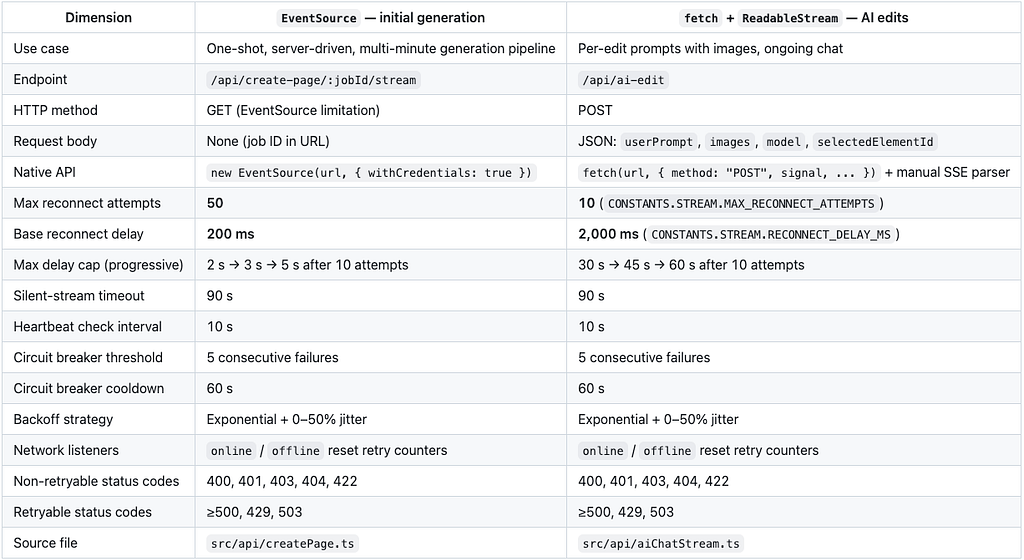
The lesson generalizes: pick the transport that matches the request shape, then layer the same reconnect/timeout/circuit-breaker logic on top regardless. Treat the network the same. Treat the API the way the API needs to be treated.
Exponential Backoff Is Table Stakes. Jitter Is What Saves You.
Every retry article on the internet shows you exponential backoff. Most stop there. Stopping there is how you build a thundering herd.
Imagine 50 users on the same enterprise wifi. The wifi router restarts. Every browser tab loses its SSE connection at the same instant. Every browser starts retrying. With pure exponential backoff, all 50 retry attempts hit your backend at the same instant, 200ms after the failure. Then 400ms after the failure. Then 800ms.
Your backend, which was already struggling because the wifi just came back and now everyone is reconnecting, gets hit with synchronized waves. This is the thundering herd. The fix is jitter.
const getReconnectDelay = (attempt: number): number => {
  const maxDelay = getCurrentMaxDelay(); // 2s, 3s, or 5s depending on attempt
  const exponentialDelay = Math.min(
    baseReconnectDelay * Math.pow(2, attempt - 1),
    maxDelay
  );
  // Add 0-50% jitter to spread out reconnection attempts
  const jitter = Math.random() * exponentialDelay * 0.5;
  return exponentialDelay + jitter;
};
The jitter is the line that took us from a backend that crumpled under retry storms to a backend that absorbs them. Half the literature on production retry calls this “decorrelated jitter” and the AWS Architecture Blog has an entire post on why full jitter is the version most people should run. The math is not subtle: with 50 clients, full jitter cuts peak load on the recovering backend by roughly the count of clients. The post is from 2015. The lesson somehow keeps not landing.
We also progressively widen the cap as attempts accumulate. The first five attempts cap at 2 seconds. After five, 3 seconds. After ten, 5 seconds for EventSource and 60 seconds for fetch. The shape says "we are willing to wait longer because the problem is clearly not transient." A user staring at the screen will not wait two minutes between retries, but a backgrounded tab on a flaky train wifi can absolutely wait 60 seconds, and waiting 60 seconds is much better for the backend than retrying 30 times in the same window.
“Connection Open” Is Not “Data Flowing”: the 90-Second Silent-Stream Timeout
EventSource will happily stay in readyState: OPEN while no bytes have arrived for 5 minutes. Every browser developer tools panel will show a green dot. Your user is staring at a typing cursor that has not moved.
The bug class is “the connection is technically alive, but no data is moving through it.” Common causes: a corporate proxy that buffers SSE until it gives up, a misconfigured load balancer with idle-connection death, a server that crashed mid-generation but did not close the socket, a wifi handoff that silently dropped the TCP stream halfway through.
The fix is heartbeat-based health checking on the client.
const CONNECTION_TIMEOUT_MS = 90000;       // 90 seconds without data → reconnect
const HEARTBEAT_CHECK_INTERVAL = 10000;    // Check every 10 seconds
const checkConnectionHealth = () => {
  const timeSinceLastData = Date.now() - lastHeartbeat;
if (hasReceivedData && timeSinceLastData > CONNECTION_TIMEOUT_MS) {
console.warn(`Connection appears stalled (no data for ${timeSinceLastData}ms). Reconnecting...`);
cleanup();
scheduleReconnect();
} else if (!isClosed) {
connectionTimeout = setTimeout(checkConnectionHealth, HEARTBEAT_CHECK_INTERVAL);
}
};lastHeartbeat is updated on every byte the client receives. The 10-second interval means worst case we notice a stall within 100 seconds of it starting, which is the right trade-off between aggressive reconnection (annoying for slow but real generations) and dead connections (worse than annoying).
Why 90 seconds and not 30? Our slowest legitimate phase, the audience-research agent scraping Reddit and Quora and parsing the results, can go 60 seconds without emitting a chunk. Picking the timeout requires knowing the longest legitimate gap your pipeline produces, then padding it. Cargo-culting “30s timeout” from a different product is how you reconnect mid-research and start the whole job over.
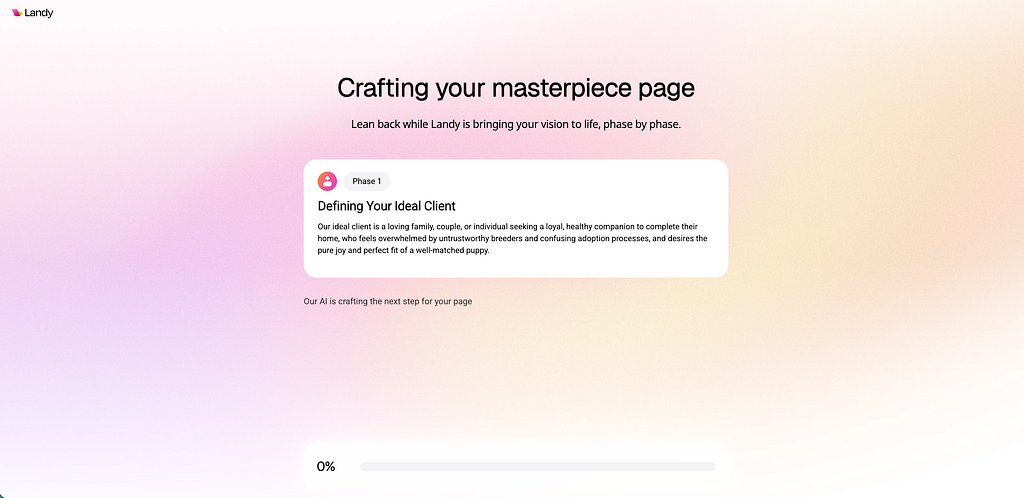
We also surface this state in the UI rather than hiding it. When isStalled && !isTyping && !isDone, the screen shows "Our AI is crafting the next step for your page" in a subdued tone. The user sees motion. The motion is honest: something is happening, even if no bytes have crossed the wire in a few seconds.
Circuit Breakers, Not Just Retries
Retries are local: this connection failed, try again. Circuit breakers are global: too many connections in a row failed, stop trying for a while.
const MAX_CONSECUTIVE_FAILURES = 5;
const CIRCUIT_BREAKER_COOLDOWN = 60000; // 1 minute
let circuitBreakerOpenUntil = 0;
const handleConnectionFailure = (error) => {
  consecutiveFailures++;
  if (consecutiveFailures >= MAX_CONSECUTIVE_FAILURES) {
    circuitBreakerOpenUntil = Date.now() + CIRCUIT_BREAKER_COOLDOWN;
    setTimeout(() => {
      consecutiveFailures = 0;
      if (!isClosed) connect();
    }, CIRCUIT_BREAKER_COOLDOWN);
  }
};
Without this, our retry loop would fire forever if the backend was down, occasionally with two-second pauses, mostly with sub-second pauses. We were one bad backend deploy away from a self-DOS. The circuit breaker says: five attempts at the same failure mode is enough evidence; back off for a full minute, then try once. If the once works, reset the counter. If it fails, back off again.
The pattern is from Michael Nygard’s Release It! and it is one of the most underused defensive patterns in browser-side LLM code. Most clients will retry until they crash the page or the user gives up. Either is worse than a polite minute of nothing.
The Retryable-Error Matrix
Not every error should retry. The most expensive bug we shipped in 2025 was retrying a 401 Unauthorized on every reconnect, which meant a user with an expired JWT generated 50 retry attempts inside their session and saw 50 toast notifications stacked at the top of the screen.
const isRetryableError = (error) => {
  if (error?.status) {
    // Don't retry on client errors (except 429)
    if (error.status === 400 || error.status === 401 || error.status === 403 ||
        error.status === 404 || error.status === 422) {
      return false;
    }
    // Do retry on server errors and rate limits
    if (error.status >= 500 || error.status === 429 || error.status === 503) {
      return true;
    }
  }
  // Retry on network errors by default
  return true;
};
The matrix is small but load-bearing:
- 4xx (auth, validation, missing): never retry. The next attempt has the same input and will fail the same way. Surface the error, send the user to login or to fix their input.
- 429 and 503: always retry. These are explicitly “try again later” signals from a healthy backend.
- 5xx: retry. Transient backend failures recover.
- Unknown / network-layer error: retry. Could be a transient TCP reset; try again.
The rule “retry on network errors by default” is the one that hurt us until we wrote it down. TypeError: Failed to fetch is a network error. So is AbortError. So is anything that does not have a status. We default to retrying because the client cannot tell the difference between "Cloudflare returned 502 then closed the connection" and "the user's wifi blinked." Both should retry.
Network-Aware: What the Browser Tells You for Free
Two browser events will save you a meaningful amount of retry budget if you wire them up.
window.addEventListener("online", () => {
  isNetworkOffline = false;
  if (!isClosed && !eventSource) {
    reconnectAttempts = 0;     // Reset attempts since the failure was network
    consecutiveFailures = 0;   // Reset circuit breaker
    connect();
  }
});
window.addEventListener("offline", () => {
isNetworkOffline = true;
cleanup();
});When the browser knows the network is gone, do not retry. There is nothing to connect to. When the network comes back, reset the counters and reconnect immediately, because the prior failures were not “the backend is broken,” they were “the user was on the subway.”
Combined with the circuit breaker, this gives us a clean state model: network down → wait. Network up → try once. Backend bad → back off. The two failure modes do not need to share a budget.
Key Takeaways
- Pick the transport for the request shape. EventSource for GET-style streams, fetch + ReadableStream for streams that need a request body. Build the resilience layer once and share it.
- Always add jitter to exponential backoff. Without it, you have built a synchronized retry weapon aimed at your own backend.
- Heartbeat-check the connection, not just readyState. A connection can be open and silent. Pick a timeout based on your slowest legitimate gap, not a copy-pasted 30 seconds.
- Circuit breakers are not optional. Five consecutive failures is enough evidence to stop. Sixty seconds is enough cooldown to learn.
- Distinguish 4xx from 5xx in your retry policy. 401 should never retry. 503 should always retry. The default for unknown errors is retry, because the client cannot tell network from backend.
- Surface stall states honestly. “Our AI is crafting the next step for your page” beats a frozen cursor. Users tolerate honest waiting; they do not tolerate hidden brokenness.
What Did We Get Out of All This
Generation success rate moved from low-90s to consistently 99%+. The visible difference for users is not “the AI got better.” The visible difference is that the page actually finishes generating on the first try, even on the connections we cannot control.
If you are shipping anything that streams LLM output to a browser, the prompt is rarely the bottleneck. The network is. Treat it like the adversary it is, and the demo stops being the moment you hold your breath.
What patterns has your team landed on for streaming reliability? Genuinely curious whether other people are running circuit breakers on the client or pushing that responsibility down to the gateway.
Try Landy AI: build a converting landing page in minutes, with audience research, copywriting, and a real-time builder. Free tier, no credit card. landy-ai.com
About the author: Adi Leviim is co-founder of Landy AI (AI landing-page builder, 50,000+ generated pages), ChatGPT Toolbox (18,000+ users), Claude Toolbox, and Gemini Toolbox, Chrome extensions that add search, organization, and export to AI assistants. He writes about the reality of building AI products with 7+ years of full-stack development experience.
Landy AI | ChatGPT Toolbox | Medium | Twitter/X | LinkedIn
50,000 AI Page Generations Later: Streaming That Survives Real Networks was originally published in Level Up Coding on Medium, where people are continuing the conversation by highlighting and responding to this story.