Running K-Nearest Neighbors (KNN) over a Google search corpus to find cross-query connections no single search can ever surface.
Human learning is all about building connections in your head. Like last week, I read an ArXiv paper on quantization, which prompted me to do some Google-fu for a FP16 vs INT8 comparison on NVIDIA’s forums, and then make a site:github.com search for a Llama.cpp fork with optimized kernels to try it myself. This takes time. Google — or an LLM — can’t make these mental hops for you.
So I wanted to see if I could speed this up by programmatically finding and shortlisting these connections for me to review later, using a classic algorithm from 1951. To collect the raw material, I used my SERP API to run 100 varied Google searches on a specific topic — then merged the ~800 results into one corpus, embedded every row, and ran cosine k-NN over the whole thing.
From that new data, I could click any result in my UI and see its nearest semantic neighbors — not just from the same search, but anywhere in the dataset, across all 100 searches — fully explorable.
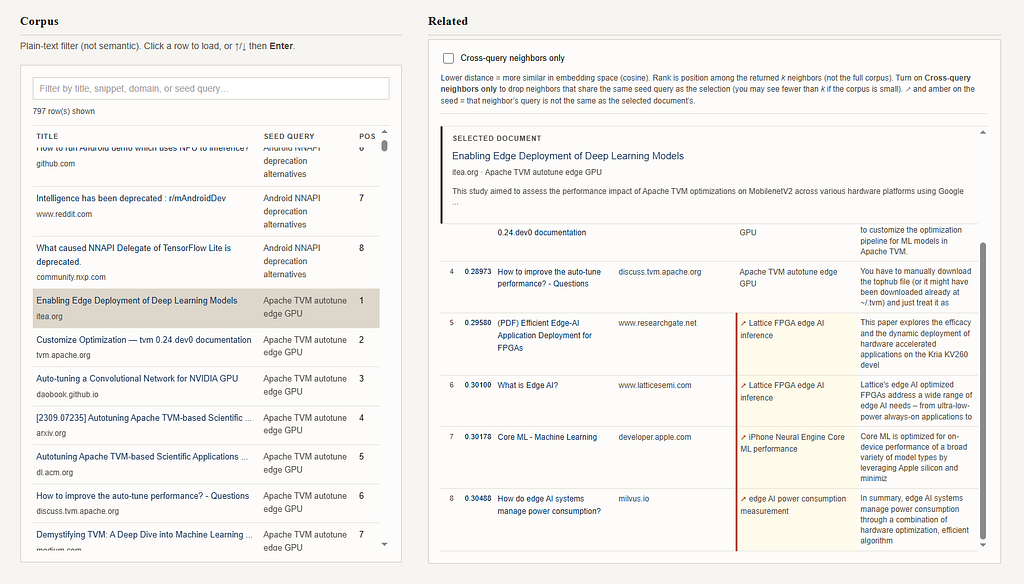
This worked exceptionally well. A whopping 42.2% of all neighbor links crossed query boundaries, and every one of the 797 documents in my corpus had at least one cross-search connection in its top 8.
I’ll present my approach and findings here, and the full code is available on GitHub to review.
Table of Contents
- What is the K-Nearest Neighbors Algorithm (KNN)?
- Architecture
- Prerequisites
- Step 1: Building a Query Set for Your Research Topic
- Step 2: Setting Up a Bright Data SERP API Client in Python
- Step 3: Ingesting Multi-Query Search Results Into DuckDB
- Step 4: Embedding Google Results and Indexing Them in ChromaDB
- Step 5: Running Cosine k-NN Over a Merged Multi-Query Corpus
- Step 6: Serving ChromaDB Vectors with FastAPI
- Step 7 : Simple UI with JavaScript
- Results: What Cosine k-NN Reveals Across 800 Google Results
- Conclusion: A Proximity-Based Knowledge Graph
What is the K-Nearest Neighbors Algorithm (KNN) ?
Similar things tend to be near each other. The k-nearest neighbors algorithm (k-NN) formalizes this:
Given a point in space, find the k closest points to it using some distance metric (here, cosine similarity over embeddings).
I treat each Google result as a point in a shared semantic space. That changes the question from “what ranks for this query?” to “what lives near this document?” Going from Google’s ranking to proximity is what makes connections show up across queries, domains, and levels of abstraction.
Why k-NN? Because it is local and doesn’t need training. It simply operates over the structure already present in the embeddings, and because it runs over the entire merged corpus, neighbors can come from anywhere in the data.
Architecture
I’m too lazy for full orchestration layers or distributed systems—so this project is just a sequence of steps that add structure, progressively.
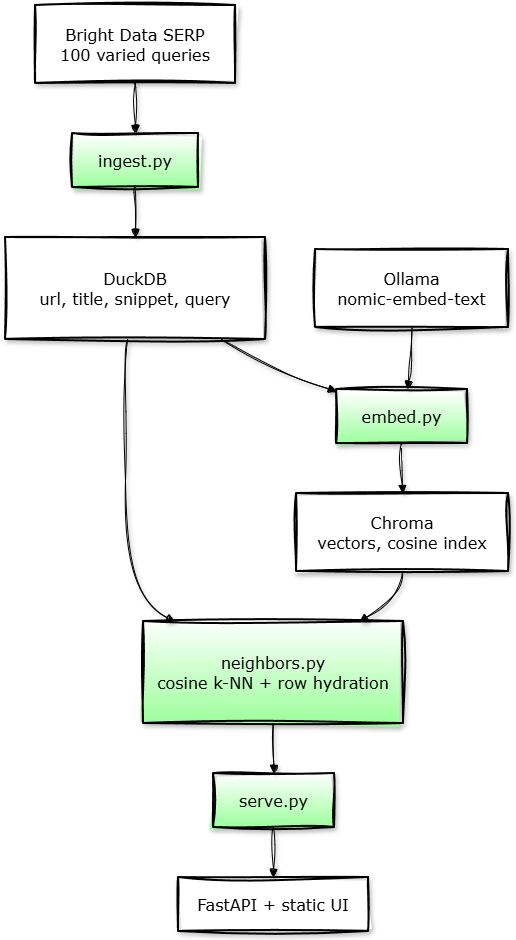
Each stage does one thing. ingest.py collects results across many queries into a single DuckDB table, preserving (url, query) pairs as distinct rows so context isn’t lost. Then embed.py converts each row into a vector (title + snippet + domain + query) and stores it in Chroma. Next, neighbors.py runs cosine k-NN over that global space and hydrates results back from DuckDB. Finally, serve.py exposes this through a minimal API and HTML/JS/CSS UI, where we can click any result, and see its nearest neighbors from anywhere in the corpus.
💡 I could have stored everything in Chroma with metadata fields and skipped DuckDB entirely. I didn’t, because Chroma does not make for a very good source of truth. Metadata in it is harder to query, to inspect ad hoc, and to rebuild from.
DuckDB on the other hand, is a single portable file, queryable with standard SQL, trivially exportable, and completely replaceable without touching the vector layer.
Prerequisites
Install: Python 3.10+, uv (or another venv workflow), Ollama with nomic-embed-text:latest pulled, and Docker (or any Chroma HTTP server) — e.g. docker compose up -d in this folder so Chroma listens on localhost:8000.
Python dependencies (requirements.txt):
python-dotenv>=1.0.0
requests>=2.28.0
chromadb>=0.5.0
duckdb>=1.0.0
fastapi>=0.115.0
uvicorn[standard]>=0.32.0
Environment Variables: Set at least BRIGHT_DATA_API_KEY and BRIGHT_DATA_ZONE (required for ingest.py). You get them from your Bright Data dashboard after signing up here; replace with your own if using some other SERP API. Everything else is optional, documented in README.md.
Run order: create/activate a venv, uv pip install -r requirements.txt, start Chroma, then do python ingest.py → python embed.py → python serve.py and open the app URL (default http://127.0.0.1:8766/).
Step 1: Building a Multi-Angle Query Set for Your Research Topic
Our list of Google queries can live in aqueries.json. For best results, try to cover as many angles as you can think of. Example: I wanted to research ML on edge devices (as of 2026), so I included strings covering hardware, software, models/compression, web/WASM, research and benchmarks, and more.
Full code here: queries.json
[
  "how to run a neural network on a microcontroller",
  "edge AI chips compared Coral TPU vs Jetson Nano",
  "TensorFlow Lite Micro supported operators",
  "ONNX Runtime Web WebGPU backend",
  "site:arxiv.org efficient LLM survey",
  "MLPerf Tiny benchmark results"
  // ...see queries.json for the full list
]
We’ll read this file once at ingest time and never again.
Step 2: Setting Up a Bright Data SERP API Client in Python
Here, we’re gonna wrap the Bright Data SERP API in a thin, defensive client that fails loudly on bad responses instead of silently passing garbage downstream.
Some quick gotchas:
- Don’t use the &num= parameter. Google deprecated that parameter in September 2025. Now you get ~10 organics regardless. Cap rows by slicing after the response, which is what limit_organic() does.
- Use a retry loop, but keep it simple. Rather than pulling in a specialized retry library, search() makes three attempts with a linear backoff of 0.5s × (attempt + 1). Good enough.
- Don’t forget to unwrap the response. The "format": "json" parameter brings in a response that is an envelope with its own status_code, headers, and body — and the actual SERP payload lives inside body, so you need a second json.loads.
Full code here: bright_data_serp.py
# a util function really
def limit_organic(data: Dict[str, Any], max_results: int) -> Dict[str, Any]:
    # Keep at most `max_results` organic rows.
    if max_results <= 0:
        return data
    organic = data.get("organic")
    if isinstance(organic, list) and len(organic) > max_results:
        return {**data, "organic": organic[:max_results]}
    return data


class BrightDataSERPClient:
    def __init__(
        self,
        api_key: Optional[str] = None,
        zone: Optional[str] = None,
        country: Optional[str] = None,
    ):
        self.api_key = api_key or os.getenv("BRIGHT_DATA_API_KEY")
        self.zone = zone or os.getenv("BRIGHT_DATA_ZONE")
        self.country = country or os.getenv("BRIGHT_DATA_COUNTRY")
        self.api_endpoint = "https://api.brightdata.com/request"

        if not self.api_key:
            raise ValueError("BRIGHT_DATA_API_KEY is required.")
        if not self.zone:
            raise ValueError("BRIGHT_DATA_ZONE is required.")

        self.session = requests.Session()
        self.session.headers.update(
            {
                "Content-Type": "application/json",
                "Authorization": f"Bearer {self.api_key}",
            }
        )

    def search(
        self,
        query: str,
        num_results: int = 10,
        language: Optional[str] = None,
        country: Optional[str] = None,
        max_retries: int = 2,
    ) -> Dict[str, Any]:
        last_err: Optional[Exception] = None
        for attempt in range(max_retries + 1):
            try:
                return self._do_search(query, num_results, language, country)
            except Exception as e:
                last_err = e
                if attempt < max_retries:
                    # simple linear backoff
                    time.sleep(0.5 * (attempt + 1))
        assert last_err is not None
        raise last_err

    def _do_search(
        self,
        query: str,
        num_results: int,
        language: Optional[str],
        country: Optional[str],
    ) -> Dict[str, Any]:
        search_url = (
            f"https://www.google.com/search"
            f"?q={requests.utils.quote(query)}"
            f"&brd_json=1"
        )
        if language:
            search_url += f"&hl={language}&lr=lang_{language}"
        target_country = country or self.country
        payload: Dict[str, Any] = {
            "zone": self.zone,
            "url": search_url,
            "format": "json",
        }
        if target_country:
            payload["country"] = target_country

        response = self.session.post(self.api_endpoint, json=payload, timeout=60)
        response.raise_for_status()
        result = response.json()
        if not isinstance(result, dict):
            raise RuntimeError(f"Bright Data unexpected response type: {type(result)}")
        inner_status = result.get("status_code")
        if inner_status is not None and inner_status != 200:
            raise RuntimeError(f"Bright Data SERP status_code={inner_status}")
        if "body" in result:
            body = result["body"]
            if isinstance(body, str):
                if not body.strip():
                    raise RuntimeError("Bright Data SERP empty body")
                result = json.loads(body)
            else:
                result = body
        elif "organic" not in result:
            raise RuntimeError("Bright Data response missing 'body' and 'organic'")
        return limit_organic(result, num_results)
None of this is glamorous, really. But a pipeline that silently ingests empty responses is worse than one that crashes loudly. So I intentionally fail fast here so the rest of the pipeline can trust its input.
Step 3: Ingesting Multi-Query Search Results Into DuckDB
With a reliable client in place, ingest.py has just one job: loop over every query in queries.json, fetch Google’s organic results, and write them into a single DuckDB table.
For the primary key, I decided on a SHA-256 hash of url + source_query. This gives us three things for free:
- The same URL retrieved by two different queries becomes two distinct rows, with different source_query values. We don't lose that provenance.
- Re-ingesting a query produces the same IDs deterministically, so DELETE WHERE source_query = ? followed by re-insert is safe to run as many times as you like.
- And finally, you won’t need an autoincrement sequence or UUID generation — the ID is fully derivable from the content itself.
def row_id(url: str, source_query: str) -> str:
    return hashlib.sha256(f"{url}\t{source_query}".encode()).hexdigest()
I've added a --refresh option too; this wipes the table and re-fetches all queries from scratch (which you'd use when you want a completely clean corpus).
Full code here: ingest.py
# Fetch Google SERP via Bright Data and write a single DuckDB table.

# Default: merge — skip queries that already have rows (same ``source_query`` string).
# With ``--refresh``: delete all rows, then re-fetch every query in the file.

import time
from bright_data_serp import BrightDataSERPClient

# resolve DuckDB + queries file and ensure data directory exists.
def db_path() -> str:
    return os.getenv("DUCKDB_PATH", str(_DIR / "data" / "serp.duckdb"))
def queries_path() -> str:
    return os.getenv("QUERIES_JSON", str(_DIR / "queries.json"))
def ensure_data_dir() -> None:
    Path(db_path()).parent.mkdir(parents=True, exist_ok=True)

# Default table name; this can also be an env var if you have a multi-table database
TABLE = "serp_results"

# Deterministic primary key with SHA256. Re-fetching a query overwrites the same id rows.
def row_id(url: str, source_query: str) -> str:
    return hashlib.sha256(f"{url}\t{source_query}".encode()).hexdigest()

# Flatten SERP `organic` into DB-ready dicts
def organic_to_rows(data: Dict[str, Any], source_query: str) -> List[Dict[str, Any]]:
    organic = data.get("organic")
    if not isinstance(organic, list):
        return []
    out: List[Dict[str, Any]] = []
    for i, row in enumerate(organic):
        if not isinstance(row, dict):
            continue
        # link vs url, description vs snippet — handle both
        url = row.get("link") or row.get("url") or ""
        if not url:
            continue
        title = (row.get("title") or "")[:8000]
        snippet = (row.get("description") or row.get("snippet") or "") or ""
        snippet = snippet[:16000]
        pos = row.get("rank") or row.get("position") or (i + 1)
        try:
            position = int(pos)
        except (TypeError, ValueError):
            position = i + 1
        domain = urlparse(url).netloc or ""
        rid = row_id(url, source_query)
        out.append(
            {
                "id": rid,
                "source_query": source_query,
                "url": url,
                "title": title,
                "snippet": snippet,
                "domain": domain,
                "position": position,
            }
        )
    return out


# Read query strings: either a top-level JSON array or passing in a full object ``{"queries": [...]}``.
def load_queries(path: str) -> List[str]:
    p = Path(path)
    raw = json.loads(p.read_text(encoding="utf-8"))
    if isinstance(raw, list):
        return [str(x).strip() for x in raw if str(x).strip()]
    if isinstance(raw, dict) and "queries" in raw:
        return [str(x).strip() for x in raw["queries"] if str(x).strip()]
    raise ValueError("queries.json must be a JSON array or {\"queries\": [...]}")


# One-time table definition. Obviously, safe to run every ingest.
def ensure_schema(con: duckdb.DuckDBPyConnection) -> None:
    con.execute(
        f"""
        CREATE TABLE IF NOT EXISTS {TABLE} (
            id VARCHAR PRIMARY KEY,
            source_query VARCHAR NOT NULL,
            url VARCHAR NOT NULL,
            title VARCHAR,
            snippet VARCHAR,
            domain VARCHAR,
            position INTEGER NOT NULL
        )
        """
    )

# 1) Connect and ensure the schema.
# 2) If ``--refresh``, delete every row.
# 3) For each query: in default merge mode, skip if that ``source_query`` already has rows, else call Bright Data.
def main() -> None:
    con = duckdb.connect(dpath)
    ensure_schema(con)
    if args.refresh:
        con.execute(f"DELETE FROM {TABLE}")  # full wipe, then every query is fetched again

    bd = BrightDataSERPClient()
    query_list = load_queries(qpath)
    for q in query_list:
        if not args.refresh and con.execute(
            f"SELECT COUNT(*) FROM {TABLE} WHERE source_query = ?",
            [q],
        ).fetchone()[0]:
            continue  # merge: already have this ``source_query``
        raw = bd.search(q, num_results=args.num_results)
        rows = organic_to_rows(raw, q)
        con.execute(f"DELETE FROM {TABLE} WHERE source_query = ?", [q])
        if not rows:
            time.sleep(args.delay)  # rate limit: full script paces on empty organics too
            continue
        con.executemany(
            f"INSERT INTO {TABLE} (id, source_query, url, title, snippet, domain, position) VALUES (?, ?, ?, ?, ?, ?, ?)",
            [
                (r["id"], r["source_query"], r["url"], r["title"], r["snippet"], r["domain"], r["position"])
                for r in rows
            ],
        )
        time.sleep(args.delay)  # pace the script between calls. `ingest.py` also sleeps after a failed `search. Dropping this invites throttling risk.

    # All done! now count rows, close the connection, and maybe stdout a quick summary
Step 4: Embedding and Indexing Google Results in ChromaDB
For embedding, I picked four fields, concatenated: title, snippet, domain, source query. I’m including domain here because it carries implicit topical weight — arxiv.org and thinkrobotics.com should mean something different even with identical text.
Why add source query as well? Because the same URL retrieved by two different searches should embed slightly differently — it captures why the result was surfaced, not just what it says.
We don’t need to go over the full embedding logic, so let’s just cover the most important bits.
Full code here: embed.py
# String fed to the embedding model
# (title → snippet → domain → source query).
def embedding_text(
    title: str, snippet: str, domain: str, source_query: str
) -> str:
    t = (title or "").strip()
    s = (snippet or "").strip()
    d = (domain or "").strip()
    q = (source_query or "").strip()
    return f"{t}\n{s}\n{d}\n{q}".strip()


# POST /api/embed. New API returns "embeddings" (list of one vector per input)
def ollama_embed_one(
    host: str,
    model: str,
    text: str,
    session: requests.Session,
) -> List[float]:
    url = host.rstrip("/") + "/api/embed"
    r = session.post(
        url,
        json={"model": model, "input": text},
        timeout=120,
    )
    r.raise_for_status()
    data = r.json()
    embs = data.get("embeddings")
    if isinstance(embs, list) and embs and isinstance(embs[0], list):
        return [float(x) for x in embs[0]]
    one = data.get("embedding")
    if isinstance(one, list):
        return [float(x) for x in one]
    raise RuntimeError(f"Ollama embed response missing embeddings: {data!r}")
Next, an excerpt of main() in embed.py. Notice that it deletes and recreates the Chroma collection every run. That's deliberate: DuckDB is the source of truth, and rebuilding the vector collection keeps Chroma in sync without writing diff/upsert logic. The tradeoff is that embedding is all-or-nothing; this script is not doing incremental vector maintenance. 😅
# Read all DuckDB rows, drop/recreate the Chroma collection, embed, and add in batches.
    con = duckdb.connect(dpath, read_only=True)
    rows = con.execute(
        f"SELECT id, source_query, title, snippet, domain FROM {TABLE} ORDER BY id"
    ).fetchall()
    con.close()
    if not rows:
        raise SystemExit(f"No rows in {TABLE}; run ingest first.")

    client = chroma_client()  # CHROMA_HOST / CHROMA_PORT / CHROMA_SSL
    name = args.collection
    try:
        client.delete_collection(name)
    except Exception:
        pass  # no collection yet on first run
    collection = client.create_collection(
        name=name,
        metadata={"hnsw:space": "cosine"},  # cosine in Chroma matches query style in serve
    )

    session = requests.Session()
    ids: List[str] = []
    embeddings: List[List[float]] = []
    batch_size = 32
    for i, (rid, source_query, title, snippet, domain) in enumerate(rows):
        text = embedding_text(
            str(title or ""),
            str(snippet or ""),
            str(domain or ""),
            str(source_query or ""),
        )
        if not text:
            text = str(rid)  # last resort so Ollama never sees an empty string
        emb = ollama_embed_one(args.ollama_host, args.model, text, session)
        ids.append(str(rid))
        embeddings.append(emb)
        if len(ids) >= batch_size or i == len(rows) - 1:
            collection.add(ids=ids, embeddings=embeddings)
            print(f"Added {len(ids)} vectors (row {i + 1}/{len(rows)})")
            ids = []
            embeddings = []
Step 5: Running Cosine k-NN Over a Merged Corpus
At this point, our two data stores have distinct jobs:
- Chroma knows vectors and row ids;
- DuckDB holds everything else — title, snippet, URL, domain, position, source_query.
Our k-NN implementation, therefore, is simple: look up the anchor in DuckDB → fetch its vector from Chroma → query for nearby ids → hydrate back from DuckDB. The Chroma layer can stay thin, all display fields come from one place.
Full code here: neighbors.py
Two implementation details you should know about:
- The numpy guard: Chroma may return embeddings as a nested list or an ndarray. The usual if not embs breaks on arrays, so first_embedding_for_query normalizes the first vector without relying on truthiness.
def first_embedding_for_query(embs: Any) -> Optional[List[float]]:
    # bc Chroma may return `embeddings` as a nested list or `ndarray`
    # This avoids `if not embs` on arrays.
    if embs is None:
        return None
    if isinstance(embs, np.ndarray):
        if embs.size == 0:
            return None
        v = embs[0] if embs.ndim > 1 else embs
        return v.tolist()
    if isinstance(embs, (list, tuple)):
        if len(embs) == 0 or embs[0] is None:
            return None
        v = embs[0]
        return v.tolist() if hasattr(v, "tolist") else list(v)
    return None
- Hydration: Chroma returns ids and distances, not the rows themselves. So rows_by_ids fetches the DuckDB records for those ids, keyed by id so Chroma's ranked order is preserved when distances are stitched back on.
def rows_by_ids(con: duckdb.DuckDBPyConnection, ids: list[str]) -> dict[str, dict]:
    if not ids:
        return {}
    placeholders = ",".join(["?"] * len(ids))
    out: dict[str, dict] = {}
    for row in con.execute(
        f"""
        SELECT id, source_query, url, title, snippet, domain, position
        FROM {TABLE} WHERE id IN ({placeholders})
        """,
        ids,
    ).fetchall():
        rid = str(row[0])
        out[rid] = {
            "id": rid,
            "source_query": row[1],
            "url": row[2],
            "title": row[3],
            "snippet": row[4],
            "domain": row[5],
            "position": row[6],
        }
    return out
Note that our default path is always pure k-NN: ask Chroma for k+1 nearest row ids, drop the anchor itself, hydrate from DuckDB.
But I’ve also added a cross_query_only flag — a UI filter toggled via a "Cross-query neighbors only" checkbox. Not pure k-NN, but useful to end users.
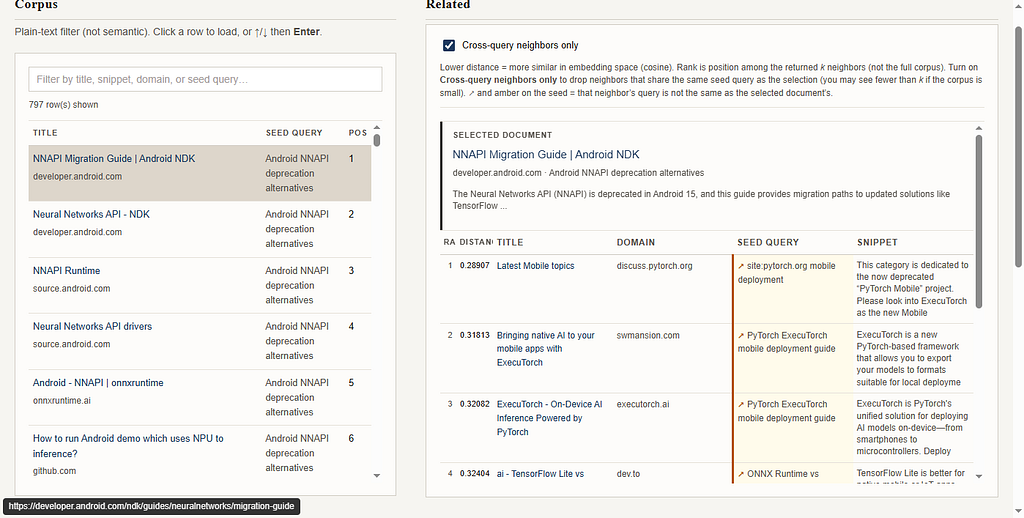
When this is on, compute_neighbors drops any candidate whose source_query matches the anchor's. The nearest neighbors in vector space are often siblings from the same original search, so this lets you ask "show me related results from other queries" without touching the index.
Regardless, compute_neighbors wires the two stores together.
def compute_neighbors(anchor: str, k: int = DEFAULT_K, *, cross_query_only: bool = False) -> dict:
    k = max(1, min(int(k), 50))
    dpath = db_path()

    # 1) DuckDB validates the anchor and gives us the row metadata, including
    # ``source_query`` for cross-query filtering.
    con = duckdb.connect(dpath, read_only=True)
    try:
        anchor_row = row_by_id(con, anchor)
    finally:
        con.close()
    if not anchor_row:
        return _neighbor_error("unknown id", k, cross_query_only=cross_query_only)

    # 2) Chroma stores the vector under the same row id.
    coll = chroma_client().get_collection(collection_name())
    got = coll.get(ids=[anchor], include=["embeddings"])
    vector = first_embedding_for_query(got.get("embeddings"))
    if vector is None:
        return _neighbor_error("no embedding for id (re-run embed.py)", k, cross_query_only=cross_query_only)

    max_n = max(1, min(int(coll.count()), 5000))
    neighbors: list[dict] = []

    if not cross_query_only:
        # Normal mode: ask for k + 1 because the nearest result is usually the anchor itself.
        qres = coll.query(query_embeddings=[vector], n_results=min(k + 1, max_n), include=["distances"])
        out_ids, out_dist = _ids_distances_from_query(qres, anchor)
        out_ids, out_dist = out_ids[:k], out_dist[:k]

        con = duckdb.connect(dpath, read_only=True)
        try:
            by_id = rows_by_ids(con, out_ids)
        finally:
            con.close()
        for nid, dist in zip(out_ids, out_dist):
            if nid in by_id:
                neighbors.append({**by_id[nid], "distance": dist})

    else:
        # Cross-query mode: nearest neighbors often share the same Google query,
        # so over-fetch, filter by ``source_query``, and widen if we still need more.
        anchor_seed = str(anchor_row.get("source_query") or "").strip()
        n_results = min(max(k * 4 + 1, k + 12, 24), max_n)
        while len(neighbors) < k and n_results <= max_n:
            qres = coll.query(query_embeddings=[vector], n_results=n_results, include=["distances"])
            out_ids, out_dist = _ids_distances_from_query(qres, anchor)

            con = duckdb.connect(dpath, read_only=True)
            try:
                by_id = rows_by_ids(con, out_ids)
            finally:
                con.close()

            neighbors = []
            for nid, dist in zip(out_ids, out_dist):
                row = by_id.get(nid)
                if not row:
                    continue
                if str(row.get("source_query") or "").strip() == anchor_seed:
                    continue
                neighbors.append({**row, "distance": dist})
                if len(neighbors) >= k:
                    break

            if len(neighbors) >= k or n_results >= max_n:
                break
            n_results = min(max(n_results * 2, k + 1), max_n)

    return _neighbor_ok(anchor_row, neighbors, k, cross_query_only)
Step 6: Serving ChromaDB Vectors with FastAPI
The backend is prime gotcha territory. Two of them, specifically:
- Route order is load-bearing. FastAPI evaluates routes in declaration order. StaticFiles with html=True is a catch-all — it will attempt to serve any path that isn't already handled as a file. If you mount it before registering the API routes, every request to /api/rows tries to find a file named api/rows in the static directory and returns 404. Make sure you register the API routes first.
- Disable docs, redoc, and openapi. For a local tool you’re restarting constantly, FastAPI’s schema introspection at startup is just noise.
PORT = int(os.getenv("SERVE_PORT", "8766"))  # override with env if needed

app = FastAPI(
    title="k-NN SERP",
    docs_url=None,
    redoc_url=None,
    openapi_url=None,
)
The actual API surface is minimal. We’ll only need two endpoints:
- First, /api/rows dumps the full DuckDB corpus ordered by query then position — this is what populates the main table on load.
- Next, /api/neighbors takes an id and k, calls compute_neighbors, and routes errors to the appropriate HTTP status codes via _neighbors_http_response.
💡 The full project has a third endpoint, /api/metrics, serving a precomputed knn_metrics.json from internal/knn_metrics.py. See the full code for that one.
We have to make each failure mode distinct because the the frontend decides what to show based on it. So, 404 for an unknown id, 400 for a missing embedding (re-run embed.py), 503 for Chroma unreachable (Docker daemon not running etc.)
Full code here: serve.py
def _neighbors_http_response(result: dict) -> JSONResponse | dict:
    err = result.get("error")
    if not err:
        return {
            "anchor": result["anchor"],
            "neighbors": result["neighbors"],
            "k": result["k"],
            "cross_query_only": result.get("cross_query_only", False),
        }
    if err == "unknown id":
        return JSONResponse({...}, status_code=404)
    if "DuckDB not found" in err:
        return JSONResponse({...}, status_code=500)
    if err.startswith("Chroma") or "Chroma" in err:
        return JSONResponse({...}, status_code=503)  # dependency down
    if "no embedding" in err:
        return JSONResponse({...}, status_code=400)  # re-run embed.py
    return JSONResponse({...}, status_code=500)
@app.get("/api/rows", response_model=None)
def api_rows() -> JSONResponse | dict[str, Any]:
    con = duckdb.connect(db_path(), read_only=True)
    try:
        rows = con.execute(
            f"SELECT id, source_query, url, title, snippet, domain, position"
            f" FROM {TABLE} ORDER BY source_query, position, id"
        ).fetchall()
    finally:
        con.close()
    payload = [
        {
            "id": r[0],
            "source_query": r[1],
            "url": r[2],
            "title": r[3],
            "snippet": r[4],
            "domain": r[5],
            "position": r[6],
        }
        for r in rows
    ]
    return {"rows": payload}


@app.get("/api/neighbors", response_model=None)
def api_neighbors(
    id: str | None = Query(default=None),
    k: int = DEFAULT_K,
    cross_query: str = "0",  # query params are strings; convert below
) -> JSONResponse | dict[str, Any]:
    anchor = (id or "").strip()
    if not anchor:
        return JSONResponse({"error": "missing id", ...}, status_code=400)
    cross_query_only = cross_query.strip().lower() in ("1", "true", "yes", "on")
    return _neighbors_http_response(compute_neighbors(anchor, k, cross_query_only=cross_query_only))


app.mount(
    "/",
    StaticFiles(directory=str(STATIC), html=True),
    name="ui",
)


def main() -> None:
    print(f"k-NN SERP UI: http://127.0.0.1:{PORT}/")
    uvicorn.run(app, host="127.0.0.1", port=PORT)


# Must come last — catches all unhandled paths as static files
app.mount("/", StaticFiles(directory=str(STATIC), html=True), name="ui")
Step 7 — Serving a Neighbor Explorer UI with JavaScript
I won’t go into UI design — this isn’t a frontend tutorial. Just use whatever rendering approach makes sense for you.
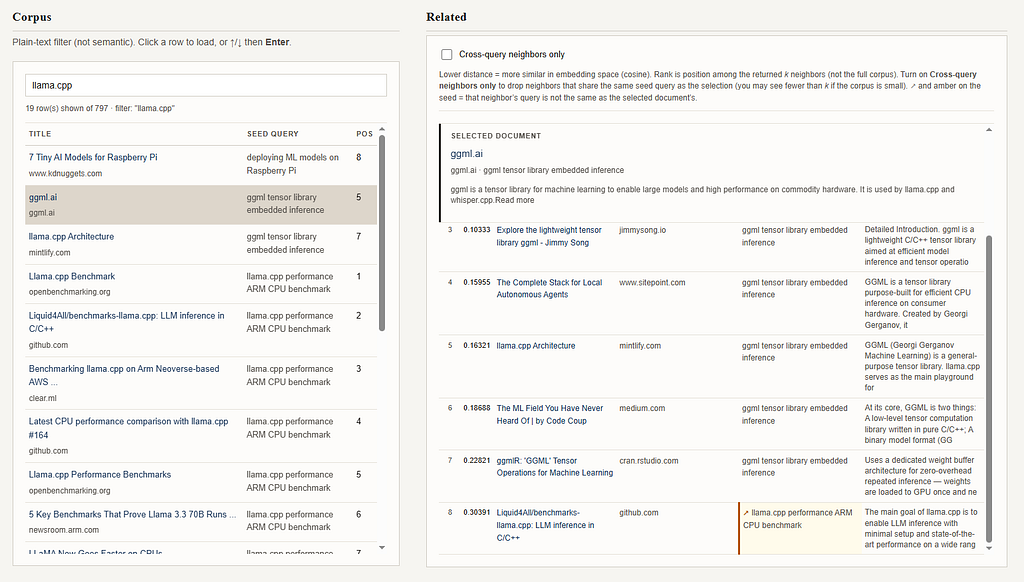
So let’s just talk about the core JS we need — a loadNeighbors function that hits/api/neighbors, builds the anchor card, maps neighbors into a table row each with rank, cosine distance, title, domain, seed query, and snippet.
Full code here: /static/index.html
  async function loadNeighbors(id, tr) {
  setRowActive(tr);
  focusId = id;
  const seq = ++loadSeq;  // capture sequence before any await
  nPanel.hidden = false;
  anchorBox.innerHTML = "<p class=\"meta loading-cell\">Loading…</p>";
  neighborsBox.innerHTML = "";

  try {
    const res = await fetch("/api/neighbors?id=" + encodeURIComponent(id) + "&k=8");
    const data = await res.json();
    if (seq !== loadSeq) return;  // a newer click landed first, discard this result

    if (!res.ok) {
      anchorBox.innerHTML = "<p class=\"err\">" + escapeHtml(data.error || res.statusText) + "</p>";
      return;
    }

    const a = data.anchor;
    anchorBox.innerHTML = /* anchor card HTML */;

    const n = data.neighbors || [];
    neighborsBox.innerHTML = n.length === 0
      ? "<p class=\"meta\">No neighbors (check embed.py / Chroma).</p>"
      : buildNeighborTable(n);

  } catch (e) {
    if (seq !== loadSeq) return;
    anchorBox.innerHTML = "<p class=\"err\">" + escapeHtml(String(e)) + "</p>";
  }
}

(async function init() {
  try {
    const res = await fetch("/api/rows");
    const data = await res.json();
    allRows = data.rows || [];
    renderTable(allRows);
  } catch (e) {
    rowMeta.textContent = "Failed to load /api/rows: " + e;
  }
})();
And that’s everything for code! Let’s look at some interesting results I found.
Results: What Cosine k-NN Reveals Across 100 Google Searches
I ran five metrics over every document in the corpus to verify the pipeline was actually bridging queries (rather than just clustering within them.) The answer was a resounding yes — 42.2% of all neighbor links crossed query boundaries, and every one of the 797 documents had at least one cross-query neighbor in its top 8 — including the niche ones!
You can see the full raw data here: metrics.json
The per-query breakdown is where it gets really interesting.
Hub Queries vs. Island Queries: How Semantic Density Varies by Topic
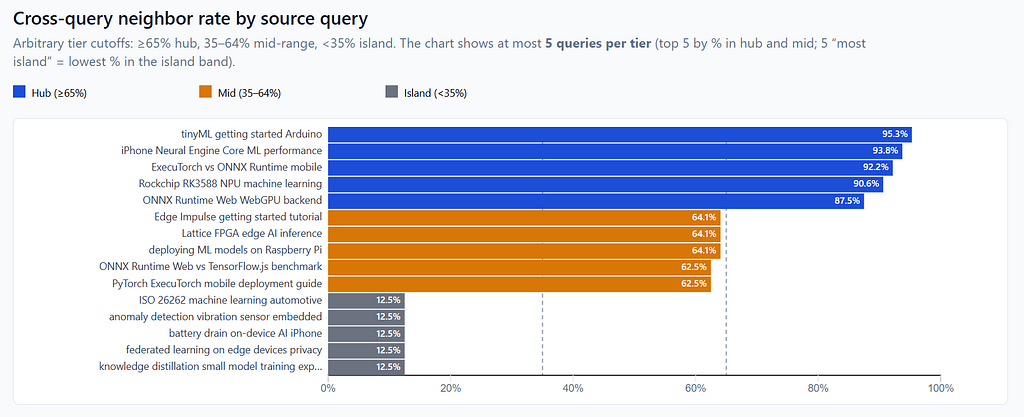
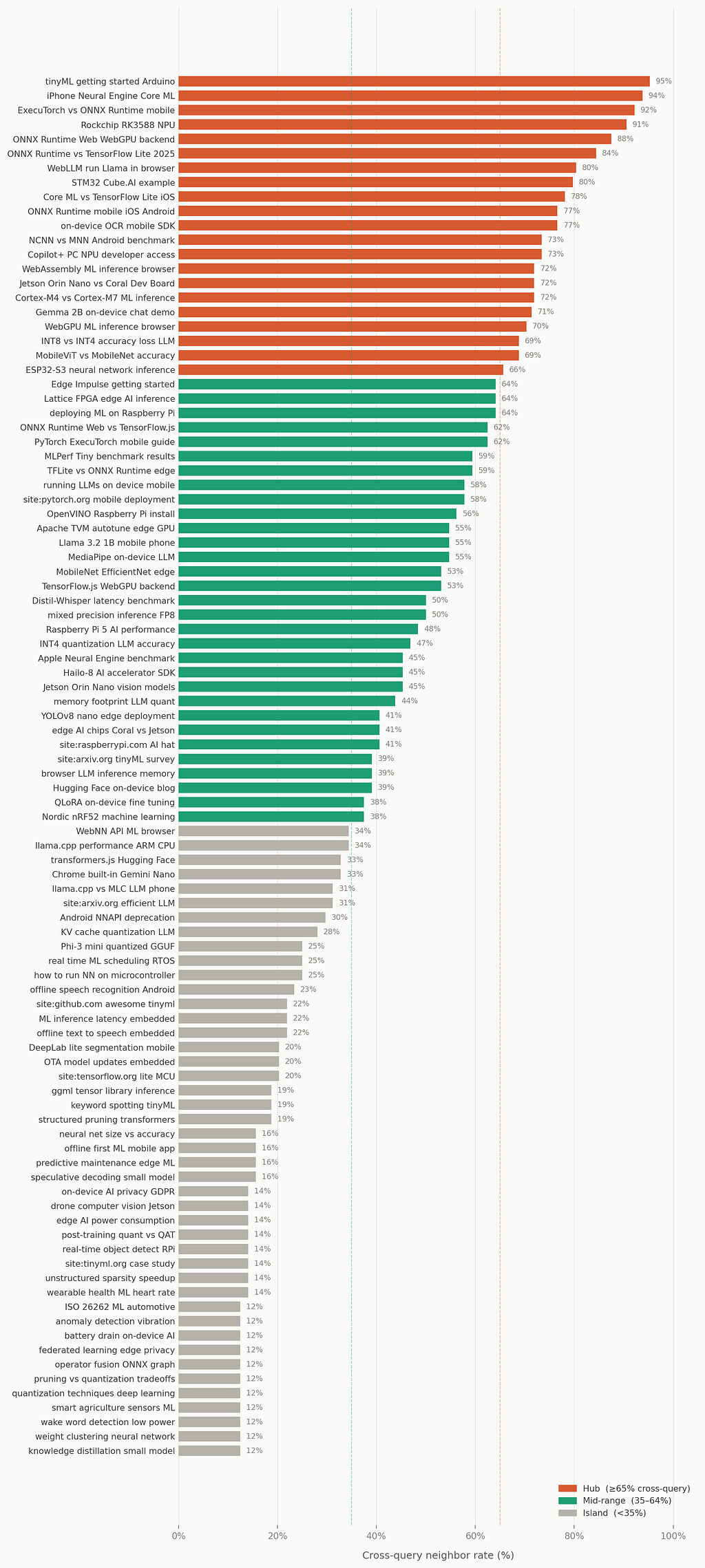
The tinyML getting started Arduino query scores 95.3% — the highest in the corpus, and on the surface, a beginner tutorial query. But its documents live at a vocabulary crossroads: the k-NN pulled neighbors from 17 different source queries, spanning hardware datasheets, ArXiv surveys, RTOS scheduling guides, and mobile deployment docs. Without the merged corpus you'd only have a list of tutorials. With it, we see that this query sits at the center of the whole topic space. Turns out, a specific chip or runtime can be a crossroads of multiple topics.
The “island” end is just as revealing. pruning vs quantization, weight clustering, knowledge distillation — all 12–19%. Clearly, model compression theory forms a tight, self-contained cluster that talks to itself fluently and barely touches the rest of the corpus. If you're researching compression techniques, you're in a separate conversation from the people researching deployment and hardware — even though most would assume those worlds overlap.
How Query-to-Query Edges Reveal Hidden Connections
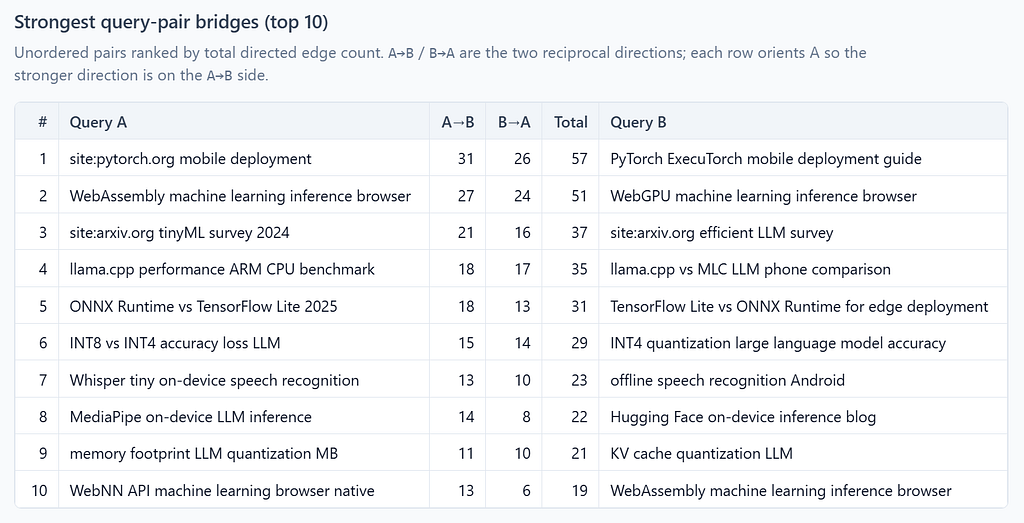
The query-to-query edge count measures how many neighbor links flow between each pair of source queries across the whole corpus:
| Rank | Query A | A→B | B→A | Total | Query B |
| ---: | --- | --: | --: | --: | --- |
| 1 | `site:pytorch.org mobile deployment` | 31 | 26 | 57 | `PyTorch ExecuTorch mobile deployment guide` |
| 2 | `WebAssembly machine learning inference browser` | 27 | 24 | 51 | `WebGPU machine learning inference browser` |
| 3 | `site:arxiv.org tinyML survey 2024` | 21 | 16 | 37 | `site:arxiv.org efficient LLM survey` |
| 4 | `llama.cpp performance ARM CPU benchmark` | 18 | 17 | 35 | `llama.cpp vs MLC LLM phone comparison` |
| 5 | `ONNX Runtime vs TensorFlow Lite 2025` | 18 | 13 | 31 | `TensorFlow Lite vs ONNX Runtime for edge deployment` |
| 6 | `INT8 vs INT4 accuracy loss LLM` | 15 | 14 | 29 | `INT4 quantization large language model accuracy` |
| 7 | `Whisper tiny on-device speech recognition` | 13 | 10 | 23 | `offline speech recognition Android` |
| 8 | `MediaPipe on-device LLM inference` | 14 | 8 | 22 | `Hugging Face on-device inference blog` |
| 9 | `memory footprint LLM quantization MB` | 11 | 10 | 21 | `KV cache quantization LLM` |
| 10 | `WebNN API machine learning browser native` | 13 | 6 | 19 | `WebAssembly machine learning inference browser` |
The site-scoped pairs at ranks 1 and 3 are worth a second look: site:pytorch.org pairs tightly with the broader ExecuTorch guide; site:arxiv.org pairs with the wider LLM survey. Our pipeline is detecting that a scoped search is a zoom-in on a broader topic — without being told.
Query Boundaries Barely Exist in Embedding Space
For each document, I measured the cosine distance difference between its nearest same-query neighbor and its nearest cross-query neighbor. A cross-query neighbor at distance 0.246 was nearly as semantically close as a same-query neighbor at 0.202.
Also, on average, such cross-query neighbors sit only a ~0.06 cosine distance away than a same-query one. That’s definitely not a loose thematic connection — in fact, it’s nearly as tight as the results Google already ranked together. Our pipeline is actually finding close ones that were never in the same search to begin with.
Conclusion: A Proximity-Based Knowledge Graph
Going proximity-based instead of Google’s traditional relevance-ranked, and cross-query instead of query-bound, gives us something Google does not. The 42.2% cross-query rate and the 3.52 average unique queries per neighborhood are evidence that the semantic space over a merged corpus has structure that rewards exploration.
This is a fine research tool, but also a setup for something even MORE useful.
You could always swap Nomic for a larger embedding model, add reranking, build a graph visualization over the query-to-query edges, or pipe this into a RAG system as a retrieval layer. If you take a shot at this, let me know in the comments, or just reach out on LinkedIn.
Some links in this article are tracking links used for analytics purposes only. I do not receive any commission or compensation from them.
Turning Google into an Explorable Knowledge Graph Using Pure k-NN was originally published in Level Up Coding on Medium, where people are continuing the conversation by highlighting and responding to this story.