What is publication context-based configuration? How we serve 7–10 different websites from 1 single codebase with same code?
Hi, I’m Sumonta Saha Mridul, an Associate Software Engineer at Cefalo, Bangladesh. I love to share technical knowledge and architectural insights from a junior developer’s perspective.
Currently, I’m working as a junior software engineer on a client project with the OG teammates. To give some context, without diving too deep, we work for a news media group in Norway and handle most of the technical responsibilities from our side.
One interesting aspect of our work is that we serve news publications’ websites, and each publication has different pages, purposes, and target audiences. The media group owns multiple publications, each with its own context. To support this, we run around 7–10+ different websites.
What really caught my attention after joining the team is that we serve all 7–10 publication websites from a single codebase. That’s fascinating, and there’s a lot of architectural learning behind it.
In this write-up, I want to share that idea in a simple level way. I won’t deep dive into implementation details, but I hope it gives you an understanding that systems can be designed and scaled like this, too.

The first question that comes to mind: Why many publications?
Let’s imagine you’re building a news media platform called “Desh Alo.”
You want to reach a broad audience, connect with local readers, along with a global audience. Naturally, you want to cover many sections. But trying to do everything under a single publication can quickly become cluttered and hard to manage.
A better approach is to split the platform into multiple publications, where each section becomes its own independent product. This allows teams to work independently, move faster, and focus on specific audiences. As a result, the product grows more efficiently and reaches a wider range of readers.
Instead of one newspaper, you now have multiple specialized publications, each serving a distinct purpose: (Example)
- Desh Alo (www.DeshAlo.com) → Daily hot news for Bangladeshi Audience
- Desh Alo Sports (www.DeshSports.com) → Focused on cricket and football
- Desh Alo Education (www.DesEdu.com) → Focused on student resources
- Desh Alo Business → Stock market and financial news
- Desh Alo Lifestyle → Fashion, food, and culture
- Desh Alo USA → News for the US Bangladeshi community
- Desh Alo Australia → News for the Australian community
- Desh Alo Fish Market → News for Global Fishing Market
…and so on. (These are an imaginary website name used for example)

This structure makes the platform easier to scale, easier to maintain, and much more effective at serving diverse audiences. (This helps both the writers and the clients)
The second question that comes to mind: Why not create separate projects for different websites (publications), since they serve different audiences?

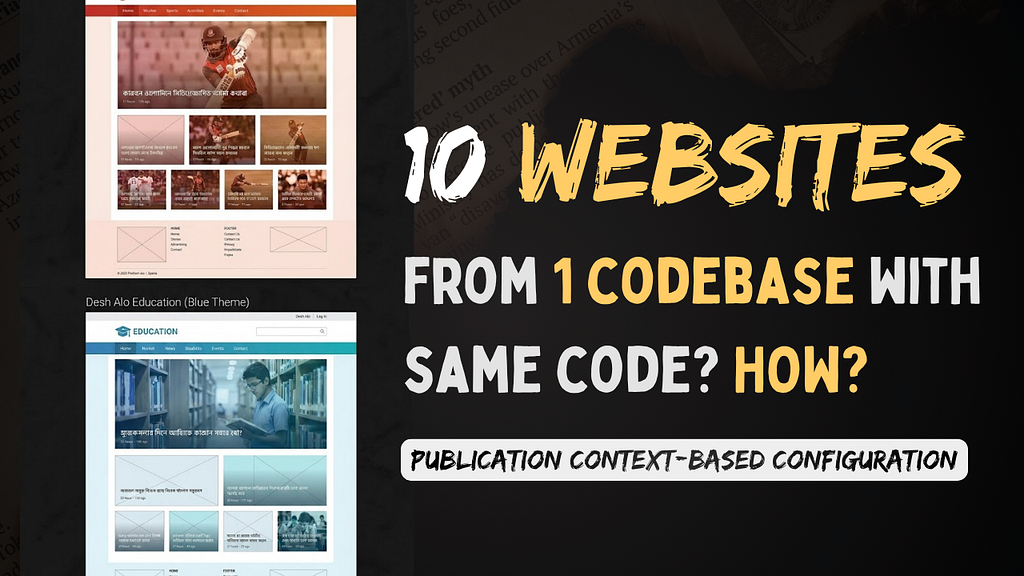
When you look at these websites side-by-side (AI-generated, for example), you notice something interesting. The UI Skeleton is almost identical:
- Header Section: Logo on the left, search on the right.
- Navbar: Links to categories.
- Article List: A grid showing thumbnails and headlines.
- Common Things: CSS, Color, Font
- Functionality: Like, Subscribe, Bookmark Button in Same Position
- Each shows a list of articles in the same format: cards, thumbnails, headlines
- Footer: Copyright and social links.

What actually changes from one publication to another are just a few things:
- Header title (Desh Alo Sports vs Desh Alo Education)
- Color theme (Sports has a Red/Orange theme vs Education has a Blue/Cyan theme)
- API endpoints (Sports fetches data from the Our Sports_API Backend and education fetches data from the Education_API.)
- Ads and data sources
Note: In this article, I am ignoring the backend logics and structure.
So the structure stays the same, only the skin (theme) and data change.
If we go back to the question again!
Technically, yes, we can create 7–10 different repositories for 7–10 Desh Alo websites. That’s the easiest and most straightforward option.
But that leads to a bigger problem.
The Main Problem
To support these 7–10 publications, in that case, we have to own:
- 7–10 different repositories
- 7–10 different codebases
- 7–10 GitHub Actions pipelines
- Manual updates for each repository
From a distribution standpoint, this works.
But here’s the issue:
Even though:
- The data sources are different
- The purpose is different
…the UI and structure are mostly the same.
Now imagine the company decides to redesign the header.
So if a small change is needed, for example, updating the navbar or redesigning the header, we have to:
- Update the same UI and CSS in all 7–10 repositories
- Create 7–10 separate PRs
- Maintain 7–10 CI/CD pipelines
This process becomes: Slow, Repetitive, Hard to maintain, Difficult to scale

What if a new publication comes? Do we need to create a new repository?
The Third Question: What is the solution?
Solution: The Publication Configuration System
Instead of multiple codebases, we can use a single codebase with a publication configuration system.
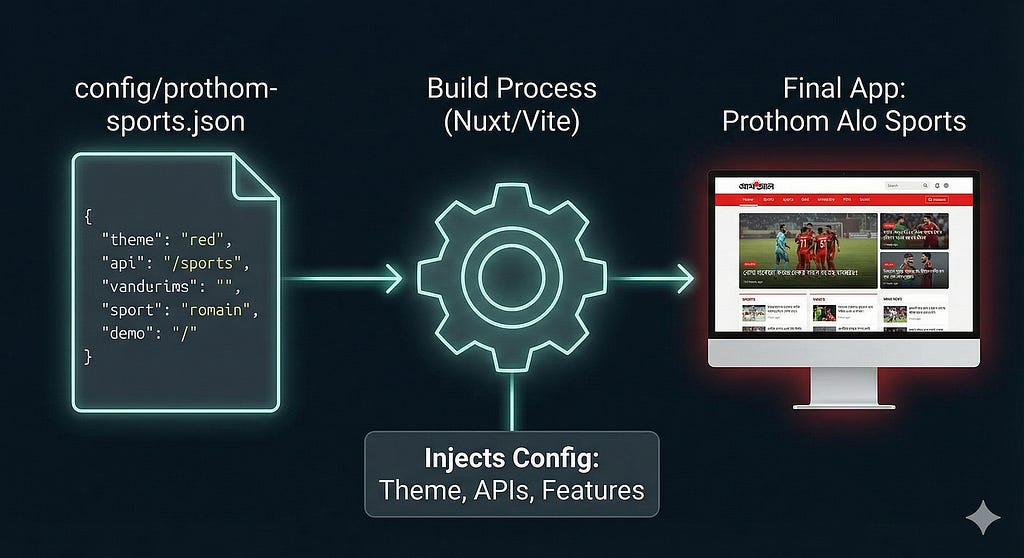
The idea is simple: We build the engine (the UI components, logic, and routing) once. Then, we feed it a “Configuration File” that tells the engine which website to build.
Each publication (for example, Desh Alo Education) will have its own JSON configuration file that defines:
- Header titles
- API endpoints for each page
- Page structure
- Design patterns
- CSS, images, links
- Feature toggles
Then we will create each page and component dynamically load based on the publication system loaded at run time
We won’t start all websites at once or switch between applications. Instead, when we start the repository, we’ll define which website (publication) we want to run.
Based on that, the application will load the corresponding JSON configuration. For example, if we want to run DeshAlo Education, we’ll start the app with that specific publication selected. In that case, we’ll only see the DeshAlo Education website
So, at runtime, we decide which application/publication we want to start, and the system loads everything based on that configuration.
How It Works (Vue / Nuxt Example)
We create a folder called config, and inside, we have specific JSON files for each publication.
How do the JSON Configs Look?
config/desh-sports.json
{
  "publicationId": "sports-01",
  "theme": {
    "primaryColor": "#FF4500",
    "font": "Roboto"
  },
  "api": {
    "baseUrl": "https://api.deshalo_sports.com",
    "endpoints": {
      "latest": "/sports-news/latest"
    }
  },
  "features": {
    "showLiveScore": true,
    "showStockTicker": false
  },
  "meta": {
    "title": "Desh Alo Sports"
  }
}
config/desh-alo-edu.json
{
  "publicationId": "edu-01",
  "theme": {
    "primaryColor": "#008B8B",
    "font": "Lato"
  },
  "api": {
    "baseUrl": "https://api.deshalo_edu.com",
    "endpoints": {
      "latest": "/edu-news/latest"
    }
  },
  "features": {
    "showLiveScore": false,
    "showStockTicker": false
  },
  "meta": {
    "title": "Desh Alo Education - Learn More"
  }
}
Normally, when we run:
npm run dev # We can not use this anymore
With a publication configuration system:
- The project first decides which publication to run
- npm run dev alone won’t be enough
- We pass the publication name, for example:
Now, in our package.json, We have commands that inject these configs:
# To run the Sports site
npm run dev:desh-alo-edu
# To run the Education site
npm run dev:desh-alo-sports
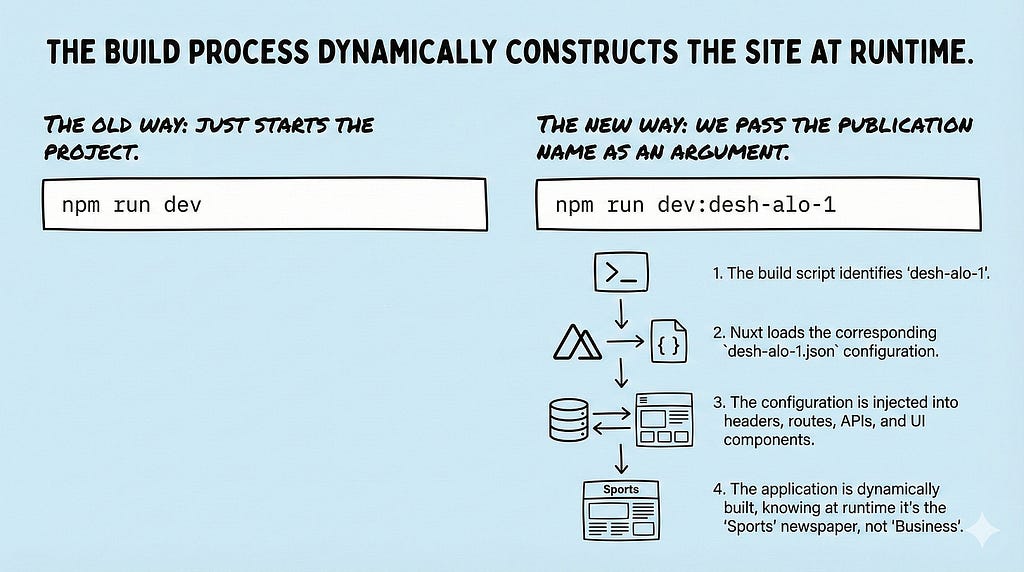
Now Nuxt:
- Loads the JSON config for Desh Alo Education
- Injects the config into headers, routes, APIs, UI, and layouts
- Dynamically builds the website based on that configuration
At runtime, the app knows it’s running an education newspaper, not sports or business.
Most interestingly, for each publication, we can add multiple configuration layers. For example, we can define different settings for test, development, and production environments, and this makes the system even more powerful and flexible.
Each publication can have multiple config layers, such as:
- default.json
- deshalo_edu.json
- prod_desh_alo_edu.json
- stage_desh_alo_edu.json
- test_desh_alo_edu.json
So we can run:
npm run dev:desh-alo-edu-test
This will:
- Load Desh Alo Education
- Apply test-environment overrides
- Run the app exactly like production, but with safety tools for testing
Now Everything becomes dynamic.
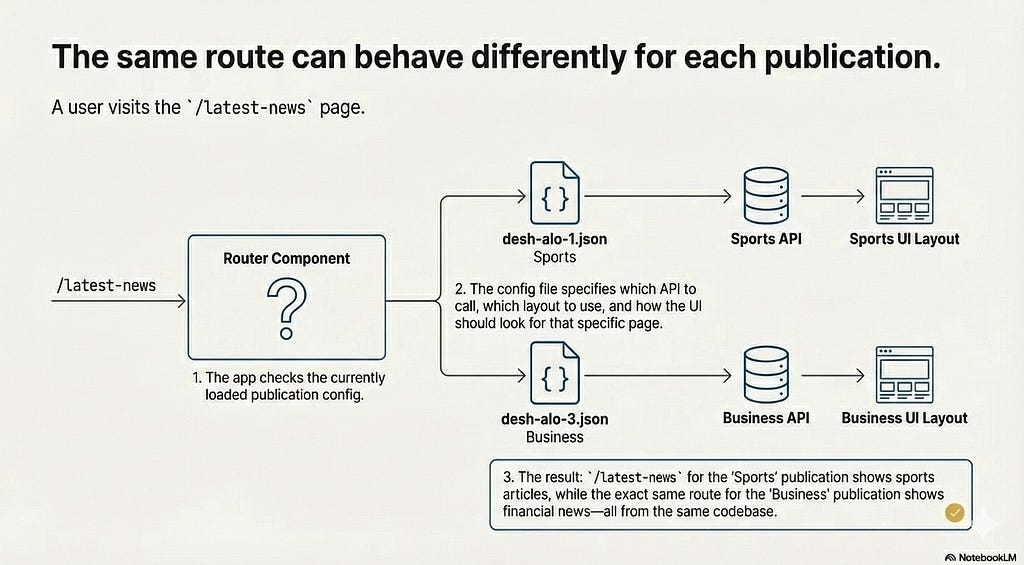
For example:
- A user visits /latest-news (www.DeshSports.com/latest-news)
- The app checks the publication config
Finds:
- Which API to call
- Which layout to use
- How the UI should look
The same route (/latest-news) can behave differently for different publications without separate codebases.
Are there any extra benefits?
Yes, there are several additional benefits to this approach:
- Independent Deployment and Execution: By using publication-configuration, each publication will have its own distinct Docker setup and deployment pipeline.
- Fault Isolation: In the future, if an issue occurs, we can take down just that specific publication rather than the entire system.
- Strategic Resource Management: During periods of high CPU usage or critical traffic spikes, we can temporarily shut down smaller, less important publications to ensure the main, high-demand publications stay online and stable.
The Big Question: Why Not Just Use Page Routing?
This is where many developers (including myself initially) get confused. You might ask:
“Why go through all this trouble with JSON configs and build scripts? Why not just have one repository with different routes?”
Like:
- DeshAlo.com/sports/home
- DeshAlo.com/education/home
And then just use reusable components for both?
This is a valid question, but here is why Page-Based Routing fails for this specific scenario:
1. A Publication is Not Just a Single Page
A “Publication” isn’t a single route. It is a complete ecosystem. Each publication is a full newspaper website, including:
- Home page
- /latest page
- Article pages
- Topic/section pages
- Search page
- Nested routes and layouts
So this is not a routing problem.
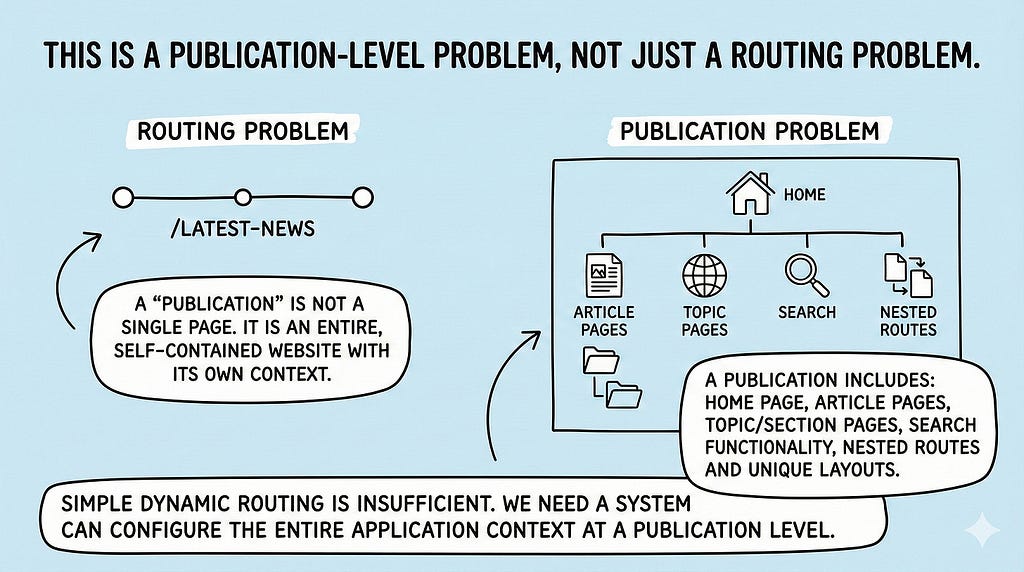
Desh Alo Sports isn’t just one page. It has its own Home, its own Search, its own Article Details, its own Category pages, and its own 404 error page.
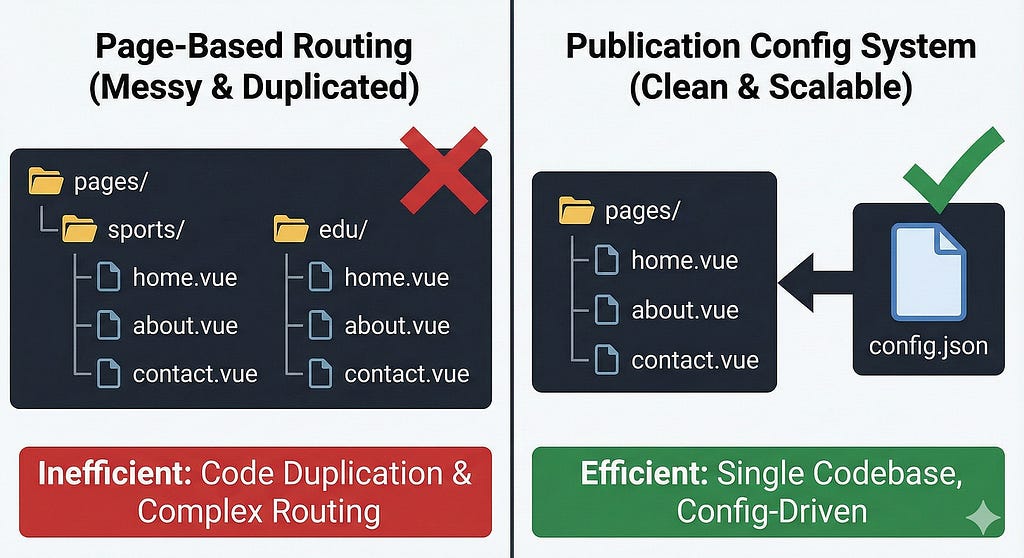
If you use page-based routing like /sports/home, you’re essentially nesting an entire website inside a route. This quickly becomes messy. Your folder structure ends up looking like:
- pages/sports/about.vue
- pages/sports/contact.vue
- pages/education/about.vue
You start duplicating the same route structure for every section. This doesn’t actually solve the problem; it just moves it somewhere else and makes the codebase harder to maintain.
2. Domain Management
We want domains like www.DeshAloSports.com, not www.DeshAlo.com/sports.
While it’s possible to handle this with complex middleware and routing logic, a Publication Configuration System treats each publication as a distinct application. When you’re on the Sports site, only the Sports-related code is loaded. The Education or Stock Market widgets aren’t even part of the bundle.
This approach:
- Keeps the architecture clean
- Improves performance
- Avoids unnecessary code loading
- Makes each publication feel like a true standalone product
That’s why a configuration-based system is a better fit than page-based routing for this kind of setup.
3. Feature Toggling Complexity
If we just used page routing, our code would be filled with messy if-else statements everywhere
// The "Bad" Way (Page Routing approach)
if (route.path.includes('sports')) {
  showScoreboard();
} else if (route.path.includes('business')) {
  showStockTicker();
} else if (route.path.includes('education')) {
  showExamResult();
}
With a Publication Configuration System, we don’t check the route. We check the config:
// The "Clean" Way
if (config.features.showScoreboard) {
  showScoreboard();
}
The app doesn’t need to know “which” website it is. It just follows the rules given to it at startup.
Conclusion
The goal of this write-up was to share a thought process, to show how it’s possible to serve multiple websites on different domains, with the same theme and structure, from a single repository.
This was the first time I explored this kind of architecture deeply, and there’s still so much more to cover. I didn’t dive into backend systems, deployment strategies, or environment orchestration here. Like everything in engineering, this approach has its own trade-offs. There is no perfect solution, only solutions that best fit a given context.
For our case, this approach made the most sense. In other scenarios, the answer might be different.
I’ll share more interesting learnings from our projects in the future. Until then, feel free to share your thoughts and what you learned from this.
Final Thought
Transitioning to a Publication Configuration System taught me something important:
Sometimes, the best engineering solution isn’t writing more code, it’s designing better systems.
By decoupling behavior (JSON configuration) from implementation (code), we can launch Desh Alo Farmer, Desh Alo Child, or even Desh Alo Canada in minutes simply by adding a new configuration file, without touching the core logic.
That’s the real power of architecture over routing.
That’s all! I hope you learned something new or saw tech from a new angle. Until next time, keep learning and building!
I regularly share what I learn through weekly posts on LinkedIn, Dev. to, and Medium. Also, I run a small YouTube channel where I try to share helpful content for developers.
Sumonta Saha Mridul, Associate Software Engineer I, Cefalo Bangladesh Ltd.
- YouTube: Code & Career Golpo
- Medium: Sumonta Saha Mridul
- Hashnode: Code & Career Golpo
- Substack: Sumonta Saha Mridul | Substack

What is publication context-based configuration? was originally published in Level Up Coding on Medium, where people are continuing the conversation by highlighting and responding to this story.