We Built a Free Crypto Signal Dashboard. Here’s a Complete Walkthrough of Every Tool.
 Coinugget8 min read·Just now
--
A complete walkthrough of Coinugget — the real-time signal dashboard that puts RSI, volume spikes, Bollinger Bands, EMA trends, and a dozen other signals on a single screen.
We’re the team behind Coinugget. This article is a first-person walkthrough of the platform we built, written to share what it does and why we built it this way.
Most crypto traders spend more time switching between tabs than actually making decisions. You check a chart, then a screener, then a news site, then back to the chart. By the time you’ve pulled together enough context to act, the candle has already closed.
That was the problem we kept running into. So we built Coinugget — a free, no-login-required dashboard that puts every meaningful market signal on one screen. This is a walkthrough of every tool it has, because most overviews focus only on one feature and miss the bigger picture.
What Is Coinugget?
Coinugget is a real-time crypto intelligence dashboard. There’s nothing to configure. You open it, and you immediately see a live feed of which coins are showing volume spikes, RSI extremes, Bollinger Band breakouts, EMA alignment, candle pattern reversals, and more — all updating through a WebSocket connection, typically within one to three seconds.
The platform covers 500+ coins across major exchanges (Binance, Bybit, Gate.io) and is available in 17 languages: English, Korean, Chinese, Hindi, Arabic, Spanish, Indonesian, Russian, Japanese, Vietnamese, French, German, Portuguese, Turkish, Thai, Italian, and Dutch.
Completely free. No account required for the core dashboard.
What You See When You Open It
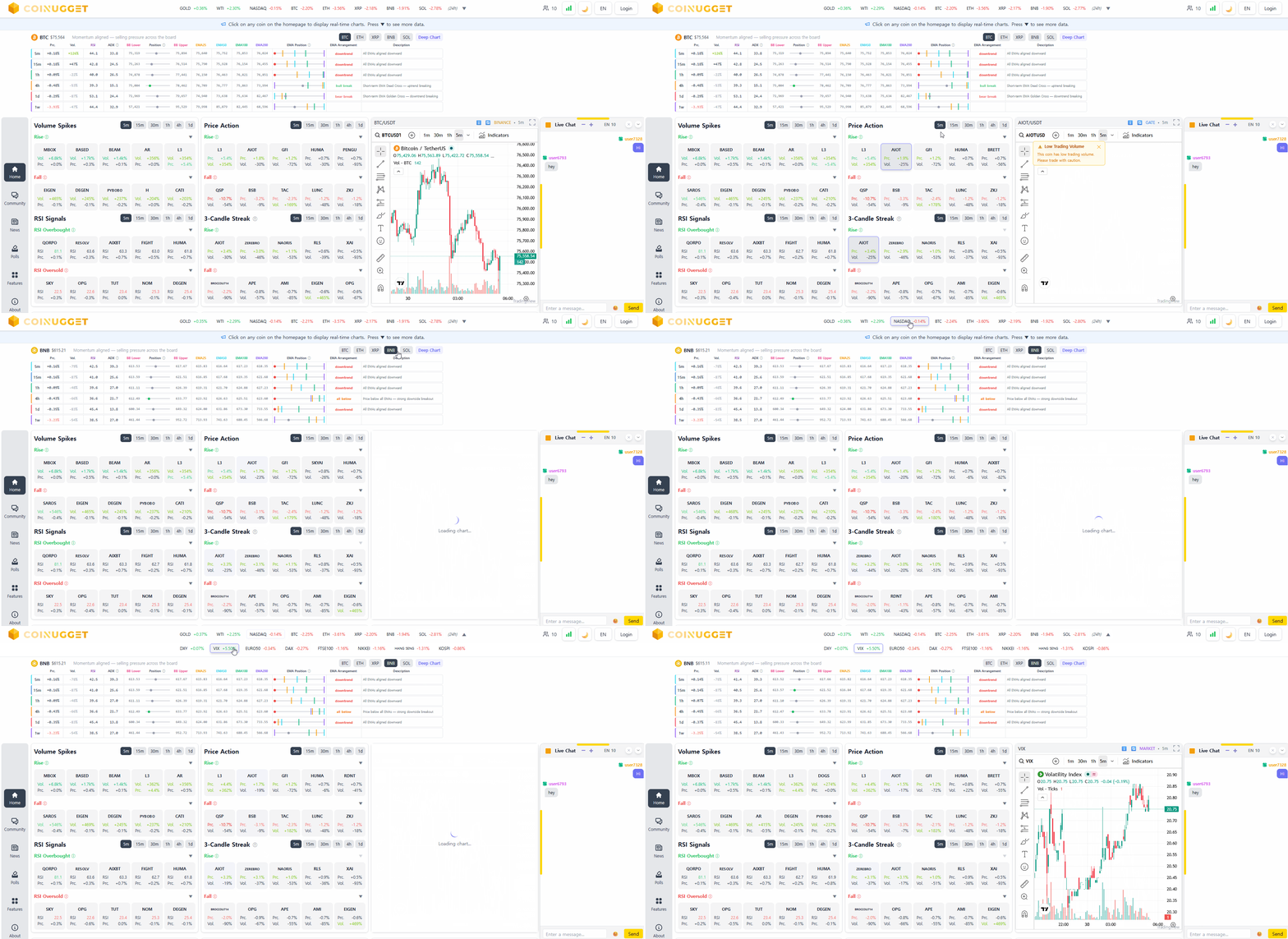
The main dashboard is a live signal board. Everything on it is updating in real time, based on the current in-progress candle compared to the previous closed one. No refresh needed, no setup, no delay.
Across the top there’s a scrolling market ticker showing prices and 24-hour changes for major coins and global indices — BTC, ETH, S&P 500, gold. Below that, the screen splits into signal panels. Each one covers a different angle on the market.
Volume and RSI panels catch coins where something is clearly starting to move — abnormal volume against the previous candle, RSI breaking into extreme zones, or multiple candles trending the same direction. The price action panels rank coins live by how much they’ve moved and flag sudden surges or drops the moment they happen in the current candle. Breakout panels scan for Bollinger Band breaks and key support or resistance levels being crossed — the kind of levels you’d normally have to draw by hand. The reversal pattern panel runs a continuous algorithmic scan looking for long-wick candles and double or triple tops and bottoms forming across all 500+ coins simultaneously.
Click any coin from any of these lists and the TradingView chart on the right loads it instantly. No new tab, no copying a ticker. The chart stays open while you keep scanning — that’s the whole point of having everything in one place.
There’s also a compact EMA signal board for a selected group of coins that shows RSI, volume, Bollinger Band position, and EMA alignment across multiple timeframes in one view. If you’ve ever wanted to check the multi-timeframe structure of five coins at once without opening five charts, that’s what it’s for.
Community Feed
There’s a built-in community where traders post observations, analysis, and alerts. A few things make it different from the usual crypto forum.
Each of the 17 supported languages has its own independent forum. Korean traders discuss Korea-relevant conditions; Arabic traders discuss theirs. You’re not scrolling through posts in languages you can’t read to find what’s relevant.
Trending posts are tracked by coin and topic in real time. When a coin starts showing up in community discussions before it appears on signal panels, that’s often an early signal worth paying attention to.
You can filter by category — analysis, alert, news, question — and by hashtag, which makes finding high-quality posts significantly faster than scrolling.
Crypto News & Market Indicators
The news page has three distinct sections working side by side.
The center column is the main news feed. Articles arrive in real time, each tagged with a sentiment label — Bullish, Bearish, or Neutral — so you can read the market mood at a glance without opening every article.
On the left is a filter sidebar. You can narrow the feed by sentiment (Bullish / Bearish / Neutral) or by category (All / General / BTC / ETH / Altcoins). Below the filters is a Watchlist section with direct links to the accounts that tend to move markets — figures like Elon Musk, CZ, Michael Saylor, and Arthur Hayes. When the market starts moving fast and you want to check if someone said something, they’re right there.
The right panel is where the market data lives, split into two tabs.
The On-Chain tab covers BTC price with 1h, 24h, and 7d comparisons, the Fear & Greed Index, CME futures gap status (whether last Friday’s close and Monday’s open left a gap and whether it’s been filled), and a full market overview — BTC dominance, altcoin season index, total market cap, and 24-hour volume. Below that is real-time regional premium data for ten countries including South Korea, the US, Japan, India, Turkey, and others. This shows how local exchange prices compare to Binance prices — the kimchi premium being the most well-known example, but most of these markets have their own divergences.
The Derivatives tab shows funding rates across major exchanges, long/short ratios, 24-hour liquidation totals broken down by long and short, open interest by exchange, BTC futures basis, and BTC ETF weekly flow data — inflow, outflow, and the trend compared to the previous week.
Polls & Bets
This one is a little different from the other sections. It’s part market sentiment tool, part game — and the two things work better together than you’d expect.
The page splits into two modes. The first is free voting, no stakes involved. Questions run on 24-hour and 7-day cycles: Will BTC go up or down in the next 24 hours? Which coin will gain the most today? Where will the Fear & Greed Index land? Which asset performs best this week — BTC, Nasdaq, gold, or something else? Casting a vote takes a few seconds and earns you nuggets, Coinugget’s in-app points. Votes reset daily at UTC 00:00.
The second mode is betting. Same questions, but you wager your nuggets on the outcome. The platform shows live odds and your potential payout based on the current pool. Get it right and your nuggets grow. Get it wrong and they don’t. There’s also a Top Diggers leaderboard tracking who has accumulated the most points — which adds a competitive layer that makes checking back after a result lands feel like more than just data.
Where the actual market information comes in is the country breakdown. Below the polls, you can see the current long/short split by country — how traders in South Korea, the US, Japan, India, and others are collectively voting. When one country’s sentiment diverges significantly from the global split, it occasionally lines up with how that region’s market moves. It’s not a primary signal, but it’s the kind of data that’s genuinely hard to find anywhere else for free.
Put together, the polls page is probably the most approachable entry point on the site. It doesn’t require you to read a chart or interpret an indicator. You just have a view, you click it, and you see what the rest of the world thinks.
Embeddable Widgets
Everything on Coinugget can also be embedded as a widget on your own site. Visit widget.coinugget.com, pick a widget type — Major Index Changes, RSI Signals, Top Winners, Price Action, Regional Premium, or Derivatives — and copy one line of iframe code. No API key, no registration.
Particularly useful for crypto news sites, analysis blogs, or community forums that want live market data without building a data pipeline from scratch.
How the Data Works
Coinugget connects to exchange APIs via WebSocket for real-time data. Most signals refresh within one to three seconds. The platform compares each signal against the current in-progress candle versus the previous closed candle — a distinction the interface makes explicit because it matters for how you interpret what you’re seeing. A signal based on an unfinished candle carries different weight than one confirmed on a closed candle.
Who This Is For
If you’re an active trader currently splitting your attention across multiple screeners, charts, and news tabs, this consolidates most of that into one place. If you do crypto analysis and want to scan 500 coins for setup conditions without opening individual charts, the signal panels cover that. If you run a crypto site and want live data widgets without API subscriptions, the embed tool is straightforward. And if you’re just getting started and want a free, no-account-required overview of what the market is actually doing, it works for that too.
The Bottom Line
What makes Coinugget worth the time isn’t any single signal — it’s having all of them on one screen, updating live, without a subscription or a setup process.
Most crypto dashboards either show too little (basic price data) or gatekeep the useful signals behind paid tiers. Here, the full suite — RSI, Bollinger Bands, EMA alignment, reversal patterns, community sentiment, on-chain indicators — is free from the moment you open the page.
If you’ve been spending more time switching tabs than making calls, it’s worth a look.
coinugget.com — widgets at widget.coinugget.com — 17 languages, no signup required.