Can we create a recommend movies using a chatbot?

The recent advent of agentic AI workflows has taken the world by storm. From software building to maintaining and updating deployed systems to banking systems, the workflow systems are taking over. The current advanced architecture enables AI agents to imitate real life working scenarios, like a team of people working together, sharing work and opinion to get the job done. In this piece, we will look into such a multiagent system for movie recommendations.
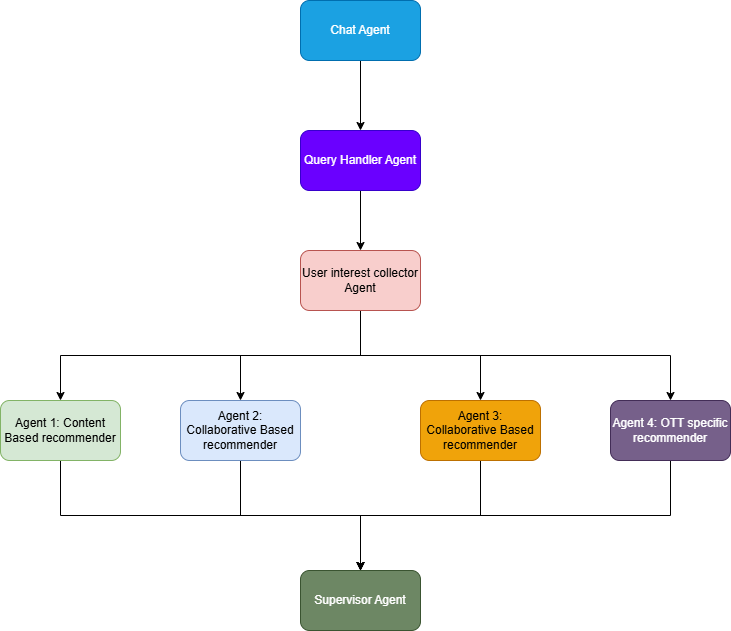
Based on different recommendation techniques, we are going to build 4 main agents handling different aspects of recommendations, supported by two others for handling user orientations. All of them will report to a supervisor agent responsible for providing the final recommendation to the user.
Datasets
Let’s know the datasets first. We will be using 8 datasets in total from kaggle for this entire project.
1: Top 1000 Highest Grossing Movies
2: Wikipedia Movie Plots
3. TMDB 5000 Movie Dataset
4. MovieLens 20M Dataset
5. IMDB Movies Dataset
6. Netflix Movies and TV Shows
7. Amazon Prime Movies and TV Shows
8. Disney+ Movies and TV Shows
The dataset number 1, 3 and 5 are used for content based filtering, 4 is used for collaborative filtering. Dataset 2 is used for filtering by similar story plots and 6,7 and 8 is used for specific OTT platform services filtering.
Tools and Libraries
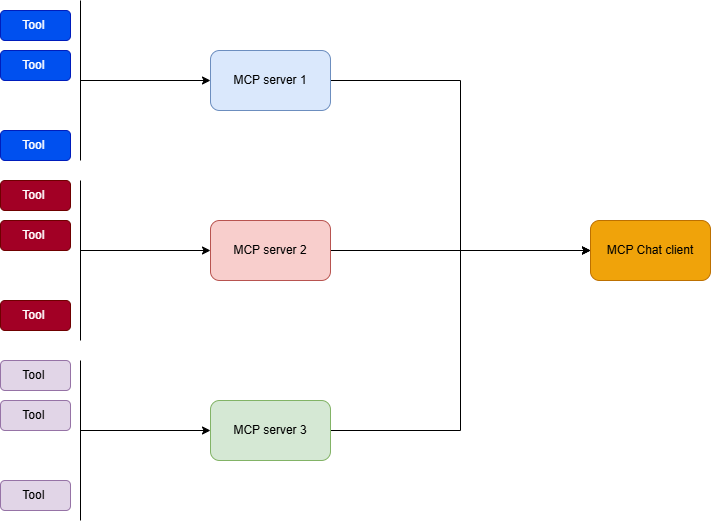
We will building a MCP based agentic system. MCP basically implements an interface or context protocol based system, which keeps the tools and the actual chat agent decoupled. This helps faster development, cleaner and robust deployments as all the MCP tools are hosted on their own servers open to interact with chatbot client. For this, we use FastMCP library, which converts functions to mcp tools.
We also want to build a multi-agent chat system, which requires interaction among agents and interconnections, so we will use Lang-graph, and langChain. We also need ChromaDB and sentence-transformers for the Retrieval Augmented Generation or RAG implementation, where ChromaDB serves as the vector database and sentence-transformers provides with the encoder for the descriptions of the movies for searching the database.
Langchain-mcp-adapters library provides the chatbot client with architecture to add and support multiple mcp tool servers to be used by the client on requirements.
For chatting, and queries, we will use Open-API chatgpt 3.5 turbo model, so the Open AI library is needed. For the final, recommender and the initial chat agent, we need to enable a web search tool, so that they can smartly handle scenarios, where tools are not available. For this we will use Tavily tool, which has pre-built library to be integrated with langchain chat agents.
Data Cleaning and Usage
- We use the TMDB and IMDB datasets as the database for the content based filtering system. For this we create a unified dataset with the fields genres, overview, runtime, rating, cast and release year.
- For each of the OTT services, we pick the columns type, title, cast, release_year, rating, genre which is present as “listed in”, and description.
- For the Wikipedia plot dataset, we pick the columns Release Year, Plot and Title columns for our dataset
- From the MovieLens 20M dataset, we create our base for collaborative filtering. The dataset is very big for traditional matrix factorization approach of collaborative filtering, so, we drop movies that has been rated by less than 5 people and the users who have rated less than 50 movies.
Data Pre-Processing and Database Creation
- For the content based systems, OTT based systems, and plot based systems:
a. Drop the NaN rows
b. Convert the genres and casts to lists
c. Clean the overviews and descriptions
d. use MiniLM from hugging face as an encoder for “Title : descriptions/plots” as the text search for the vector DB
e. create metadata from the other columns for the vector DB.
f. Push and create database - For Collaborative systems:
a. We consider 2 ways for providing the collaborative based recommendations: based on user-movie interaction, and user-genre interaction. The user genre interaction helps to provide a wider scope of recommendations.
b. The movie lens provides ratings for each movie by users, which is from 0–5, we convert it from 0–1 for watched and liked. This helps a bit with the cold start problem of collaborative filtering also.
c. For the movies we consider, the movies users marked 4 and above, as 1, and we pick the genres for those movies.
d. We store each user’s top 5 movies for reference while creating predictions.
e. We use SVD to decompose the user-movie matrix for movies and PCA for user-genre matrix, which is followed by the nearest neighbors algorithm for prediction for both cases.
f. All the elements of operations, like the model and scalers and the decomposers are saved as pickle for inference times.
After all these are done, we create a single piece of inference code to read from the vector DBs.
The Cold Start Problem
There exists a basic issue with the collaborative filtering. For a new user, we don’t know the users inclinations, so we can’t find similar users, resulting in no recommendations from collaborative filtering systems. To solve this issue, whenever an user registers to content based service, be it OTT platform or micro blogging platforms like medium or substack, it asks the user its interests or movies or posts user likes. This helps to create an embedding for the user which is used to fetch similar posts or content for the user.
So, we do a similar idea for our collaborative filtering. We compile a list of the 20–30 top liked and popular movies for the user to chose from and also provide a list of the genres available for the user to select from, which helps to get past the cold start problem.
MCP Integrations
The above operations base of 4 different tools. Now is the time to build the executors expose them as tools and integrate with chatbots. MCPs exposes its function tools to be used by the client chatbot in mainly 2 ways: Steamable HTTPs / stdio. The HTTPs way is a more standalone approach, where the tools and client chatbot can interact via HTTP protocol, when placed on 2 different containers in a network, giving it a more scalable and independent approach. While the Std/IO way is file based, where the tool files and the chat client are running on the same system, handled by a standard filesystems IO exchange. The tools have to bind to the LLM client to be used in the chatbot. The LLM client reads the prompt provided and invokes the tools as required.
In order to properly create a MCP tool server, we need to use something called Pydantic library. For proper integration the client needs to know what the tool does, what input it takes and what output it provides. This is brokered by the pydantic’s modelling. It is very similar to input schema verification while writing an Rest API with FastAPI.
from fastmcp import FastMCP
from pydantic import BaseModel, Field

mcp = FastMCP("Content_Filtering")

class RecommendationRequest(BaseModel):
    query: str = Field(..., description="The user's query for movie recommendations.")

class RecommendationResponse(BaseModel):
    ranked_results: list[str] = Field(..., description="A list of recommended movie titles.")

@mcp.tool()
def get_content_based_recommendation(request: RecommendationRequest) -> RecommendationResponse:

    """
    _summary_
    name: "Get Content-Based Movie Recommendations"
    description: "This function takes the user's query and returns a ranked list of movie recommendations based on content filtering techniques."

    Args:
        "input_schema": {
            "type": "object",
            "properties": {
                "query": {
                    "type": "string",
                    "description": "The user's query for movie recommendations."
                }
            },
            "required": ["query"]
        },
        "output_schema": {
            "type": "object",
            "properties": {
                "ranked_results": {
                    "type": "array",
                    "items": {"type": "object"},
                    "description": "A list containing the ranked movie recommendations."
                }
            },
            "required": ["ranked_results"]
        }
    """

......


if __name__ == "__main__":
    mcp.run(transport="stdio")
We need something of this structure to build a proper tool server with fastMCP. The “@mcp.tool” decorator helps to declare the tool in the server. And once you are done with the setting up, all we need to do is run the server to use it.
On the client side, we can establish connections as:
from langchain_mcp_adapters.client import MultiServerMCPClient
from langchain_mcp_adapters.tools import load_mcp_tools

mcp_client_content = MultiServerMCPClient({
    "content_based_recommendation": {
        "command": "python",
        "args": ["content_filtering_mcp.py"],
        "transport": "stdio",
    }

})

mcp_client_collaborative = MultiServerMCPClient({
    "collaborative_based_recommendation": {
        "command": "python",
        "args": ["collaborative_filtering_mcp.py"],
        "transport": "stdio",
    }
})

mcp_client_plot = MultiServerMCPClient({
    "plot_based_recommendation": {
        "command": "python",
        "args": ["plot_based_filtering_mcp.py"],
        "transport": "stdio",
    }
})

mcp_client_specific = MultiServerMCPClient({
    "service_based_recommendation": {
        "command": "python",
        "args": ["provider_specific_mcp.py"],
        "transport": "stdio",
    }

}

from langchain_tavily import TavilySearch

tool_tavily=TavilySearch(max_results=2)

import io
import ipykernel.iostream
import sys

# MCP stdio on Windows expects stderr.fileno(); Jupyter OutStream does not implement it.
if isinstance(sys.stderr, ipykernel.iostream.OutStream):
    try:
        sys.stderr.fileno()
    except io.UnsupportedOperation:
        ipykernel.iostream.OutStream.fileno = lambda self: 2

tools_content = await mcp_client_content.get_tools()
tools_collaborative = await mcp_client_collaborative.get_tools()
tools_plot = await mcp_client_plot.get_tools()
tools_specific = await mcp_client_specific.get_tools()

content_based_recom_llm = llm.bind_tools(tools_content)
collaborative_based_recom_llm = llm.bind_tools(tools_collaborative)
plot_based_recom_llm = llm.bind_tools(tools_plot)
specific_based_recom_llm = llm.bind_tools(tools_specific)
master = llm.bind_tools([tool_tavily])
The MultiServerMCPClient helps to aggregate multiple MCP tool servers and load the tools. One thing to note is, this entire process happens asynchronously, so, it won’t be possible in an environment where async and await is not dirtectly supported like Colab under some circumstances.
We can bind the loaded tools with the LLMs as shown. We have 5 different LLMs here due to the multiagent setup, each LLM for each agent.
Logging Integration
From personal experience, for MCP functions, logging is very essential to keep track of the execution and debugging. Actually, the LLM calling the functions and the inputs passed, the execution of the function and the output returned and produced by the MCP tool is quite a black box operation if we don’t integrate a tool like Langsmith. Even after integrating langsmith, its quite difficult to debug. To prevent this, we need to keep logs for each agents, tools and the chatbot separately, to segregate concerns and debug.
It will be best to create a logger and push it to the individual tool files with different file names for logging.
Retrieval Augmented Generation(RAG) setup
For the OTT specific, content based and plot based recommender systems, we basically need a supporting database to be connected as a source of knowledge to our LLM based chat agent, this is where RAG or Retrieval Augmented Generation comes into play.
For the RAG setup, we use ChromaDB, which is a vector database. We feed the encoded “Title: description” as the text search key and the metadata along with it. For fetching, we introduce a cache db also, for faster fetches.
The function fetches top 5 results from the vector DB. After all 5 results have been fetched, the result documents are sent to a cross-encoder where we use: cross-encoder/ms-marco-MiniLM-L-6-v2 to check which of the returned results best suite the query. We select top 3 movie titles and return them with their description as the response. The responses are ranked using cosine similarities between the embeddings of the query and response provided from the RAG database.
Langgraph Implementation
As discussed, the langgraph based chatbot application is multiagent application with 5 main agents and 2–3 supporting agents each assigned their own tasks. Let’s see the structure of the graph first, explanation follows:
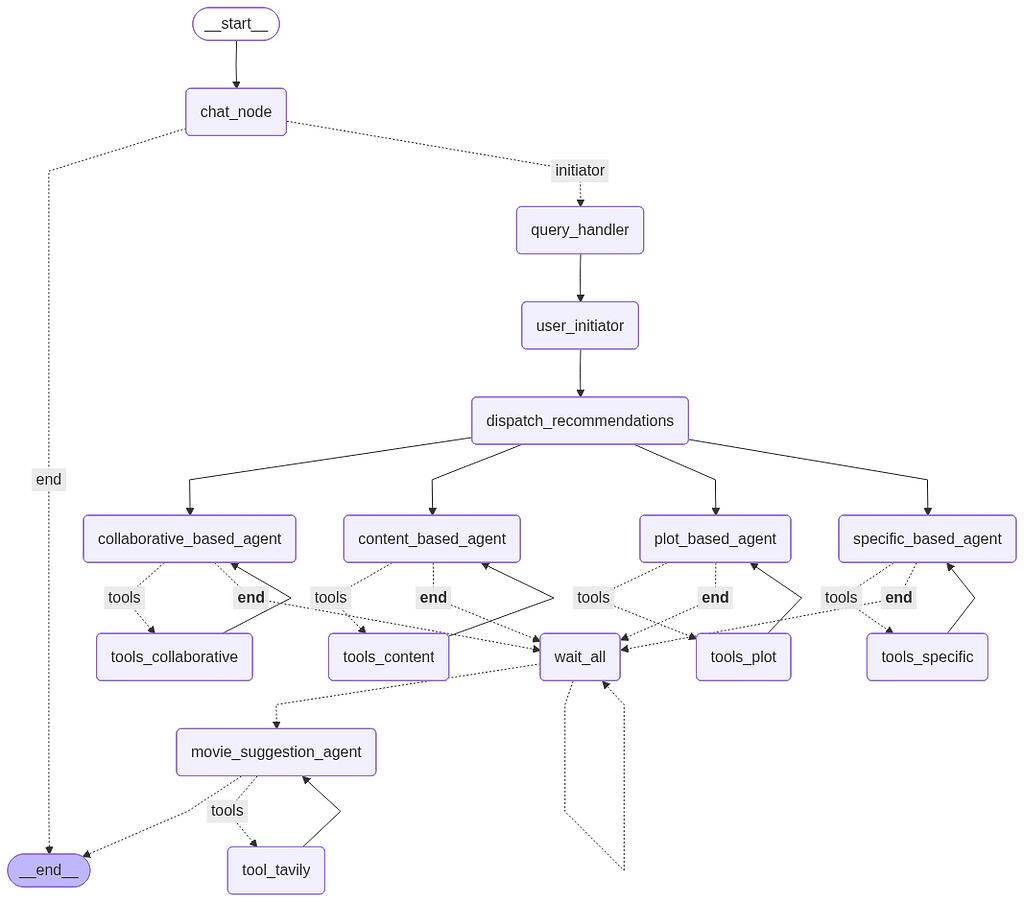
Similar to a graph, langgraph consists of nodes and edges. Each node is an agent node or a tool node. Agent Nodes are LLMs executing some action and tool nodes contains of the MCP tools the agents need to use to get the actions done. The chief difference between lang chain and lang graph is that in lang chain, actions are chained to one another, there is no execution path, where as in lang graph there are loop backs and edges defining the execution paths, often conditioned, i.e, based on a condition an edge or path is taken or an action is executed.
The graph here is defined as:
from langgraph.graph import StateGraph, START, END
from langgraph.prebuilt import ToolNode, tools_condition

builder = StateGraph(State)

builder.add_node("chat_node", chat_agent)
builder.add_node("query_handler", query_handler_agent)
builder.add_node("user_initiator", user_initiator_agent)
builder.add_node("dispatch_recommendations", dispatch_recommendations)
builder.add_node("content_based_agent", content_based_agent)
builder.add_node("collaborative_based_agent", collaborative_based_agent)
builder.add_node("plot_based_agent", plot_based_agent)
builder.add_node("specific_based_agent", provider_specific_agent)
builder.add_node("movie_suggestion_agent", movie_suggestion_agent)
builder.add_node("wait_all", wait_all)

builder.add_node("tools_content", ToolNode(tools_content))
builder.add_node("tools_collaborative", ToolNode(tools_collaborative))
builder.add_node("tools_plot", ToolNode(tools_plot))
builder.add_node("tools_specific", ToolNode(tools_specific))
builder.add_node("tool_tavily", ToolNode([tool_tavily]))

builder.add_edge(START, "chat_node")

builder.add_conditional_edges(
    "chat_node",
    check_recommendation_router,
    {"end": END, "initiator": "query_handler"},
)

builder.add_edge("query_handler", "user_initiator")
builder.add_edge("user_initiator", "dispatch_recommendations")

builder.add_edge("dispatch_recommendations", "content_based_agent")
builder.add_edge("dispatch_recommendations", "collaborative_based_agent")
builder.add_edge("dispatch_recommendations", "plot_based_agent")
builder.add_edge("dispatch_recommendations", "specific_based_agent")

# Conditional routing: if tool called → ToolNode, else → wait_all
builder.add_conditional_edges(
    "content_based_agent",
    tools_condition,
    {"tools": "tools_content", "__end__": "wait_all"}
)

builder.add_conditional_edges(
    "collaborative_based_agent",
    tools_condition,
    {"tools": "tools_collaborative", "__end__": "wait_all"}
)

builder.add_conditional_edges(
    "plot_based_agent",
    tools_condition,
    {"tools": "tools_plot", "__end__": "wait_all"}
)

builder.add_conditional_edges(
    "specific_based_agent",
    tools_condition,
    {"tools": "tools_specific", "__end__": "wait_all"}
)

builder.add_conditional_edges(
    "movie_suggestion_agent",
    tools_condition,
    {"tools": "tool_tavily", "__end__": END},
)

builder.add_conditional_edges(
    "wait_all",
    wait_all_router,
    {"wait_all": "wait_all", "movie_suggestion_agent": "movie_suggestion_agent"},
)

# Loop-back edges: after tool execution, return to agent for processing
builder.add_edge("tools_content", "content_based_agent")
builder.add_edge("tools_collaborative", "collaborative_based_agent")
builder.add_edge("tools_plot", "plot_based_agent")
builder.add_edge("tools_specific", "specific_based_agent")
builder.add_edge("tool_tavily", "movie_suggestion_agent")
Let’s talk about the nodes here:
- The main agent nodes: content_based_agent, collaborative_based_agent, plot_based_agent, specific_based_agent (for OTTs), movie_suggestion_agent. the 4 agents are responsible for each type of recommendation, while the movie_suggestion_agent governs all of these 4 agents and produces the final output as discussed
- Tool Nodes: there are 5 tool nodes 1 for each of the main 5 agents. So it all sums up to tools_content, tools_collaborative, tools_plot, tools_specific, tool_tavily. Each of this tool nodes is added to the main agent nodes using a conditional edge, that dictates, if there is a requirement the tool attached will be called. Each of the tools have loop back edges to the caller node, which verifies the results returned by the tools and uses it. If the tool call fails, this allows the chat LLM agent to handle the scenario in human language, keeping the sanity of the system.
- START and END nodes are predefined nodes indicating entry and exit points of the entire graph flow.
- The initial chatnode is the starter node, which handles general conversation with human. In case the human user wants to ask about the weather and not movies, this chatnode handles and exits, instead of executing the graph. This can be considered as an edge case handling to improve user experience for a robust system
- The wait_all node and the dispatch nodes are just go betweens. The dispatch nodes ensures the 4 agents start working in parallel with the same inputs, and the wait_all node basically keeps looping back to itself waiting for all the 4 agent nodes to complete execution so that the supervisor agent gets every side’s response before making the final call.
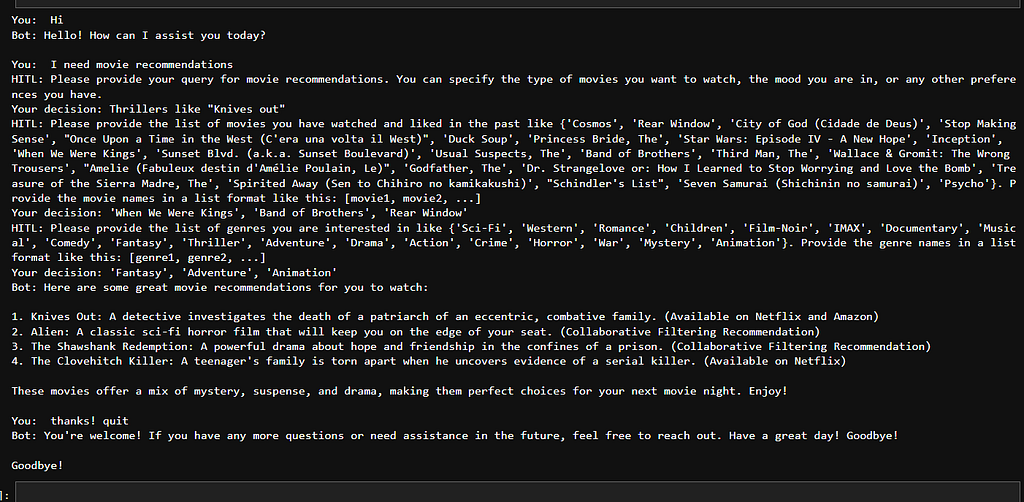
- The query handler and the user initiator nodes help the user to enter the query like what kind of movie or genre he/she wants to watch and the user’s choices for the cold start problem. These two agents in particular are a bit special, as they require feedback from the user. This concept is called “Human In The Loop”. This is used in scenarios where the agentic AI system needs feedback or confirmation from the user regarding some operation or they can’t actually execute the action on their own. This is done by using “interrupts” which makes the agent wait for human response, and it works something like as shown below.
def user_initiator_agent(state: State) -> dict:
    agent_name = "user_initiator_agent"
    df = pd.read_csv("filtering/Cold_starter.csv")
    df_movies = df['movie_name'].tolist()
    df_genres = df['genres'].str.split(',').explode().unique().tolist()

    user_movies_choice = interrupt(
        f"Please provide the list of movies you have watched and liked in the past like {set(df_movies)}. "
        "Provide the movie names in a list format like this: [movie1, movie2, ...]"
    )
    user_genre_choice = interrupt(
        f"Please provide the list of genres you are interested in like {set(df_genres)}. "
        "Provide the genre names in a list format like this: [genre1, genre2, ...]"
    )

    parsed_movies = ast.literal_eval(user_movies_choice)
    parsed_genres = ast.literal_eval(user_genre_choice)
    log_agent(agent_name, f"received movies={parsed_movies} genres={parsed_genres}")

    return {
        "user_movies_choice": parsed_movies,
        "user_genre_choice": parsed_genres,
    }
Then we compile this graph for execution. One thing to note is, the graphs are generally stateless, which basically interpretes to the fact that they have no memory. So if you tell it your name, it will forget. So, we need to add memory to it, to make it stateful, which remembers things through out that execution. It can be done as:
from langgraph.checkpoint.memory import MemorySaver

memory = MemorySaver()
graph = builder.compile(checkpointer=memory)
print("Graph compiled.")
There is a caveat of using memory. To execute a graph with memory we need to invoke the graph with an unique thread_id. This helps to know the session to which the memory of the execution belongs to, also it might be the way the current chat agents remember user specific things.
   result = await graph.ainvoke(
        state,
        config={"configurable": {"thread_id": thread_id}},
    )
The State
On close attention we see during initiation, we see something called state. So, what is state? State is how the agents interact with each other. It is a set of values that is shared by every agent, basically represents what is happening in the execution. Let’s see by example. In our case, the state is defined as:
from typing_extensions import TypedDict, Optional, Annotated
from operator import or_

from langgraph.graph.message import add_messages
from langchain_core.messages import AnyMessage

class State(TypedDict, total=False):
    messages: Annotated[list[AnyMessage], add_messages]
    user_query: str
    results: Annotated[dict, or_]
    user_genre_choice: list[str]
    user_movies_choice: list[str]
So this gets passed around to the agents and the values get updated. The contents are:
- messages: The messages exchanged between the user, the system and the agents. Serves a history also. The add_messages ensures, that the list is always appended and never replaced. So, if we say, messages = “Hi”. It appends “Hi” to the list of messages.
- The user_query is the question the user provides to the query handler agent.
- user_genre_choice and user_movies_choice are the user inputs given to the user initiator agent.
- The results is a dictionary for each of the 4 agents to update their feedbacks in. Now, here we could have gone with “content based output” and so on. In fact that’s how I started. But as the execution of this 4 agents is parallel, they try to update the State together causing conflicts. But for a dictionary we can update as:
def content_based_agent(state: State) -> dict:
    agent_name = "content_based_agent"
    try:
        messages = state.get("messages", [])
        user_query = state.get("user_query", "")
        log_agent(agent_name, f"received user_query={user_query}")

        tool_hits = get_tool_texts(messages, {"get_content_based_recommendation"})
        if tool_hits:
            raw = tool_hits[0][1]
            log_agent(agent_name, f"tool raw response={raw}")
            readable = parse_tool_response(raw)
            log_agent(agent_name, f"tool parsed response={readable}")
            return {"results": {"content_based_recommendation": readable}}

        if not user_query:
            log_agent(agent_name, "no query provided")
            return {"results": {"content_based_recommendation": "No query provided"}}

        prompt = f"Recommend movies similar to: {user_query}"
        log_agent(agent_name, f"sending prompt={prompt}")
        response = content_based_recom_llm.invoke(prompt)
        log_agent(agent_name, f"llm response tool_calls={getattr(response, 'tool_calls', None)} content={getattr(response, 'content', '')}")
        return {"messages": [response]}
    except Exception as e:
        log_agent(agent_name, f"error={e}")
        return {"results": {"content_based_recommendation": f"Error: {str(e)}"}
Finally, the movie suggestion agent reads all the results and produces the output.
We run this entire graph in an infinite loop, so that the application does not exit directly on solving 1 query as:
while True:
    user_input = input("You: ")
    if user_input.lower().strip() in {"exit", "quit"}:
        print("Goodbye!")
        break

    print("You: ", user_input)

    thread_id = str(uuid.uuid4())
    state = State({"messages": [HumanMessage(content=user_input)]})

    result = await graph.ainvoke(
        state,
        config={"configurable": {"thread_id": thread_id}},
    )

    # Handle all interrupts in sequence (query -> movies -> genres)
    while True:
        interrupts = result.get("__interrupt__", [])
        if not interrupts:
            break

        prompt_to_human = interrupts[0].value
        print(f"HITL: {prompt_to_human}")
        decision = input("Your decision: ").strip()
        print(f"Your decision: {decision}")

        result = await graph.ainvoke(
            Command(resume=decision),
            config={"configurable": {"thread_id": thread_id}},
        )

    messages = result.get("messages", [])
    if messages:
        # Print the latest non-empty message content to avoid blank bot output.
        bot_text = ""
        for msg in reversed(messages):
            content = getattr(msg, "content", "")
            if str(content).strip():
                bot_text = str(content)
                break
        if bot_text:
            print(f"Bot: {bot_text}\n")
On execution, we get something like this:
Conclusion
MCP and lang graph are some of the leading topics in the AI industry today. I hope i could shed some light on this topic through this small demonstration.
Thanks and Happy Reading!
The code can be found here: https://github.com/abr-98/Multiagent_Movie_Recommender/
Recommending Movies: Powered by AI was originally published in Level Up Coding on Medium, where people are continuing the conversation by highlighting and responding to this story.