In Part 1, we covered what Live Activities are:
not notifications, but a persistent, updatable surface on the Lock Screen and Dynamic Island.
This part is where things get real:
- Who actually renders the UI?
- Where does the data live?
- How does your server fit into all of this?
The split: system vs. your app
What I had to internalize early was this:
- Your app does not paint on the Lock Screen. iOS does. You ship a Widget Extension that describes the Live Activity UI using SwiftUI (and your ActivityAttributes + ContentState types).
- ActivityKit is the bridge: it tells the system there is a live activity, what its static info is (e.g. booking id), and what its current state is (title, venue, seat, colors, deep link, etc.).
Mental Model
- Your app + ActivityKit → owns data + lifecycle
- System (iOS) → owns rendering, layout, and delivery
- Widget Extension → renders the UI
This is NOT — “another screen in your app”
It’s closer to — a state-driven UI rendered by the system
Static vs. dynamic content
I learned to separate two kinds of data Apple calls out in the API:
- Attributes — fixed for the life of that activity (in our world: things that shouldn’t change once the session is created, like identifiers the backend uses to target the right booking).
- Content state — everything that can change with each update: copy, colors, gate vs. screen labels, messages, deep link string, etc.
Why this matters? If you mess this up early:
- Your server payloads become painful
- Updates break or become rigid
- You lose flexibility as the product evolves
Rule that worked for me:
- Keep attributes minimal
- Push everything else into content state
The two tokens
Even before implementation, I needed correct vocabulary:
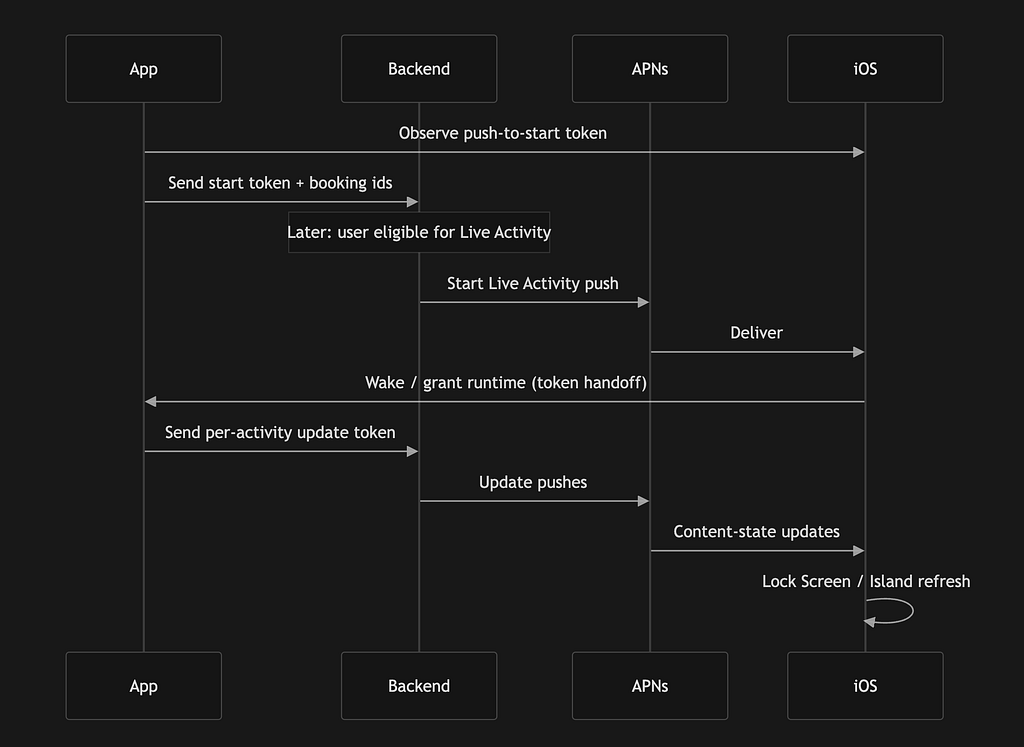
Start / push-to-start token — Lets the server start new Live Activities for this app/device (subject to user settings and OS rules).
Update token — Lets the server update one specific active Live Activity instance.
They’re not interchangeable. One booking might need a new activity started from the server; each running activity needs its own update token on the backend.
Apple’s documentation also stresses: tokens can change. There isn’t a tidy “expires in X minutes” story you can rely on — your app should observe token streams and push new values to your server when they change. I did a hit and trial process and found out that my push-to-start token was at-least working for 6 days. I’ll go deeper on what I got wrong first and what fixed it in Part 3.
🚨 HIRING: Tech Professionals
💰 $3K–$10K/Month
🌍 Remote + 🏢 Onsite Opportunities
🎯 Open Roles:
Backend • Frontend • Full Stack • DevOps • Data Engineer • UI/UX • QA
👉 Apply Now

Two ways to drive updates (and two real-world shapes)
There are two big patterns in the docs: update from the app vs update from the server. In practice, the right mix depends on how your product behaves while the Live Activity is “alive.” Two extremes helped me explain it to myself and to stakeholders.
Shape A — “The app is basically still part of the story” (think Ola, Uber, delivery)
For a ride or a live delivery, the user often keeps the app open (or recently used) while the thing on the Lock Screen is happening. They’re watching the map, checking ETA, or the session is short and intense.
Those products also typically have location (and related) permissions. Location-backed work can give the app legitimate background execution so the app can compute fresh state — where the car is, revised ETA — and push updates into ActivityKit without waiting for a server round-trip for every frame of the story.
Shape B — “The event is far away and the app might be cold” (think tickets, shows, travel days ahead)
Our booking case often looks different. Someone books for next week or next month or maybe a whole year. Right after checkout, we might not have a meaningful local cache of everything the Lock Screen will eventually need — and the user may never open the app again until showtime or maybe uninstall the app.
Here, server-driven updates aren’t optional; they’re the default. The Live Activity has to stay correct when:
- The app hasn’t been foregrounded in days.
- We need to start the activity from the backend (Push-to-Start) when we’re ready, not when the user taps in.
- Gate, screen, messaging, or reminders change without the user launching us.
Perspective: that’s a higher coordination bar. You need tokens on the server, correct APNs payloads, handling for token rotation, and you have to think about background relaunch — because the system may wake your app briefly to hand you a new token or to align with an ActivityKit event, not because the user opened you.
Challenges I want readers to anticipate:
- You can’t assume “we’ll refresh when they open the app.” For far-future events, they might not.
- Push-to-Start + update tokens become your control plane; if registration is flaky, the UI simply won’t appear or won’t update.
- Images and rich assets often need an App Group (or similar) strategy — the push payload isn’t always the place for a full poster.
- No fixed token TTL in the mental model you can hard-code: treat tokens as observable streams and keep the server in sync.
So the same Apple feature, two product realities: for Ola/Uber-style flows, background-capable app work can carry a lot of the weight; for ticket-style flows, you live or die on server push and token hygiene. Our implementation leans hard into the second camp.
So, Push-to-Start lets your server start a Live Activity.
Without it — You depend on the app being opened
With it — Backend controls when the experience begins
Flow
- App registers with backend
- Backend gets start token
- Backend sends push → Live Activity appears
- Backend sends updates → UI evolves
This was critical for us because: Users shouldn’t have to reopen the app just to start the experience.
What I Actually Built (Conceptually)
On the app side:
- A manager that listens early for:
- lifecycle events
- token updates
Backend contracts:
- register start token
- register update token
Widget Extension:
- purely renders UI
- reads shared assets if needed
Clean separation
- App → tokens, lifecycle, backend sync
- Extension → UI only
In Part 3, I’ll break down tokens and the full architecture — what they don’t tell you in the docs, and what actually works in production. Now I know this got a bit lengthy but there is just so much of content around this topic which is also not defined in the Apple docs. Hope you found this helpful!
Thank you for being a part of the community
Before you go:

👉 Be sure to clap and follow the writer ️👏️️
👉 CodeToDeploy Tech Community is live on Discord — Join now!
Disclosure: This post includes affiliate and partnership links.
Live Activities on iOS: How They Actually Work Under the Hood (Part 2) was originally published in Level Up Coding on Medium, where people are continuing the conversation by highlighting and responding to this story.