Live Activities look simple — until you try to build them.
At first, I thought they were just another type of notification. That assumption was completely wrong — and it cost me time. This post is the mental model I wish I had before touching ActivityKit.
🚀 Get a job faster.
This AI applies to jobs for you, so you never miss opportunities.
⚡ 300,000+ companies
⚡ Apply in minutes,
⚡ More applications → more interviews → faster offers
⏳ Every day you apply manually, you lose opportunities.
👉 Start Now And Get Hired Faster.

What I thought they were (at first)
At a glance, I lumped Live Activities together with push notifications. Both show up without opening the app, so it felt like “another kind of alert.”
That was wrong in a useful way. A normal notification is a moment: it appears, the user dismisses or taps it, and it’s mostly done. A Live Activity is a surface: something that can stay on screen and update in place while the user is doing other things.
What Live Activities actually are?
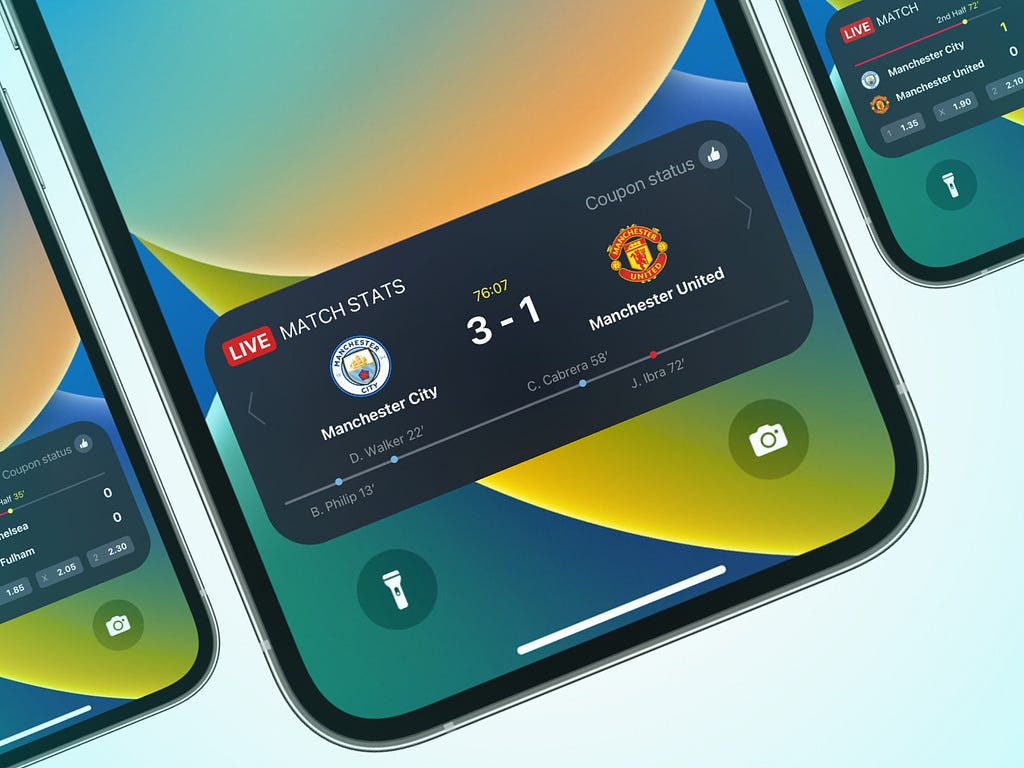
Live Activities are a way for your app to show live, glanceable information in two system-owned places:
- Lock Screen — A card below the clock
- Dynamic Island — Compact or expanded live UI
Why they exist (what I figured out)
Once I separated them from notifications, the “why” made sense:
- Glanceability — People pick up their phone hundreds of times a day. They often want status, not navigation. Let’s say, you have ordered a pizza and then closed the app. Now after every few minutes you need to make an extra effort to get the phone, search and open the app, go to orders section and then get the latest update. Live Activities meet that with minimal friction.
- Trust and consistency — Apple controls layout, update rules, and lifecycle so the experience doesn’t turn into random overlays from every app.
- Continuity — Something important can stay visible and refresh (gate change, time slip) without the user reopening your app.
For a booking product, that maps cleanly: show the ticket story where the user already looks — the Lock Screen — and keep it honest as things change.
How I “figured it out” for our product
I didn’t start with ActivityKit or APNs. I started with three questions:
- What does the user need to see without opening the app?
Title, status, a short message, maybe a deep link back in — whatever minimal serves your purpose.
2. Who updates that information?
Sometimes the app; in our case, often the server.
3. How long should it live?
From “confirmation” until the event window ends — or until the user dismisses it — within Apple’s rules — about which we will talk later on.
Answering those made it obvious we weren’t building “a prettier notification.” We were building a tiny, always-on companion UI driven by structured state that can change over time. And making this was not easy at all and very minimal information is available on the web — so most of the effort went into research and the hit-and-trial.
That’s the bridge to the technical story: you need a Widget Extension to define how that UI looks, and you need a clear contract for what data flows in (static vs. dynamic). The heavy lifting — push-to-start, tokens, relaunch — is the next chapter.
Thank you for being a part of the community
Before you go:

👉 Be sure to clap and follow the writer ️👏️️
👉 CodeToDeploy Tech Community is live on Discord — Join now!
Disclosure: This post includes affiliate and partnership links.
iOS Live Activities Explained: The Mental Model Most Developers Miss was originally published in Level Up Coding on Medium, where people are continuing the conversation by highlighting and responding to this story.