I Tried 7 Trading Journals (TradeZella, TraderSync, Edgewonk…). My Ranking
 Andrew Rul Trading5 min read·Just now
--
I used to think trading journals were optional. Something “serious traders” talk about on YouTube while everyone else just trades and hopes for the best. Then I had a painful realization: I was repeating the same mistakes and calling it “market conditions.” Same bad habits, different week.
Now I use trading journals regularly. And I tried a lot of them. Basically I tested seven popular trading journals and trackers. Some are built for stocks, some for futures, some for anything. I used them the same way: log trades, review performance, find patterns, try to fix leaks.
And here’s my ranking.
What I wanted from a journal (my criteria)
One more thing before we start.
A good journal should help you answer questions like:
- Which setup actually pays for me?
- What mistake repeats after losses?
- Do I trade better in London or New York?
- Where do I give profits back?
- What happens if I change one rule?
So I rated each tool on:
- Speed of logging (if it’s slow, you won’t do it)
- Context (screenshots, notes, checklists, tags)
- Analytics (useful stats, not just charts that look nice)
- Workflow (does it fit a real trader’s routine?)
- Ability to learn (can I review execution, not only results?)
1) Forex Tester Online (FTO). Best overall “journal,” even though it’s not only a journal
This one surprised me. I started using Forex Tester Online as a backtesting simulator, not a journal. But once I got into its journaling workflow after a recent update several months ago, it became my default place to review and improve.
The difference is simple: most journals track what happened after the trade. FTO lets you track the trade with the chart still on screen, while your memory is fresh. That matters more than it sounds.
What made it #1 for me
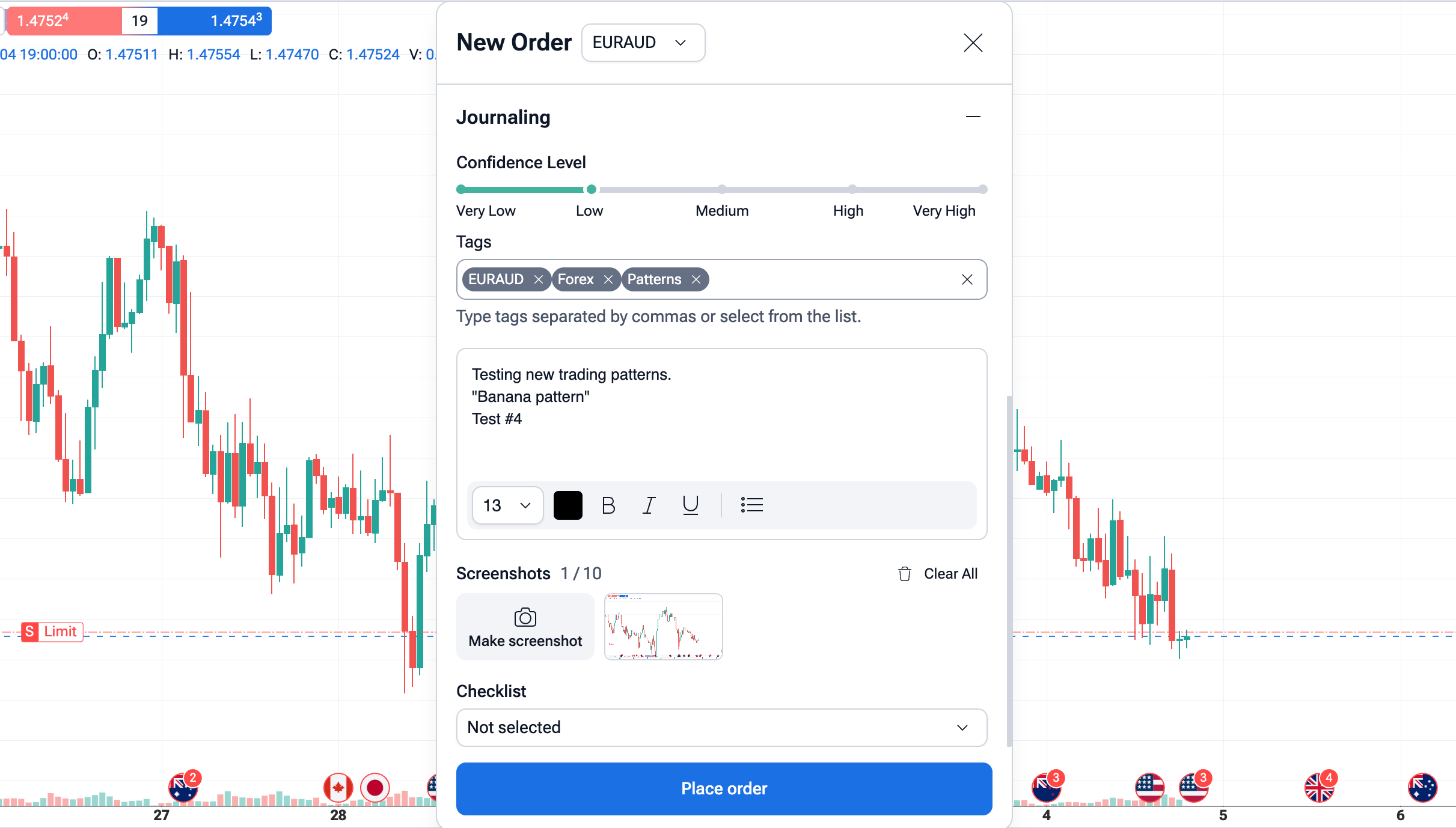
When I take a trade in FTO, logging it takes seconds:
I tag it (setup, mistake, session, market type).
I tick a checklist (rules followed or broken).
I write one short note: what I saw and why I clicked.
I attach a clean screenshot with one click.
Then I can filter and analyze everything later by tag, session, day of week, and habits.
But the real killer feature is that it’s backtesting + replay + journaling in one place.
If I’m reviewing a trade and I realize I exited like an idiot, I can replay that exact moment again, re-trade it, and compare.
Most journals tell you: “You exited early.”
FTO lets you practice better exits on the same market movement.
It’s also good for collaboration: you can share a project with notes and screenshots, not just results. That’s how you get real feedback, not vague opinions.
If you already backtest, journaling inside the same tool just makes sense.
2) TradeZella. Best “modern” dashboard
TradeZella is clean, fast, and the UI feels like it was made in this decade. If you’re a stock trader or a futures trader who wants quick stats and a polished experience, it’s strong.
The analytics are easy to read. It makes it simple to spot things like:
- best time of day
- biggest losing patterns
- overtrading days
- win rate shifts
The weakness is that it still feels like a “results tracker” more than a “skill builder.” Great for seeing what’s wrong. Less useful for practicing what’s right.
3) TraderSync. Solid, practical, slightly “heavy”
TraderSync is one of those tools that does a lot. Tagging, screenshots, stats, filtering — it covers the basics well.
If you’re the type who wants structure, it’s good. It feels more “classic” than TradeZella, less slick, but reliable.
My issue was workflow. I didn’t always enjoy using it. And if you don’t enjoy the process, you won’t stick with it long-term. Journaling has to be frictionless.
4) Edgewonk. Powerful, but not friendly
Edgewonk is serious. It’s built for traders who actually want to dig deep and treat this like a craft.
It has strong psychology tracking and structured journaling. You can be very detailed.
But it also feels like homework. Some people love that. I don’t. I want journaling to support trading, not become another job.
If you’re very disciplined and like deep review sessions, Edgewonk can be a great fit.
5) Trademetria. Good for basics, less useful for growth
Trademetria does the core job: track trades, show stats, keep you organized.
But compared to the top tools, it didn’t give me many “aha” moments. It’s more of a record-keeper than a performance coach.
If you want something simple and you’re consistent with logging, it can work.
6) Myfxbook. Useful, but not really a journal
Myfxbook is more about account tracking and performance reporting. It’s helpful to see results and compare periods.
But in terms of journaling — notes, checklists, tags, screenshots, execution review — it’s not built for that.
I consider it a “mirror,” not a journal.
7) Google Sheets / Spreadsheet journaling. The classic
Yes, it works.
Yes, it’s customizable.
And yes, most people quit after two weeks.
I’ve tried spreadsheets multiple times. They always start with motivation and end with missed entries because you don’t want to fill cells.
The problem isn’t the spreadsheet. The problem is time and friction.
If journaling takes 10 minutes per trade, you won’t do it. And if you don’t do it, it doesn’t exist.
What I learned after trying all of them
A journal is only useful if it becomes part of your trading loop.
The loop looks like this:
Trade ➡️ log fast ➡️ review patterns ➡️ change one rule ➡️ test again ➡️ repeat.
Most journal apps cover the “review patterns” part. Very few help with the “test again” part.
My recommendation
If you’re trading live and you want a clean performance dashboard, start with TradeZella or TraderSync.
If you want to actually get better not just track — use a tool that connects journaling to real practice. For me, that’s Forex Tester Online.
Because the goal isn’t to create a nice report.
The goal is to stop repeating the same mistake with a different excuse.
—
Andrew Rul Trading
Follow for more ratings and experiments