I redesigned a trust-sensitive fintech product using an AI-first workflow, and this is what broke
 Alexandru Oprea7 min read·Just now
--
I realized something was broken when I stopped asking “does this solve the problem?” and started asking “is this better than the last version?”
Many designers would agree AI has been getting good at making beautiful layouts. I wanted to test something more intangible: trust. It’s abstract. It’s contextual. It’s industry-specific. It also evolves. I started to wonder if AI could work through something as nuanced and complex as earning someone’s trust.
The world has been moving faster and faster. AI has propelled this momentum even more. I’m not the first to ask at what cost? But I did want to find that out, on a more specific topic.
So I set up an experiment in the form of a redesign with a deliberate constraint: AI handles the first draft of every artifact. I only pick up a design tool when it demonstrably can’t do the job.
And so it was me, the AI, and a product that has felt suspicious for a while.
Why this experiment
I’m a product designer who finds trust fascinating as a design problem. It mostly happens at a subconscious level, often in an instant. Users rarely think “I trust this”, they just stay, or they don’t. I wanted to see how well AI can handle matters of trust.
What I didn’t expect was to run into the same problem with AI. The more you use it to make design decisions, the less equipped you become to evaluate whether those decisions are any good. It simultaneously does the work and erodes your ability to judge the work. That’s something we’ll come back to later.
Why Joko?
Joko is a cashback and rewards platform. I’d come across it before and something felt… off. It functioned well and was appealing, but it felt unfinished for some reason. The ambiguity was what made me very curious and thus served as a perfect testing ground for my experiment. I wasn’t trying to redesign a broken product. I was trying to diagnose a feeling.
The setup: rules, tools, and what I was measuring
The rules
I followed a simple rule: AI generates the first draft of every artifact. I could guide it, redirect it, and make edits, but I couldn’t start from scratch. No opening of a design tool until AI has made something I can look at.
The tools
- Claude and ChatGPT for reasoning, synthesis, and analysis
- Figma Make as the primary visual output tool
What I was measuring
I made ongoing observations on speed vs. quality at each stage. More specifically, where did AI make me faster without costing me quality? Where did speed become a trap?
How I went about it and where things got interesting
Stage 1: Parallel research. We mostly agreed
Before I handed anything to AI, I did my own audit on three key players in the space to establish a baseline so I knew wether I was leading the AI or it was leading me. Then came the its turn to do the same research using the same framework I designed for myself.
The AI was indeed quick on the analysis, and provided a surprising amount of overlap with my findings, but it also provided ones that were irrelevant. Some of the observations it made sounded structured but didn’t meaningfully relate to trust. The AI was also very confident in providing me with the wrong information, which is dangerous. Had I not made my own assessment first, I wouldn’t really know what to focus on, or how any of this feels to a user in context.
Before moving into design, I had AI build me an evaluation framework, which is a custom checklist for rewards apps specifically. But the framework was only useful because I’d already done the work to know what criteria mattered. AI structured it. I knew what to put in it. That distinction would come up again.
Stage 2: Guiding the wireframes. Successes and gaps
This is where the experiment got interesting
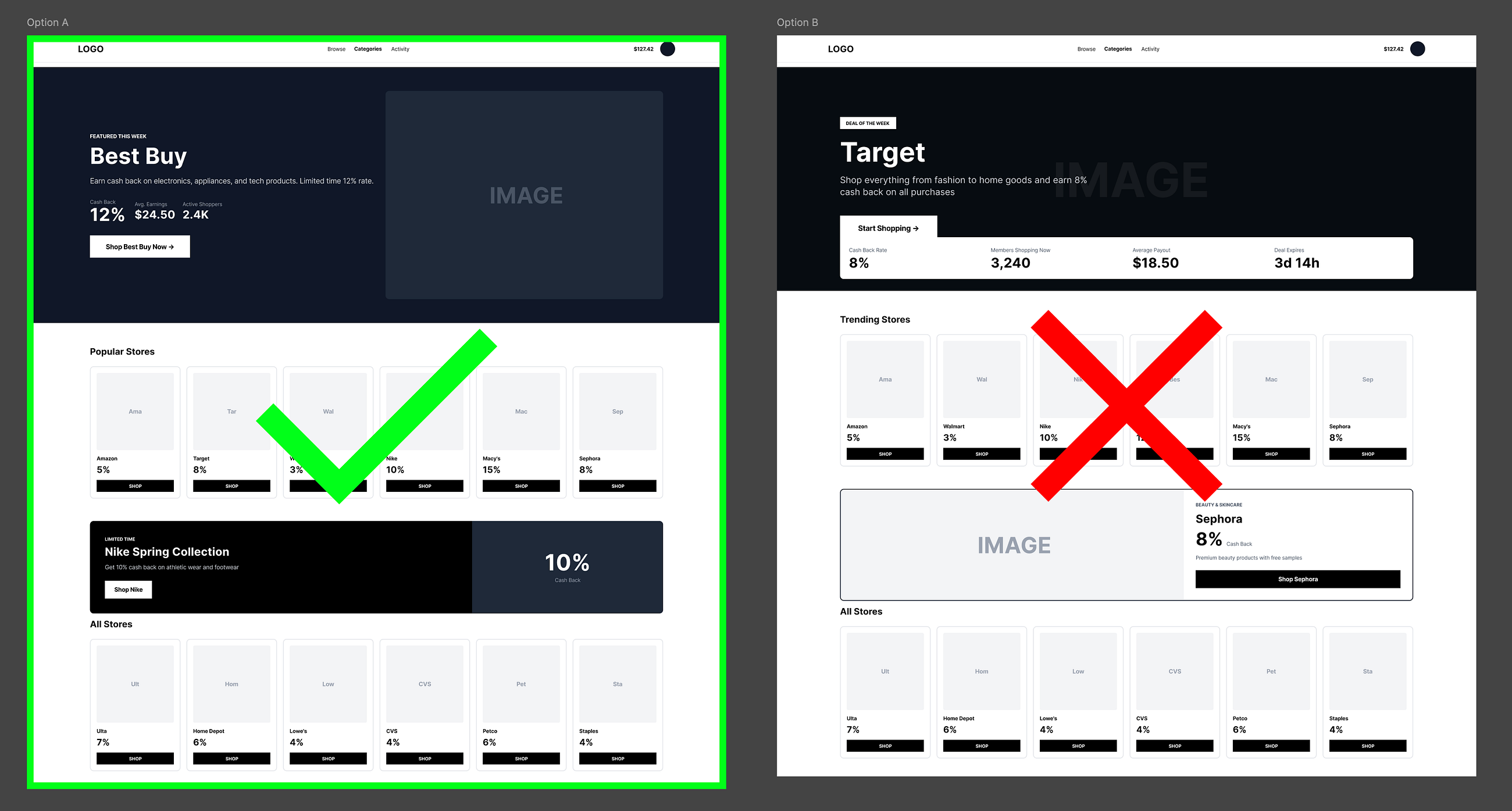
I began with one clear prompt that included the design recommendations we formulated and let AI carry the initial direction. From there it was an iterative process, guiding and only correcting when things went sideways.
It was a mixed experience. A few moments are worth naming specifically:
The genre problem. Early wireframes looked like marketing landing pages with spacious, modern layouts and lots of white space. They were visually fine, but completely wrong for the context. Rewards and cashback apps have a genre. Users expect density in both data and offers. A beautiful minimal layout subverts those expectations and in this case signals that someone is more interested in aesthetics than ROI. This would break trust in this context. I knew that. AI didn’t.
The confidence trap (first of several encounters). Once I’d corrected course, the iterations moved fast. Maybe too fast. AI would propose something, I’d approve it, and we’d move to the next element. The iterative process accelerated but my understanding wasn’t keeping up. I stopped fully absorbing the impact of each change, especially when everything looks reasonably good on the surface. Instead of moving with intent, I started just chasing whatever felt most off in the moment and was gradually losing sight of the original design direction.
The site architecture. AI shined here. Header and navigation iterations were strong, and layout logic at a macro level was consistently reasonable. But it worked because by that point I’d already defined what the structure needed to accomplish. AI combined the patterns. I determined which patterns were worth combining. That’s an important things to note.
Stage 3: Where I fully took over
At a certain level of granularity, AI lost the thread.
Card design was the clearest example. I asked for iterations on hierarchy, content amount, image ratio, and reward prominence. The outputs suddenly stoped having reasons. They felt arbitrary, visually misaligned and unappealing. They were disconnected from the trust framework we’d been working within. AI was seemingly combining patterns that exist elsewhere, but it didn’t know why they’d been chosen for this context. It also was seemingly forgetting our past conversations.
From here I finished the card design by hand, editing and assembling AI-generated elements myself.
Closing the loop: the AI audit
Once the redesign was back on the right trajectory and ultimately felt complete, I closed the loop the only way that made sense; I had AI evaluate what we’d built together.
The redesign scored higher, as expected. But the audit only worked because the framework it was measuring against had been shaped by my judgment from the start. In areas where my judgement was absent, like genre expectations, contextual feel, what a rewards app is supposed to communicate, the audit had nothing to say. AI is only as good as the thinking that surrounds it.
Final thoughts: what actually broke and why it matters
The process worked. The redesign is technically better, with more legible hierarchy, stronger trust signals, clearer personalization logic. If you ran it through the framework, it passes.
Two things broke that I didn’t expect, however.
My judgment, temporarily.
The more I delegated, the more I deferred. AI is confident even when it’s wrong and that confidence is contagious. By the middle of the process I was assessing outputs against each other rather than against the original problem. I’d stopped asking “does this solve the trust issue?” and started asking “is this better than the last version?” Those are very different questions, and only one stays on track for truly great design.
I think there’s a ceiling on how much of a design process you can responsibly hand to AI. Currently I feel it sits somewhere around 30–40%, before your judgment starts to cost you more in clarity than AI is saving you in speed. Past that threshold, you’re not using AI as a collaborator. You’re outsourcing your thinking and hoping the output is good.
Our ability to develop taste, at scale must continue to be nourished
AI will make you faster. But faster at what? Speed is only valuable if you know where you’re going. And knowing where you’re going in design, what feels right, what feels off, what a user in a specific context actually experiences requires exposure to real life experiences. It requires having used dozens of bad apps, scrolled past hundreds of untrustworthy checkout flows, noticing the moments when a design stops working and then figuring out why.
AI compresses the time we spend discovering on our own, which is fine only until you realize that the time wasn’t wasted. That’s where the taste and ability to make judgements was built. If we optimize away the slow, uncomfortable, inconclusive parts of design exploration, we optimize away the conditions under which taste develops.
Companies moving fast on AI-assisted design workflows should think carefully about what they’re protecting. For me, the answer starts with protecting the slow parts.