Thanks to Claude Code Leak, which showed how the internal Claude Code team works, I am now catching bugs that code review misses
Everything started with a huge feature request last week.
I generated a detailed plan for restructuring a Flutter project. It ended up having five tasks, 30+ implementation steps, 4 big Architecture Decision Records. The plan covered everything: error handling patterns, folder structure, dependency injection, testing strategy. It looked perfect to me.
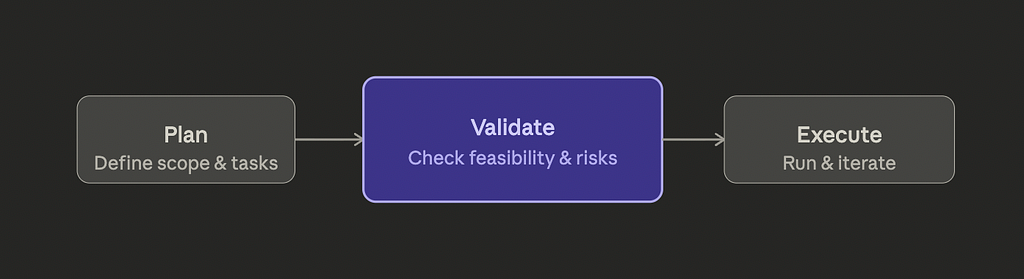
Before, I would’ve sent this straight to execution. An agent picks up the plan, starts writing code, and I review the output later. That was my AI workflow for months. Plan, execute, review.
A couple of weeks ago, Claude Code accidentally pushed their source code to public (see Claude Code Source Leak Megathread on Reddit). After checking what they have myself and reading the community analysis over it, I decided to adopt some practices from them. And, I implemented a validation step between the plan and execution. Ten minutes. Zero code written.
The result: seven issues surfaced, including unverified package versions that could’ve broken the build, a task that touched 20+ files per step without checkpoint guidance, and acceptance criteria that were too vague for an agent to verify against.
Neither my agents nor my half-baked (especially when they are my own stupid indie projects) code review would have caught these before (at least some of them, I'm still reviewing them OK?!)
The Plan-Execute Trap
Most AI-assisted development workflows have two phases. You describe what you want (the plan), then an agent builds it (the execution). Maybe you add code review at the end. This is the setup you’ll find in most tutorials, most tools, most workflows.
It looks efficient. You’re not wasting time on ceremony. You plan, you execute, you review. Three clean steps.
The problem is the gap between planning and execution. Plans contain assumptions. Some are explicit, like “use fpdart for error handling.” Some are implicit, like assuming a package version exists, or assuming a directory structure is already in place, or writing “verify the feature works” as an acceptance criterion without defining what “works” means.
Agents don’t question these assumptions. They execute. If your plan says “implement authentication,” the agent will make a reasonable guess about what that means. Its guess might be wrong. You won’t find out until code review, after the agent has built an entire feature on top of that guess.
I kept running into this. Not on small tasks. On the bigger ones, the ones where planning felt thorough and comprehensive. The more detailed the plan, the more hiding spots for unresolved decisions.
What Falls Through the Cracks
Here’s what I was finding in code review that shouldn’t have made it that far:
Unverified dependencies. A plan says “add fpdart ^1.1.0.” Does that version exist? Does it support the Dart SDK version in the project? The plan doesn’t check. The agent doesn’t check. It adds the line to pubspec.yaml and moves on. If it breaks, you find out during execution, not planning.
High-risk steps without guardrails. A task that touches 20+ files in a single step is risky. If something breaks halfway through, you need to know where to roll back to. But the plan just lists the files and moves on. No checkpoints, no intermediate verification.
Vague acceptance criteria. “Verify the DI setup works” isn’t something an agent can verify. What does “works” mean? All dependencies resolve? The app compiles? A specific test passes? The vaguer the criterion, the more the agent has to guess. And guessing is where bugs come from.
Orphaned references. A plan mentions a file in its “Files Touched” section that no step actually creates or modifies. Or a step references a directory that doesn’t exist yet without a creation step. These are small things. They cascade.
Stale assumptions. The plan was written against a specific branch state. By the time execution starts, has anything changed? Are there uncommitted changes that might conflict? The plan doesn’t know.
Every one of these is fixable. But they’re only fixable if you catch them before execution starts. Once code is being written, these assumptions become load-bearing walls. Changing them means rework.
The Validation Gate
The fix was adding a single step between planning and execution. I call it validate-plan. It reads the plan file and runs five checks:
Plan syntax. Does the plan follow the expected structure? Are there acceptance criteria for each task? Are dependencies between tasks declared? This is mechanical, like a linter for plans.
Scope boundaries. Does the plan stay within what was originally requested? Plans tend to grow. A task that started as “migrate error handling” quietly expands to include refactoring three unrelated modules. Scope creep in a plan becomes scope creep in execution, except now an agent is doing the creeping and you won’t notice until review.
Decision register integrity. Every architectural decision in the plan should map to a documented rationale. If the plan says “use feature-first folder structure,” is there a record of why? If not, the agent has no way to make judgment calls when edge cases come up during execution.
Execution step viability. Can each step be completed as described? Are the referenced files and directories real? Are the tools and commands available? Are the steps ordered correctly based on their dependencies?
File and folder readiness. Does the current state of the repository match what the plan expects? Are there uncommitted changes that could conflict? Missing directories that need to be created first?
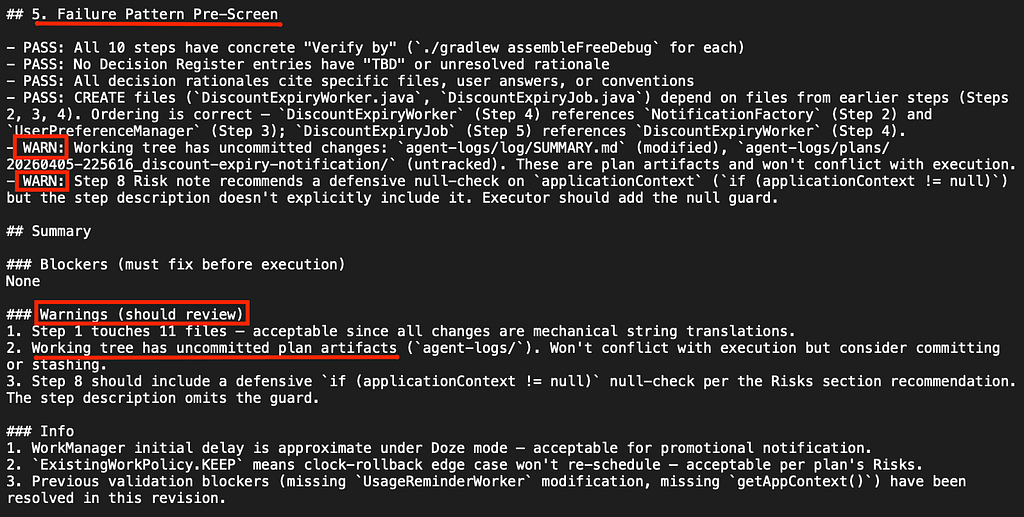
The output is a report: blockers (must fix before execution) and warnings (should address, won’t break things). In the Flutter project case: zero blockers, seven warnings. Ten minutes to generate. All seven warnings were things I fixed in the plan before a single line of code was written.
Why Code Review Doesn’t Catch This
Code review is good at catching implementation bugs. Wrong logic, missing edge cases, bad patterns. It’s not good at catching planning bugs. Funnily, there is no code before the execution at all. And, you are handing over the plan to an agent and believing that the code will be sound! Not happening.
By the time you’re reviewing code, the architectural decisions are already made. The folder structure exists. The dependency versions are locked. The acceptance criteria were already interpreted by the agent, one way or another.
If the plan said “use injectable for DI” but didn’t specify whether to use lazy or eager initialization, the agent picked one. Code review will show you which one it picked. But at that point, you’re evaluating “is this acceptable?” instead of “what should this be?” Those are different questions. The second one should have been answered before any code was written.
Code review also can’t catch what wasn’t done. If a plan was missing a step, the agent didn’t skip it. It was never there. There’s nothing in the code to review because the work was never performed. You’d have to notice the absence of something, and that’s much harder than noticing the presence of a bug.
Validation catches absences. “This plan doesn’t verify the output after a high-risk step.” “This acceptance criterion is not agent-verifiable.” “This dependency version hasn’t been confirmed.” These are things that are visible in a plan and invisible in code.
What Actually Changed
Before adding the validation gate, I’d estimate about 30–40% of the issues I caught in code review were things that shouldn’t have made it past planning. Not code bugs. Planning bugs. Assumptions that should have been resolved, decisions that should have been made, criteria that should have been sharpened.
After adding it, that category dropped significantly. The issues I find in code review now are real implementation issues, things that couldn’t have been caught without seeing the actual code. That’s what code review is supposed to be for.
The bigger shift is how I think about plans. Writing a plan used to feel like the last creative step before handing off to automation. Now it feels like a draft. The validation step is the editorial pass. It makes the plan tighter, more explicit, more executable. And it takes ten minutes.
It’s cheaper to fix a plan than to fix code. That sounds obvious when you say it out loud. But most AI workflows skip the step that makes it actually true.
The Takeaway
If you’re using AI agents for anything beyond small one-shot tasks, your workflow probably has a gap between planning and execution. A gap where assumptions live unchallenged, where decisions are implied but not recorded, where “works” means different things to you and the agent.
Adding a validation step there doesn’t require new tools or frameworks. It requires the discipline to ask: is this plan actually ready to execute? Not “does it look good,” but “can an agent execute this without making any decisions on my behalf?”
If the answer is no, the plan isn’t done yet. And that’s a much better time to find out than during code review.
I’ve been building this validation step as a custom Claude Code skill that plugs into my planning-to-execution pipeline. If you’re interested in how the full workflow fits together, I wrote about the broader approach in By the time execution starts, there should be nothing left to decide.
If you have come this far, I guess I can assume that you are interested in AI and tech. If you want more reads in tech and lifestyle around tech don’t forget to check out my profile. If you wanna choose your next read immediately, you can go for this one: I Forgot What I Worked On Yesterday
Always review what AI generates before pushing. It handles the tedious stuff, you stay the engineer.
Wish you all the best in your AI journey!
I Added One Step to My AI Workflow, and It Boomed the Quality was originally published in Level Up Coding on Medium, where people are continuing the conversation by highlighting and responding to this story.