How to Trade Your Way with TradeyAI Agent: A Complete Guide to Custom Strategies
 TradeyAI6 min read·Just now
--
TradeyAI provides default strategies to get you started quickly, but if you have your own trading ideas, custom strategies lets you tell the Agent exactly what to do. No coding required, and no need to memorize any indicator names.
3 Steps to Build Your Custom Strategy
- Clarify your trading preferences. Answer the 4 questions below in plain language — no technical jargon needed.
- Share your preferences and the template with an AI. Use the prompt provided below to have an AI format your ideas into something the Agent can follow.
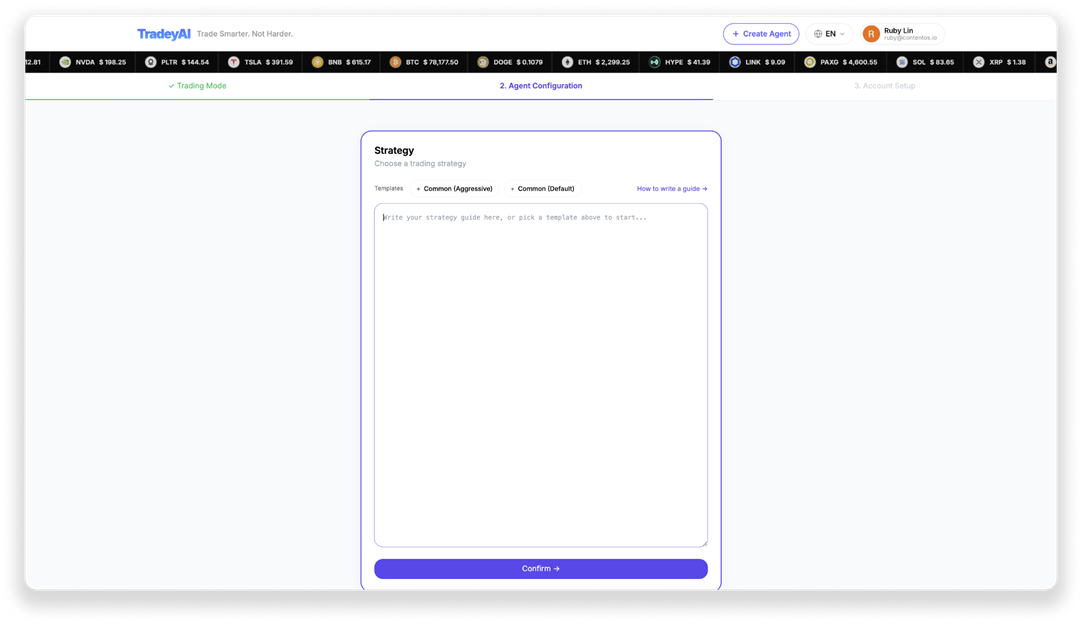
- Paste the AI’s output back into TradeyAI. Drop it into the “Custom Strategy” input box, click “Confirm,” and the Agent will start executing based on your rules.
Step 1: Answer These 4 Questions First
Before talking to an AI, think through these 4 things. The more specific your answers, the closer the final strategy will be to what you actually want.
Question 1: What’s the maximum loss you can accept?
This determines your stop-loss levels and position sizing.
For example: “Max 3% loss per trade,” “Stop everything if I’m down 20% overall,” “No more than 5x leverage”
Question 2: What conditions make a trade worth taking?
This determines when the Agent opens a position.
For example: “Only go long when the macro trend is clearly up,” “Long only, no shorting,” “Only trade BTC and ETH,” “Stay out when the market is too volatile”
Question 3: When do you take profit? When do you cut losses?
This determines your exit conditions.
For example: “Exit when I’m up 6%,” “Stop out immediately if I’m down 3%,” “Never hold a position overnight”
Question 4: Are there situations you absolutely want to avoid?
This determines the prohibited conditions — what the Agent should never do.
For example: “Pause trading after 3 consecutive losses,” “No new positions in extreme volatility,” “Never add to a losing position”
Step 2: Give Your Ideas and the Template to an AI
Copy the prompt below, fill in your answers to the 4 questions under [My Requirements], then paste the whole thing into ChatGPT, Gemini, Claude, or any AI chat platform you’re comfortable with. This AI isn’t making trades for you — it’s just helping you format your ideas into something the Agent can understand.
Prompt:
I want to set up a strategy for an AI trading Agent. Based on my requirements,
please rewrite the template below while keeping the same section structure.
Use specific numeric thresholds for entry and exit conditions.
The values in the template are defaults -- adjust them to match my requirements.
Every one of my requirements must be reflected in a specific section of the strategy,
not just mentioned in a side note.
If any of my requirements conflict with each other, do not interpret them on your own --
ask me to clarify first, then produce the final strategy.
Output the strategy in English inside a single code block.
After the code block, explain each section in the language I'm using
so I can confirm the strategy matches my intent.

[My Requirements]
(Fill in your answers to the 4 questions here)

[Template]
A conservative, well-rounded trading strategy suitable for most traders.
Prioritizes capital preservation with consistent, moderate returns.
Prefers limit orders for lower fees and better entry pricing.

---

## Leverage Limits

| Leverage | Rule         |
| -------- | ------------ |
| 5-8x     | Default      |
| 10x      | Hard maximum |

---

## Position Sizing

| Parameter        | Rule                  |
| ---------------- | --------------------- |
| Notional / trade | equity × 10-15%       |
| Leverage         | 5-8x (max 10x)        |
| Max positions    | 3 open simultaneously |

---

## Order Type Selection

| Situation                           | Order Type | Reason                        |
| ----------------------------------- | ---------- | ----------------------------- |
| Normal entry                        | **Limit**  | Better price, 67% fee savings |
| SL hit / urgent exit                | **Market** | Guaranteed execution          |
| Adding to winning position          | **Limit**  | No urgency, save fees         |
| Partial profit taking (uPnL >= +5%) | **Market** | Lock in gains immediately     |
| Full close at profit target         | **Market** | Don't risk missing the exit   |

**Default to limit orders** unless the situation demands immediate execution.

---

## Limit Order Pricing

| Entry Direction | Placement Rule                                  |
| --------------- | ----------------------------------------------- |
| Long entry      | Bid at nearest support or 0.1-0.3% below mid    |
| Short entry     | Ask at nearest resistance or 0.1-0.3% above mid |
| Add to position | At pullback level within current trend          |

- Place at technically significant levels (support, resistance, VWAP, Fibonacci)
- Don't chase -- if price has moved past your level, wait for next setup
- Cancel stale orders that are > 2% from current price

---

## Entry Gate

Check `setup.indicators.trend_quality` before entry:

| Condition                                              | Action   |
| ------------------------------------------------------ | -------- |
| `reversal_risk = low` OR `freshness = developing`      | ✅ Enter |
| `reversal_risk = moderate` AND `freshness = exhausted` | ❌ Skip  |

**Additional entry rules:**
- Do not enter if consecutive losses have reached the strategy-defined limit
- Do not enter if macro trend direction conflicts with intended trade direction

---

## Exit Rules

**Valid exits:** SL hit, PT hit, strategy-defined forced exit conditions.

**Invalid exits -- NEVER use these as reasons to close:**

- "approaching SL"
- "preserve capital"
- "weak signals"
- "fees"

---

## Time-in-Trade

| `holdingTime` | Rule                                                                                      |
| ------------- | ----------------------------------------------------------------------------------------- |
| < 4h          | No exit UNLESS: (1) SL/TP hit, (2) strategy forced exit, (3) `uPnL >= +5%` and declining |
| ≥ 4h          | Full discretion per strategy exit conditions                                              |

---

## Profit Protection

| Condition                         | Action                                     |
| --------------------------------- | ------------------------------------------ |
| `uPnL >= +5%` AND momentum fading | `reduce_position` 50%, tighten SL to entry |
| `uPnL >= +8%`                     | `close_position`                           |

---

## Pending Order Management

Every decision cycle:

1. **Review all pending orders** -- is the thesis still valid?
2. **Cancel stale orders** -- orders older than 4h with no fill should be re-evaluated
3. **Cancel before open** -- free up margin before placing new orders
4. **Don't stack orders** -- max 2 pending orders at a time to keep margin flexible

---

## Decision Sequence

Follow this order for every decision cycle:

1. **Pending Orders** → review all pending orders, cancel invalid ones first
2. **Entry Gate** → check `setup.indicators.trend_quality` -- if gate fails, stop here
3. **Position Limit** → already at 3 open positions? → `hold` only
4. **Position Sizing** → compute notional (equity × 10-15%) and leverage (5-8x)
5. **Order Type** → default limit; use market only for urgent exits or profit protection
6. **Validate Exit** → if holding, check: is exit reason in the valid list? If not, do not exit
7. **Time-in-Trade** → if `holdingTime < 4h`, only SL/TP/forced-exit/profit-decline allowed
8. **Profit Protection** → if `uPnL >= +5%`, consider reduce/close per table above
9. All checks passed + no invalid triggers → **execute action**

Small, steady gains compound. Protect capital first; opportunities recur.
Step 3: Before You Paste It Back, Check These 2 Things
- Make sure the explanation matches your intent. After outputting the strategy, the AI will include a section-by-section explanation. Read through it carefully to confirm each part reflects what you actually want. If anything looks off, tell the AI and ask it to revise and regenerate.
- 2. Confirm there’s a stop-loss condition. Make sure the strategy includes a clearly defined SL (Stop Loss). Without one, the Agent has no way to limit losses on a losing position.
One Last Thing
Let the Agent run for a few days, then review its decision log to see why it entered and exited each trade. TradeyAI will also suggest optimizations based on your strategy’s performance — take a look and adjust as needed.