How I scaled beyond a single monolithic agent — with production code, observability dashboard, and zero extra LLM calls
Why Multi-Agent? The Single Agent Was Fine.
Let me be honest: the single-agent system worked. In my previous article, I built an MCP server with 15+ tools controlling Gmail, Salesforce, Google Calendar, and a local filesystem. For a small team, it was more than sufficient. The observability dashboard tracked every call. Nothing was broken.
So why rebuild it?
Because I was designing for the next step, not fixing the current one. The single-agent architecture had a structural limitation I could see coming: every new capability — VectorDB for document Q&A, customer service workflows, internal helpdesk — meant adding more tools to the same agent. At 15 tools it was manageable. At 25 or 30, the agent would be reasoning over a tool list longer than some prompts. At enterprise scale with multiple departments, a single agent carrying every tool for every domain becomes the bottleneck — not because it fails, but because it can’t grow cleanly.
Think of it this way: a 5-person startup can have one person handling sales, support, and accounting. That’s not a bug, it’s efficient. But you wouldn’t design a 50-person org that way. You’d create departments.
That’s what multi-agent is: creating departments for your AI.
I didn’t wait for it to break. I redesigned it while it was still working — so I could compare both architectures running side by side on the same GCP VM.
Architecture: 6 Agents, 1 Orchestrator
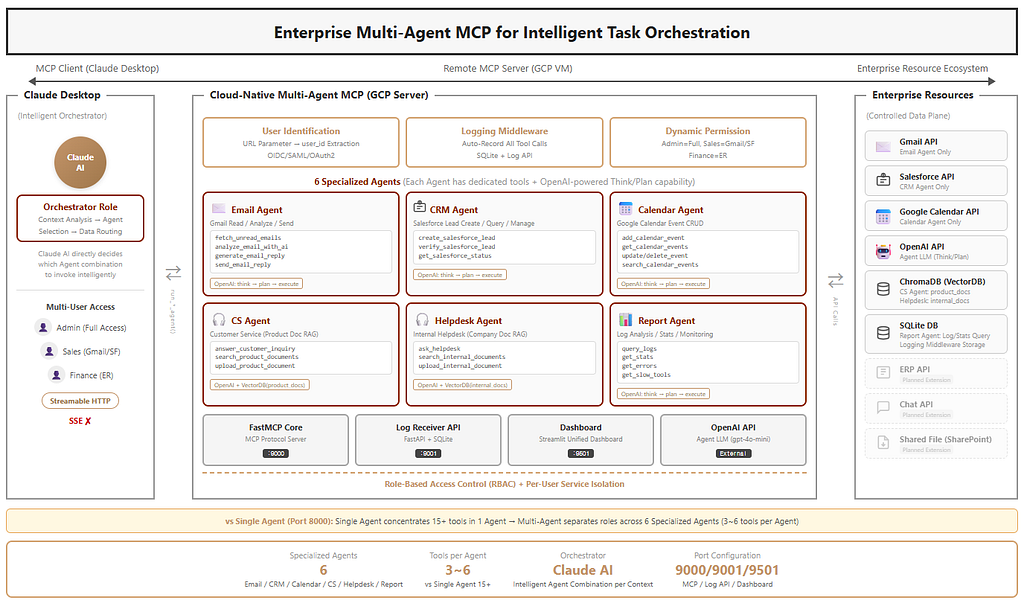
The core idea is separation of concerns, applied to AI agents.
Instead of one agent with 15+ tools, I created 6 specialized agents, each owning 3–6 tools in their domain:
- Email Agent — Gmail read, analyze, reply, send
- CRM Agent — Salesforce Lead create, verify, manage
- Calendar Agent — Google Calendar event CRUD
- CS Agent — Customer service with product document RAG
- Helpdesk Agent — Internal helpdesk with company document RAG
- Report Agent — Log analysis, statistics, monitoring
The critical design decision: Claude Desktop acts as the orchestrator. There’s no separate orchestrator LLM call. Claude directly decides which agents to invoke based on context — eliminating the double-LLM-call overhead that plagues many multi-agent systems.
The Agent Architecture
Each agent follows the same pattern: think → plan → execute. The BaseAgent class handles this loop, while specialized agents register their own tools.
class BaseAgent:
    async def run(self, task: str, context: dict = None) -> AgentResult:
        # Step 1: LLM plans which tools to use
        plan = await self.think(task, context)

        # Step 2: Execute tools sequentially
        for step in plan.get('plan', []):
            result = await self.execute_tool(step['tool'], **step['params'])

        # Step 3: Return combined results
        return AgentResult(...)
The think() method is where each agent's intelligence lives. It sends the task and its available tools to OpenAI, which returns a structured execution plan:
async def think(self, task: str, context: dict = None) -> dict:
    tools_desc = self.get_tools_description()
    system_prompt = f"""You are '{self.name}' specialist agent.
Role: {self.description}

Available tools:
{tools_desc}

Analyze the request and create a JSON execution plan."""

    response = await asyncio.to_thread(
        generate_text_with_system,
        system_prompt=system_prompt,
        user_prompt=f"Request: {task}",
        temperature=0.3,
    )
    return json.loads(response)
Each agent gets a 45-second timeout — tight enough to stay within mcp-remote's 60-second limit, with room for network overhead.
Specialized Agents: Domain Isolation in Practice
Here’s what the Email Agent looks like. Notice how it only registers email-related tools:
class EmailAgent(BaseAgent):
    def __init__(self, llm_config: dict):
        super().__init__(
            name="Email Agent",
            description="Handles email read, AI analysis, reply generation, and sending.",
            llm_config=llm_config,
        )

    def register_tools_from_services(self, user_id: str = None):
        from ..services import gmail_service, openai_service

        async def fetch_unread_emails(minutes_ago: int = 60, max_results: int = 5):
            return gmail_service.get_recent_emails(
                minutes_ago=minutes_ago, max_results=max_results, user_id=user_id
            )

        async def analyze_email_with_ai(email_content: str, sender_email: str = ""):
            return await asyncio.to_thread(
                openai_service.extract_customer_info, email_content, sender_email
            )

        self.register_tool('fetch_unread_emails', fetch_unread_emails,
                          'Fetches recent emails (minutes_ago, max_results)')
        self.register_tool('analyze_email_with_ai', analyze_email_with_ai,
                          'Extracts customer info from email using AI')
        # ... send_email_reply, generate_email_reply
The CRM Agent follows the same pattern but only knows about Salesforce:
class CRMAgent(BaseAgent):
    def register_tools_from_services(self, user_id: str = None):
        from ..services import salesforce_service

        async def create_salesforce_lead(customer_name: str, customer_company: str,
                                          customer_email: str, **kwargs):
            customer_info = {
                'name': customer_name, 'company': customer_company,
                'email': customer_email, ...
            }
            return salesforce_service.create_lead(customer_info, user_id=user_id)

        self.register_tool('create_salesforce_lead', create_salesforce_lead,
                          'Creates a new Lead in Salesforce')
This isolation means the Email Agent literally cannot touch Salesforce, and the CRM Agent cannot read emails. Each agent is constrained to its domain — by design, not by convention.
Claude as Orchestrator: The Key Design Decision
Most multi-agent frameworks use a dedicated orchestrator agent — an LLM that analyzes the request, decides which agents to call, then synthesizes the results. This works, but it means every request goes through two LLM calls minimum: one for the orchestrator, one for the specialist.
I took a different approach. The MCP server exposes each agent as a tool:
@mcp.tool()
async def run_email_agent(task: str) -> dict:
    """Email Agent: handles email read, analyze, reply, send."""
    return await _run_agent_safe('email_agent', 'Email Agent', task)

@mcp.tool()
async def run_crm_agent(task: str) -> dict:
    """CRM Agent: Salesforce Lead create, verify, manage."""
    return await _run_agent_safe('crm_agent', 'CRM Agent', task)

# ... run_calendar_agent, run_cs_agent, run_helpdesk_agent, run_report_agent
Claude Desktop — which is already an LLM — sees these tools and decides which to call. When a user says “check my email, register the new customer in CRM, and send a reply with product info,” Claude:
- Calls run_email_agent → reads and analyzes the email
- Calls run_cs_agent → looks up product info from VectorDB
- Calls run_crm_agent → creates a Salesforce Lead
- Calls run_email_agent → sends the reply with product details
No orchestrator LLM call. No double-processing. Claude is the orchestrator.
The comment in the source code tells the story:
# orchestrate_task removed
# → Claude Desktop's Claude AI directly selects the appropriate Agent
# → Eliminates redundant OpenAI calls (Orchestrator → Agent), 2-3x speed improvement
The Real-World Scenario: New Customer Email
Here’s what a typical multi-agent workflow looks like in practice.
A new customer emails asking about my example ‘SmartBox Pro cloud storage product’. The user tells Claude: “Check my email and handle the new customer inquiry.”
Step 1 — Email Agent reads the inbox, finds the email, and uses AI to extract: name (Lee MS), company (ABC Tech), title (Manager), phone, email.
Step 2 — CS Agent searches the VectorDB product_docs collection using RAG. Finds ‘SmartBox Pro specs, pricing (1TB at $9.90/mo, 5TB at $29.90/mo, unlimited at $99/mo), volume licensing info, and free trial details’.
Step 3 — CRM Agent creates a Salesforce Lead with the extracted customer info. Returns the Lead ID for tracking.
Step 4 — Email Agent composes a reply including the product information from Step 2, and sends it.
Four agent calls, three different external APIs (Gmail, ChromaDB, Salesforce), one cohesive workflow. Claude decided this sequence based on context — it understood “new customer” means CRM registration is needed, and “product inquiry” means CS Agent should look up docs.
For an existing customer? Claude skips Step 3 entirely. Same email type, different agent combination. That’s the intelligence layer.
Multi-User Isolation: Per-User Service Instances
The system supports multiple user roles — admin, sales, finance — each with different API access. A middleware extracts user_id from the URL parameter:
class UserIdentificationMiddleware(Middleware):
    async def _extract_and_set_user(self, context: MiddlewareContext):
        request = get_http_request()
        user_id = request.query_params.get("user_id", "admin")

        get_or_create_user_services(user_id)
        set_current_user(user_id)
        await context.fastmcp_context.set_state("user_id", user_id)
Each user gets isolated service instances — their own Gmail credentials, their own Salesforce connection. The admin sees everything; sales only gets Gmail and Salesforce; finance gets the ERP tools (when we add them).
Observability: From Tool-Level to Agent-Level
The logging middleware from my single-agent system carried over directly — same LoggingMiddleware, same SQLite schema, same finally block pattern that guarantees every call gets recorded.
But multi-agent adds a critical new dimension. The single-agent dashboard answered “which tool was called?” The multi-agent dashboard answers “which agent was called, what did it plan, and which tools did it execute?”
Agent-to-Tool Mapping
The dashboard maintains a static mapping from tools to agents:
AGENT_TOOLS = {
    "email_agent": ["fetch_unread_emails", "send_email_reply",
                     "analyze_email_with_ai", "generate_email_reply"],
    "crm_agent": ["create_salesforce_lead", "verify_salesforce_lead"],
    "cs_agent": ["answer_customer_inquiry", "search_product_documents"],
    "helpdesk_agent": ["ask_helpdesk", "search_internal_documents"],
    # ...
}
This mapping lets the dashboard reverse-engineer which agent triggered each tool call — even though the SQLite log only stores tool names. When you see create_salesforce_lead in the logs, the dashboard knows it came from the CRM Agent.
The Dashboard: Three Tabs
The dashboard is organized into three tabs, each serving a different operational need.
Tab 1: Overview — Summary cards (total calls, success rate, avg response, error count), hourly call volume chart, and per-tool statistics. This is what you check first to see if everything is healthy.

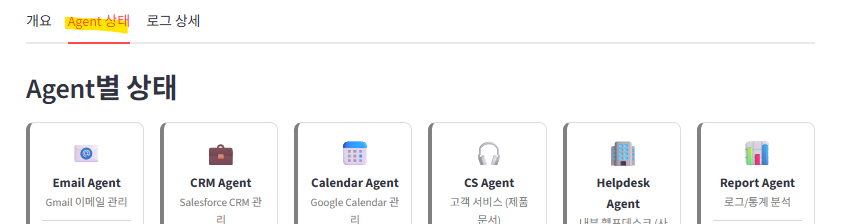
Tab 2: Agent Status — A status card for each of the 6 agents, color-coded by health: green (healthy), orange (warnings), gray (idle). Each card shows call count, error count, and average response time. Click to expand and see individual tool statistics within that agent.
def render_agent_status(agent_stats):
    cols = st.columns(len(AGENTS))
    for i, (agent_key, agent_info) in enumerate(AGENTS.items()):
        stats = agent_stats.get(agent_key, {})
        calls = int(stats.get("calls") or 0)
        errors = int(stats.get("errors") or 0)

        if calls == 0:
            status_color = "gray"    # Idle
        elif errors > 0:
            status_color = "orange"  # Warnings
        else:
            status_color = "green"   # Healthy
At a glance: Email Agent handled 12 calls with zero errors, CRM Agent had 3 calls with 1 failure, Calendar Agent is idle. This agent-level view didn’t exist in the single-agent dashboard — it couldn’t, because there was only one agent.
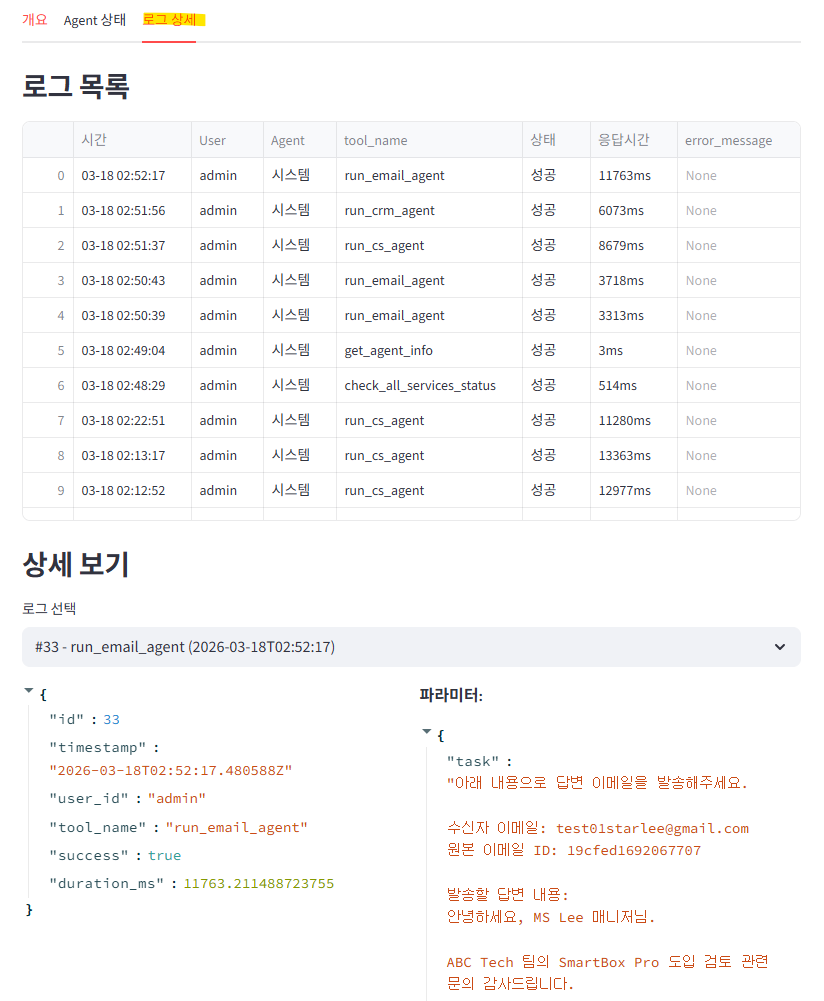
Expanding an agent card reveals its tool-level breakdown — the natural debugging flow: “CRM Agent failed” → expand → “create_salesforce_lead failed once, verify_salesforce_lead succeeded twice" → click the failed log → see the error message and parameters.
Tab 3: Log Detail — Filterable log table with drill-down to individual call parameters, error messages, and result summaries. Filters include time range, user ID, agent, status, and keyword search.
Infrastructure
The infrastructure runs on three ports on the same GCP VM:
- Port 9000 — FastMCP server (MCP protocol)
- Port 9001 — Log Receiver API (FastAPI + SQLite)
- Port 9501 — Streamlit dashboard
The single-agent system (port 8000, dashboard on 8501) still runs alongside it — both coexist on the same VM, making A/B comparison trivial.
Single Agent vs. Multi-Agent: What Actually Changed
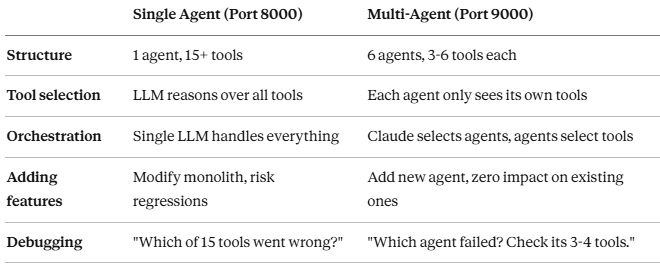
The most surprising improvement wasn’t speed — it was reliability. With fewer tools per agent, each agent’s LLM planning step became more accurate. An Email Agent with 4 tools almost never picks the wrong one. A single agent with 15+ tools occasionally can confuse send_email_reply with create_salesforce_lead when both appeared in the same context.
Key Takeaways
- Claude as orchestrator eliminates the double-LLM tax. Most multi-agent frameworks add latency with a separate orchestrator. Using the MCP client itself as the orchestrator gives you multi-agent benefits without the performance penalty.
- Domain isolation improves tool selection accuracy. An agent with 4 tools makes better decisions than one with 15. The reasoning space is smaller, the prompts are shorter, and the LLM has less room for confusion.
- The BaseAgent pattern makes agents composable. Think → plan → execute with a 45-second timeout. Every agent follows the same lifecycle, which makes debugging predictable and testing straightforward.
- Observability scales naturally. The same logging middleware captures multi-agent workflows. The dashboard just gets a richer story to tell — agent-level patterns, cross-agent workflows, per-user activity.
- Start monolithic, split when it hurts. I wouldn’t have known where to draw the domain boundaries without running the single-agent system first. The tool-call logs showed me exactly which tools clustered together and which caused confusion.
What’s Next: Same MCP Server, Different Clients and AIs
This multi-agent MCP server was built with a deliberate constraint: the server code doesn’t know or care which client is calling it. It exposes run_email_agent, run_crm_agent, run_cs_agent as standard MCP tools. Any MCP-compatible client can invoke them.
That constraint unlocks the real experiment. The next series of articles will keep this exact MCP server codebase untouched and swap out everything above it — the client, the AI model, the orchestration framework:
- Cursor + GPT AI + Multi-Agent — What happens when GPT-4o calls the same 6 agents from inside a code editor? How do prompt design and function call patterns shift when the developer workflow replaces the chat workflow?
- Cursor + Open-Source AI (Llama) + Multi-Agent — Running the same MCP functions with a local LLM. No commercial API calls. How much quality do you lose? Where does it break?
- Web/Mobile (Google ADK) + MCP Server — Google’s Agent Development Kit calling MCP endpoints from mobile and web apps. The agent moves from desktop to the browser.
- Web/Mobile (LangGraph / CrewAI) + AI + MCP Server — Open-source orchestration frameworks coordinating execution order and tool calls across the same 6 agents. How does explicit graph-based orchestration compare to Claude’s implicit orchestration?
The core question across all of these: can you freely swap out the client and AI without changing a single line of MCP server code? If the answer is yes, MCP becomes the universal interface layer for AI agents — not tied to any single platform, model, or framework.
The journey to break free from single-platform dependency starts here.
The full implementation is demonstrated in video on SunnyLab TV. All code referenced in this article is from a production MCP system running on GCP. Find me on Medium for the previous articles in this series.
Tags: Multi-Agent Systems, MCP Server, Artificial Intelligence, Claude, Python, Software Architecture, Cursor, LangGraph, Google ADK
How I Built a 6-Agent MCP System on GCP — and Why Claude Makes the Perfect Orchestrator was originally published in Level Up Coding on Medium, where people are continuing the conversation by highlighting and responding to this story.