From Zero to Live FlowSniper Bot in minutes.
 FlowSniper Actual5 min read·1 hour ago
--
What it actually feels like to set this thing up. Honest version.
By FlowSniper Actual Estimated read: 5 minutes
The pitch in one sentence
You buy a key, run one command on a Linux server, follow some prompts, transfer some TAO, flip a switch, and BOOM, an autonomous bot starts trading Bittensor subnets on your behalf.
Total time: under an hour, mostly spent familiarizing yourself and exploring the menus, countless settings, and strategies to play with.
The real experience
You finish reading the introduction. You decide to try it. You secure a key. An discord message arrives with your personalized install URL and your license key is baked into the URL itself. One copy/paste command to start!
You spin up a $5/month VPS somewhere (DigitalOcean, Hetzner, Vultr — they’re all fine), pick Ubuntu 22.04, SSH in. Maybe five minutes if you’ve never done this before.
You paste the install command. Single line, your URL. Hit enter.
The installer goes to work. It validates your license, shows you the terms, asks you to accept them, then installs Python, sets up a systemd service, drops in a watchdog that recovers the bot if it ever hangs, and creates a CLI alias so you can type flowsniper to open the menu.
The installer walks you through wallet setup. btcli (the standard Bittensor CLI) creates a new coldkey for the bot. It shows you a 12-word mnemonic phrase. Write it down. Save it offline. This is not optional. That phrase is the only way to recover the wallet if your VPS dies. *FlowSniper never has access to your keys or wallet so we can’t help you recover.*
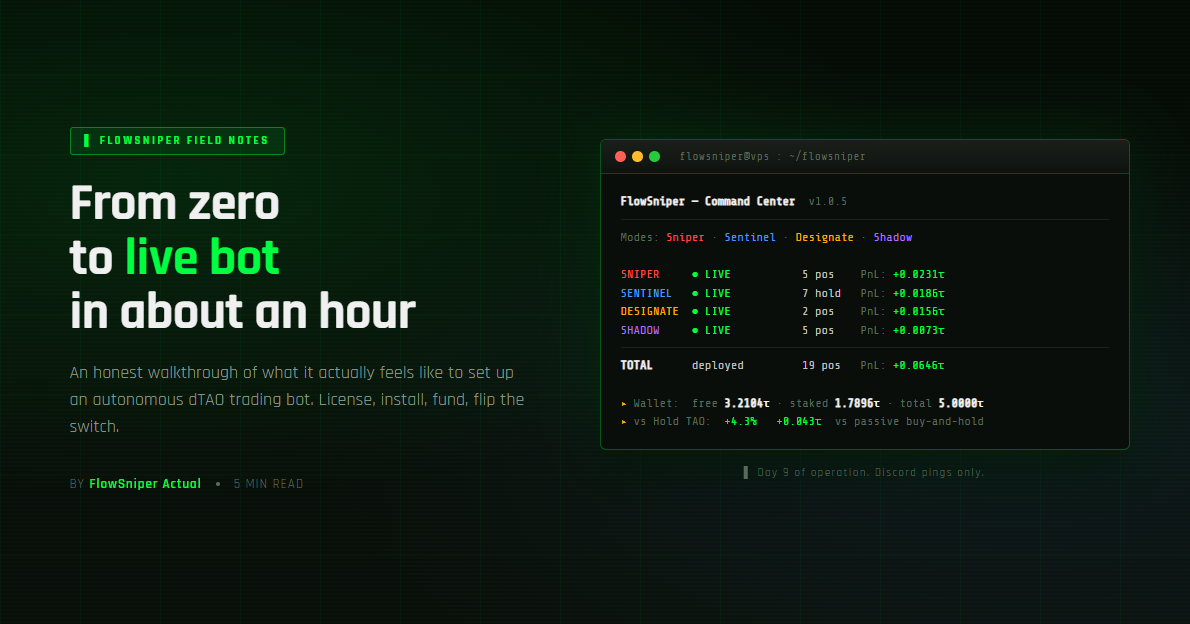
That’s the install. Now type flowsniper and you’re staring at the Command Center, the bot’s home screen. Type [13] for ARSENAL, this is where you will manage your wallet, then type D to see your wallets address plus a QR code.
The real first decision
This is where people mess up.
The bot has four trading modes | Sniper, Sentinel, Designate, and Shadow. They run in parallel by default. New operators get excited and turn them all on.
Don’t.
Pick one. Just one. For your first week.
If you want hands-off, low-drama, “deploy capital well and beat holding TAO”, that’s Sentinel. This is what I recommend for most beginners.
If you want to manually pick subnets and have the bot manage execution + risk on each one, that’s Designate.
If you want to copy-trade specific wallets you’ve identified as the best traders, that’s Shadow.
If you want full active momentum trading, that’s Sniper. (Highest volatility. Maybe not your first mode.)
Why one mode? Because four modes producing trades, exits, rebalances, and notifications simultaneously is overwhelming when you’re still building intuition. You’ll see noise everywhere and start second-guessing the bot. One mode at a time, you actually learn what it’s doing.
You can enable the others next week. Or the week after. The bot isn’t going anywhere.
Then you flip the switch
Configure your chosen mode (the menu walks you through tier selection — start with Balanced for Sentinel), preview what it would do via Sentinel’s Portfolio Preview screen, and when you’re satisfied, navigate to RANGE HOT.
By default, every mode is in dry-run, the bot does everything except actually placing trades. RANGE HOT is the per-mode live trading control. You toggle Sentinel from DRY to LIVE, the bot checks prerequisites (TAO funded, mode enabled, profile configured), and either flips it live or marks it PENDING with a reason.
Two switches because trading real money should require two affirmative actions.
The bot is now LIVE.
Then you walk away
This is the second place people mess up.
Don’t sit and watch the menu. The bot operates on hour-to-day timescales. Refreshing every ten minutes makes you see noise as signal. You’ll panic-toggle, second-guess, manually intervene, and confuse the bot’s position tracking.
Set up Discord notifications instead ([10] NOTIFICATIONS in the menu, paste a webhook URL, toggle the alerts you want). Then close the SSH window and check Discord tomorrow.
This is genuinely how I run the bot most of the time. I rarely SSH in. I just look at Discord pings as they come and dive in if something concerning shows up.
What to expect in your first week
Day 1: Mostly waiting. A few entries, maybe an exit. Wallet PnL fluctuates by a few percent. Normal.
Day 2–3: The bot is building positions. Wallet PnL still unstable. Some positions up, some down.
Day 4–7: First real exits. Realized PnL starts accumulating.
Week 2+: Patterns emerge. You start to understand which signals the bot weights heavily, what the win rate looks like for your config, when to adjust.
The metric that matters: at the bottom of the Command Center, there’s a “vs Hold TAO” line. This compares the bot’s earnings against what you’d have made just holding TAO over the same period. That’s the actual scorecard. If it’s positive after a couple weeks, the bot is doing its job.
Where to go for the details
I deliberately kept this short and high-level, there’s a lot to say about each step that I haven’t said.
For the comprehensive walkthrough, every menu screen, every config option, every common gotcha, read the Getting Started field guide. It’s the operator manual: detailed, dry, complete.
For the deep dive on how each trading mode actually decides things, every signal, every threshold, every exit trigger, read the Mode Reference. This is the document I’d recommend reading after you have a week of bot experience to ground it against.
For everything else, docs.flowsniper.ai.
The honest sales pitch
If the install steps above sound exhausting, FlowSniper might not be for you yet. The bot rewards operators who are willing to invest an hour upfront for an autonomous system that runs for months. If you want a polished GUI app you click around in, this isn’t that.
But if you have ever looked at 128 subnets, and thought “there’s no way I can manage all this manually”, yeah. That’s exactly the problem we built FlowSniper to solve.
Hour of setup. Months of autonomous operation. Discord pings when interesting things happen.
Worth trying.
Also, in our discord there is a secondary market to buy/sell keys. All keys are limited, and supply drops are few and far between, so when they drop, if you hesitate, you’ll miss your shot.
FlowSniper is at flowsniper.ai. Get started at flowsniper.ai/getting-started. Deep technical reference at flowsniper.ai/mode-reference. Discord at discord.gg/EjaS6yWWad, I read every message.
Built for traders. Not sheep.
Tags: Bittensor, Cryptocurrency Investment, How To Tutorial, Algorithmic Trading, Self Hosted