Overview
The Bitchat integration enables MeshCore devices to communicate with the Bitchat Android app through a bridge layer that translates between Bitchat protocol and MeshCore mesh networking. This is an additive feature that preserves all existing MeshCore functionality while adding Bitchat compatibility.
Key Principles
- Additive, Not Substitutive: Bitchat support is added alongside MeshCore, not replacing it
- No Infrastructure Changes: Repeaters and room servers require no modifications
- Encapsulation Strategy: Bitchat messages are encapsulated in standard MeshCore packets
- Backward Compatible: Existing MeshCore nodes continue to work normally
Architecture
┌──────────────────────────────────────────────────────────────────────────┐
│                            MeshCore Device                               │
├──────────────────────────────────────────────────────────────────────────┤
│                                                                          │
│  ┌─────────────────────────────┐    ┌────────────────────────────────┐  │
│  │    WITH DISPLAY (Menu)      │    │     BUTTON-ONLY (T1000-E)      │  │
│  │   ┌─────────────────────┐   │    │   ┌────────────────────────┐   │  │
│  │   │   BITCHAT Page      │   │    │   │   5x Button Press      │   │  │
│  │   │  ┌─────┐  ┌─────┐   │   │    │   │   (Quintuple)          │   │  │
│  │   │  │  M  │  │  B  │   │   │    │   │  ┌──────────────────┐  │   │  │
│  │   │  │Mesh │  │BitC │   │   │    │   │  │ LED: 3 blinks    │  │   │  │
│  │   │  └──┬──┘  └──┬──┘   │   │    │   │  │ Buzzer: tone     │  │   │  │
│  │   │     └────┬───┘      │   │    │   │  └────────┬─────────┘  │   │  │
│  │   └──────────┼──────────┘   │    │   └───────────┼────────────┘   │  │
│  └──────────────┼──────────────┘    └───────────────┼────────────────┘  │
│                 │                                   │                    │
│                 └───────────────────┬───────────────┘                    │
│                                     ▼                                    │
│  ┌────────────────────────────────────────────────────────────────────┐ │
│  │                    SerialBLEInterface                               │ │
│  │  • MeshCore UART Service (6E400001-B5A3-F393-E0A9-E50E24DCCA9E)    │ │
│  │  • Bitchat Service (F47B5E2D-4A9E-4C5A-9B3F-8E1D2C3A4B5C)        │ │
│  │  • Only ONE service advertised at a time                           │ │
│  │  • Auto-disconnects clients on mode switch                         │ │
│  │  • PIN auth (MeshCore) / Open access (Bitchat)                    │ │
│  └────────────────────────────────┬───────────────────────────────────┘ │
│                                   │                                      │
│                       ┌───────────▼────────────┐                        │
│                       │    BitchatBridge       │                        │
│                       │  • Encapsulate         │──► MeshCore GRP/TXT    │
│                       │  • Decapsulate         │◄── BC magic header     │
│                       │  • Loop prevention     │                        │
│                       └───────────┬────────────┘                        │
│                                   │                                      │
│                       ┌───────────▼────────────┐                        │
│                       │       MyMesh           │                        │
│                       │     (MeshCore)         │                        │
│                       └───────────┬────────────┘                        │
│                                   │                                      │
│                       ┌───────────▼────────────┐                        │
│                       │     LoRa Radio         │                        │
│                       │    (SX1262/etc)        │                        │
│                       └────────────────────────┘                        │
└──────────────────────────────────────────────────────────────────────────┘
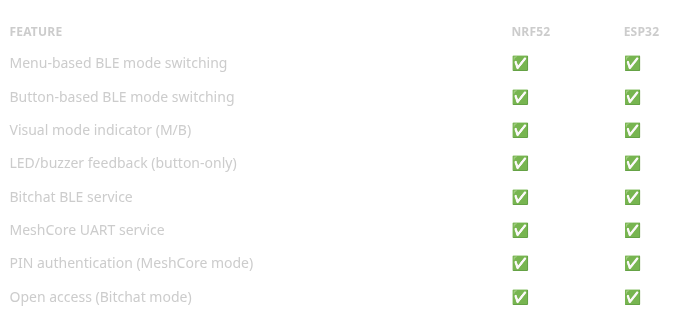
Platform Support
With Display (Menu-Based)
Navigate to the BITCHAT page and press ENTER to toggle between modes. Display shows large M (MeshCore) or B (Bitchat).
Button-Only (T1000-E)
Press the user button 5 times rapidly (within ~3 seconds) to toggle modes. See Button-Based Mode Switching for details.
Quick Start
Enable Bitchat (For Developers)
Add to your platformio.ini:
build_flags =
    -D ENABLE_BITCHAT=1
    -D BLE_MODE_SWITCHING=1
Check Device Compatibility
Bitchat requires either a display with buttons OR button-only with LED feedback for mode switching.
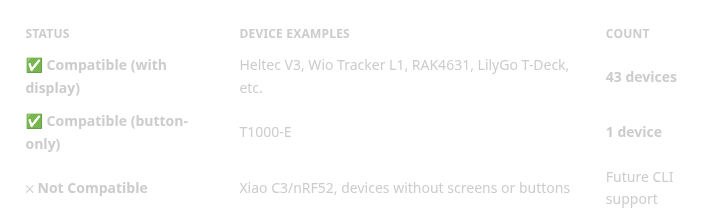
📋 See Complete Device List — Find your specific device
Quick Start
Enable Bitchat Support
# Build with Bitchat support
export ENABLE_BITCHAT=1
pio run -e WioTrackerL1_companion_radio_ble
Runtime Control
Bitchat mode is controlled on-device via the UI or button presses:
With Display:
- Navigate to BITCHAT page using LEFT/RIGHT buttons
- Press ENTER to toggle between MeshCore and Bitchat modes
- Display shows large M (MeshCore) or B (Bitchat)
Button-Only (T1000-E):
- Press user button 5 times rapidly (within ~3 seconds)
- LED blinks 3 times (fast=Bitchat 150ms, slow=MeshCore 500ms)
- Buzzer plays acknowledgment tone (if available)
Note: The device always boots in MeshCore mode. Mode is not persisted across reboots.
Message Flow
Bitchat → MeshCore
- Bitchat app sends MESSAGE via BLE to #mesh channel
- BitchatBLEService receives and parses message
- BitchatBridge formats for MeshCore with 📱 prefix
- Message sent as PAYLOAD_TYPE_GRP_TXT via mesh on #mesh channel
MeshCore → Bitchat
- MeshCore receives group message on #mesh channel
- BitchatBridge verifies channel secret matches SHA256("#mesh")
- BitchatBridge detects non-Bitchat origin (no 📱 prefix)
- Message formatted as Bitchat MESSAGE with TLV payload
- Sent to Bitchat app via BLE notification for #mesh channel
#mesh Channel
The #mesh hashtag channel is the primary interoperability channel between Bitchat and MeshCore.
Channel Key Derivation
#mesh secret = first_16_bytes(SHA256("#mesh"))
             = 0x5B664CDE0B08B220612113DB980650F3
The channel secret is the first 16 bytes of the SHA256 hash of the UTF-8 encoded channel name string (including the # prefix).
Both Bitchat Android app and MeshCore firmware derive the same channel secret using this mechanism, enabling seamless group messaging.
Firmware Implementation
- Secret Computation: BitchatBridge::computeMeshSecret() derives the secret at initialization
- Channel Verification: BitchatBridge::isMeshChannel() verifies messages belong to #mesh
- Channel Initialization: MyMesh::addHashtagChannel("mesh") creates the channel on startup
See Protocol Specification for technical details.
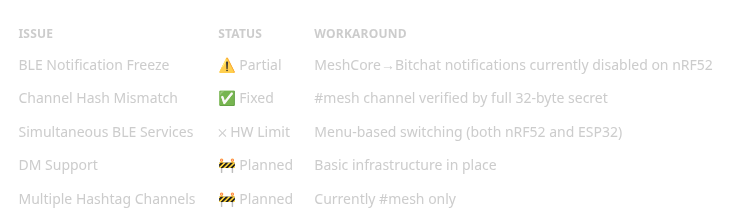
Known Limitations
Menu-Based BLE Mode Switching
Due to BLE advertising size constraints, both nRF52 and ESP32 platforms use menu-based switching rather than simultaneous services:
Navigation:
- Use LEFT/RIGHT keys to navigate to the BITCHAT page
- Display shows:
- “M” with “MeshCore” text → MeshCore mode active
- “B” with “Bitchat” text → Bitchat mode active
- Press ENTER to toggle between modes
Platform-Specific Implementation:
- nRF52: Switches advertisement data between Nordic UART and Bitchat service UUIDs
- ESP32: Uses setBitChatMode() to dynamically change advertised UUID via SerialBLEInterface
Both platforms provide identical user experience for mode switching.
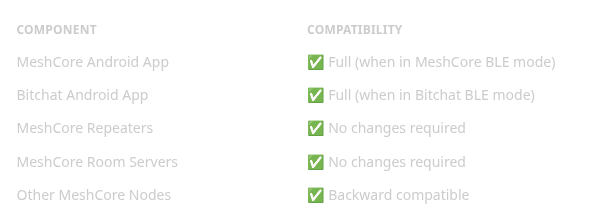
Compatibility
References
- Bitchat Android App
- MeshCore Companion Protocol: companion_protocol.md
- MeshCore Packet Structure: packet_format.md
Bitchat Integration for MeshCore was originally published in Coinmonks on Medium, where people are continuing the conversation by highlighting and responding to this story.