You own the code. Own and understand what it does.
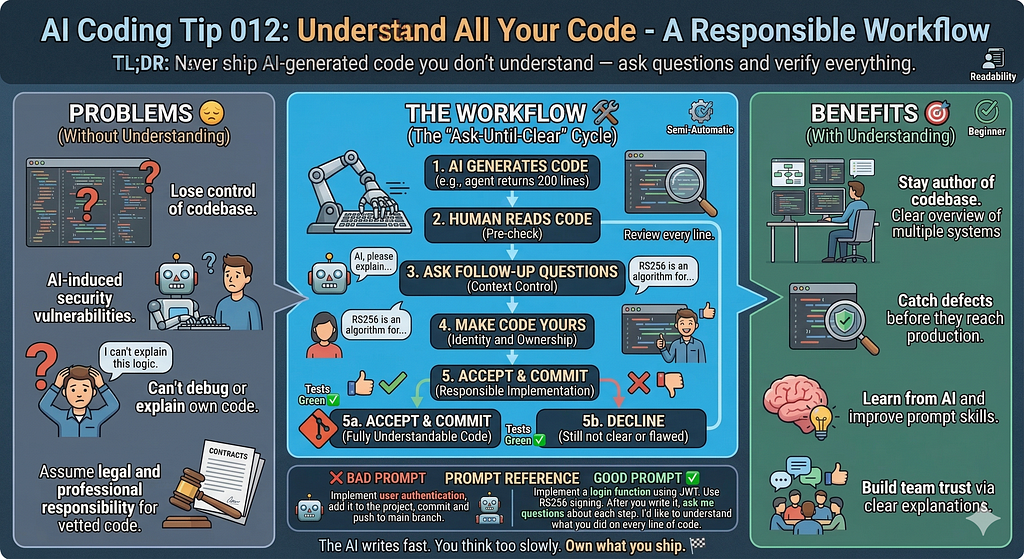
TL;DR: Never ship AI-generated code you don’t understand — ask until you do.
Common Mistake ❌
You ask an AI agent to implement a feature.
It returns 200 lines of code.
You run the tests. They pass. You commit and push.
You think you are the best ‘agentic-coder’ in the world.
But you never read the code.
Three weeks later, a security issue happens in production.
The AI introduced subtle bugs you could have caught in two minutes.
You didn’t catch it because you never looked.
You’re accountable but don’t understand what the code does, and you can’t explain it to others.
There are many fancy video tutorials on using agents without reviewing the code.
Remember, there must always be a human in the loop.
Problems Addressed 😔
- You lose control of your own codebase.
- You can’t debug code you don’t understand.
- You ship vulnerabilities without knowing they exist.
- You can’t explain your own code in a code review.
- You build a dependency on AI that makes you a worse engineer over time.
- You take legal and professional responsibility for code you never vetted.
Code Smell 313 - Workslop Code
How to Do It 🛠️
- Read every code line the AI generates or modifies before you accept it.
- Ask the AI to explain any part you don’t understand.
- Ask follow-up questions until the explanation is clear to you.
- Identify the assumptions the AI made and verify them.
- Check edge cases the AI might have missed.
- Refactor and polish any part that you would not have written that way yourself.
- Make the code yours before you commit it.
Benefits 🎯
- You stay as the author of your codebase, not just a curator of AI output.
- You catch defects before they reach production.
- You learn from what the AI generates.
- You build trust with your team because you can explain your code.
- You make better prompts over time because you understand what went wrong.
Context 🧠
AI agents are fast. That speed creates pressure.
You feel like slowing down to read breaks the momentum.
It doesn’t. It saves you.
The AI doesn’t know your system. It doesn’t know your constraints.
It doesn’t know what happened last quarter when you made a similar change.
You do. That context is irreplaceable.
When you skip reading, you hand off judgment to a tool that has no judgment. You outsource the one thing only you can do.
Asking questions is not a sign of weakness.
It is how you stay in control.
The AI won’t judge you for asking.
It will give you a better answer.
Prompt Reference 📝
Bad Prompt:
Implement user authentication,

add it to the project,

commit and push to the main branch.

(This prompt gives the AI full authority over a critical system

You get a blob of code with no checkpoint for understanding.)
Good Prompt:
Implement a login function using JWT.

Use RS256 signing.

After you write it, ask me questions about each step.

I'd like to understand what you did on every line of code

(This prompt sets expectations.

You get code AND an explanation.

You know what to verify)
Considerations ⚠️
- The AI can write completely wrong, confident-sounding code.
- Passing tests doesn’t mean you wrote correct logic.
- The AI optimizes for plausible output, not correct output.
- You are responsible for what you deploy, not the AI.
- Some AI mistakes are subtle. You only catch them when you read carefully.
Type 📝
[X] Semi-Automatic
Limitations ⚠️
- For very large generated files, break your review into sections.
Tags 🏷️
- Readability
Level 🔋
[X] Beginner
Related Tips 🔗
AI Coding Tip 006 - Review Every Line Before Commit
- AI Coding Tip — Ask the AI to Explain Its Own Code
- AI Coding Tip — Use AI as a Pair Programmer, Not a Replacement
Conclusion 🏁
The AI writes fast. You think too slowly. That is not a flaw.
That is the division of labor that makes the combination work.
Speed without understanding is just faster mistakes.
Ask questions. Read the code. Own what you ship. 🏁
More Information ℹ️
- The Pragmatic Programmer, 20th Anniversary Edition
- OWASP Top Ten Web Application Security Risks | OWASP Foundation
- Introduction {#intro}
- Do Users Write More Insecure Code with AI Assistants?
https://www.acm.org/code-of-ethics
Also Known As 🎭
- “Trust but verify.”
- “AI-generated code review.”
- “Responsible AI coding.”
- “Developer accountability”
Tools 🧰
- Any AI coding assistant (GitHub Copilot, Claude, Cursor, Codeium)
- Your language’s linter and static analysis tool
- Code review tools (GitHub PRs, GitLab MRs, Gerrit)
Disclaimer 📢
The views expressed here are my own.
I am a human who writes as best as possible for other humans.
I use AI proofreading tools to improve some texts.
I welcome constructive criticism and dialogue.
I shape these insights through 30 years in the software industry, 25 years of teaching, and writing over 500 articles and a book.
This article is part of the AI Coding Tip series.
AI Coding Tip 012 — Understand All Your Code was originally published in Level Up Coding on Medium, where people are continuing the conversation by highlighting and responding to this story.